 Login
Login
- Table of Contents
- Related Documents
-
| Title | Size | Download |
|---|---|---|
| 06-Appendix B LEDs | 140.98 KB |
6 Appendix B LEDs
LEDs
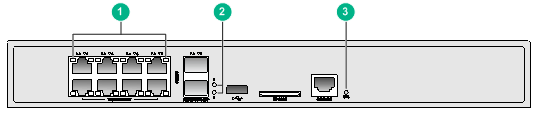
|
(1) 100/1000BASE-T autosensing Ethernet copper port status LEDs |
|
|
(2) 1000BASE-X SFP port status LEDs |
(3) System status LED (SYS) |
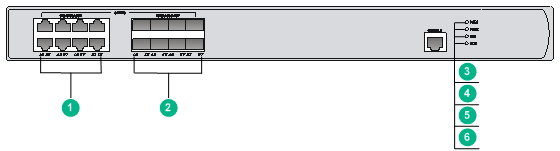
Figure6-2 WX3510H LEDs
|
(1) 100/1000BASE-T autosensing Ethernet copper port status LEDs |
|
|
(2) 100BASE-FX/1000BASE-X SFP port status LEDs |
|
|
(3) Power module 1 status LED (PWR1) |
(4) Power module 2 status LED (PWR2) |
|
(5) System status LED (SYS) |
(6) Expansion card status LED (MOD) |
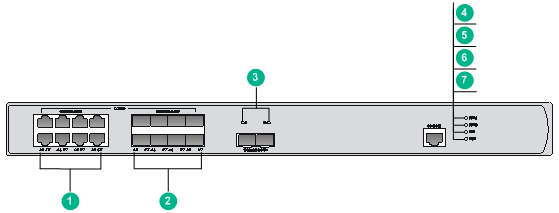
Figure6-3 WX3520H LEDs
|
(1) 100/1000BASE-T autosensing Ethernet copper port status LEDs |
|
|
(2) 100BASE-FX/1000BASE-X SFP port status LEDs |
(3) 10GBASE-R SFP+ port status LEDs |
|
(4) Power module 1 status LED (PWR1) |
(5) Power module 2 status LED (PWR2) |
|
(6) System status LED (SYS) |
(7) Expansion card status LED (MOD) |
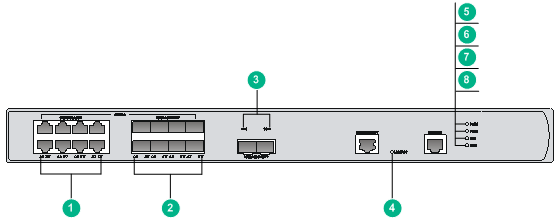
Figure6-4 WX3540H LEDs
|
(1) 100/1000BASE-T autosensing Ethernet copper port status LEDs |
||
|
(2) 100BASE-FX/1000BASE-X SFP port status LEDs |
(3) 10GBASE-R SFP+ port status LEDs |
|
|
(4) 100/1000BASE-T out-of-band management Ethernet port status LED (LINK/ACT) |
||
|
(5) Power module 1 status LED (PWR1) |
(6) Power module 2 status LED (PWR2) |
|
|
(7) System status LED (SYS) |
(8) Expansion card status LED (MOD) |
|
LED description
Table6-1 LED description for the WX3508H access controller
|
LED |
Mark |
Status |
Description |
|
System status LED |
SYS |
Flashing green (0.5 Hz) |
The system is operating correctly. |
|
Flashing green (4 Hz) |
The system is starting up. |
||
|
Steady red |
The system has failed POST, or a critical fault has been detected. |
||
|
Off |
The power is turned off, or the power system is faulty. |
||
|
100/1000BASE-T autosensing Ethernet copper port status LED |
N/A |
Steady green |
A 1000 Mbps link is present on the port. |
|
Flashing green |
The port is receiving or transmitting data at 1000 Mbps. |
||
|
Steady yellow |
A 100 Mbps link is present on the port. |
||
|
Flashing yellow |
The port is receiving or transmitting data at 100 Mbps. |
||
|
Off |
No link is present on the port. |
||
|
1000BASE-X SFP port status LED |
N/A |
Steady green |
A 1000 Mbps link is present on the port. |
|
Flashing green |
The port is receiving or transmitting data at 1000 Mbps. |
||
|
Off |
No link is present on the port. |
Table6-2 LED description for the WX3510H/WX3520H/WX3540H access controllers
|
LED |
Mark |
Status |
Description |
|
Power module 1 status LED |
PWR1 |
Steady green |
Power module 1 is operating correctly. |
|
Steady yellow |
Power module 1 is faulty. |
||
|
Off |
No power module is present. |
||
|
Power module 2 status LED |
PWR2 |
Steady green |
Power module 2 is operating correctly. |
|
Steady yellow |
Power module 2 is faulty. |
||
|
Off |
No power module is present. |
||
|
System status LED |
SYS |
Steady green |
The system is starting up. |
|
Flashing green |
The system is operating correctly. |
||
|
Flashing green |
The system is downloading files. |
||
|
Steady yellow |
The system has failed POST, or a critical fault has been detected. |
||
|
Off |
No power is input. |
||
|
Expansion slot status LED |
MOD |
Steady green |
An interface card is present. |
|
Flashing green |
The hard disk is reading or writing data. |
||
|
Steady yellow |
A failure has occurred. |
||
|
Off |
No interface card is present. |
||
|
100/1000BASE-T out-of-band management Ethernet port status LED |
LINK/ACT |
Off |
No link is present. |
|
Steady green |
A link is present. |
||
|
Flashing green |
The port is receiving or transmitting data. |
||
|
100/1000BASE-T autosensing Ethernet copper port status LED |
N/A |
Steady yellow |
A 100 Mbps link is present on the port. |
|
Flashing yellow |
The port is receiving or transmitting data at 100 Mbps. |
||
|
Steady green |
A 1000 Mbps link is present on the port. |
||
|
Flashing green |
The port is receiving or transmitting data at 1000 Mbps. |
||
|
Off |
No link is present on the port. |
||
|
100BASE-FX/1000BASE-X SFP port status LED |
N/A |
Steady yellow |
A 100 Mbps link is present on the port. |
|
Flashing yellow |
The port is receiving or transmitting data at 100 Mbps. |
||
|
Steady green |
A 1000 Mbps link is present on the port. |
||
|
Flashing green |
The port is receiving or transmitting data at 1000 Mbps. |
||
|
Off |
No link is present on the port. |
||
|
10GBASE-R SFP+ port status LED |
N/A |
Steady green |
A link is present on the port. |
|
Flashing green |
The port is receiving or transmitting data at 10 Gbps. |
||
|
Off |
No link is present on the port. |