Deploy UIS-Sec gateway component VMs
Restrictions and guidelines
Select one or two available hosts as the destination hosts when you deploy UIS-Sec gateway component VMs. A maximum of two UIS-Sec gateway component VMs can be deployed at a time.
To deploy UIS-Sec gateway component VMs with DPDK enabled, make sure each destination host has a minimum of one available Ethernet interface that supports DPDK, and configure DPDK settings. For more information, see "Create vSwitch vs_gateway."
Procedure
On the top navigation bar, click Network.
From the left navigation pane, select Advanced Network Management.
Click Deploy UIS-Sec Gateway Component.
Click the UIS-Sec Gateway Component tab.
Click Deploy.
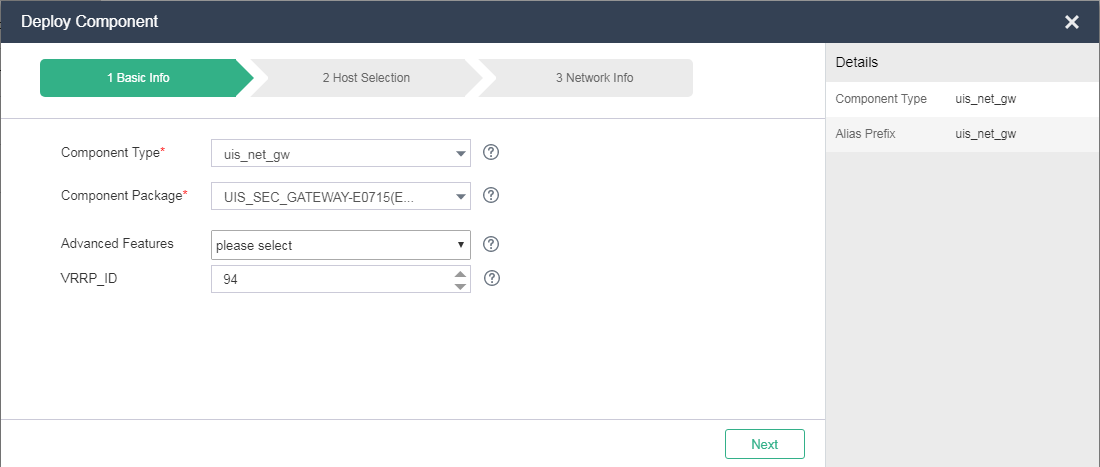
Select a component type and a component package, and then click Next.
Figure-1 Configuring basic settings
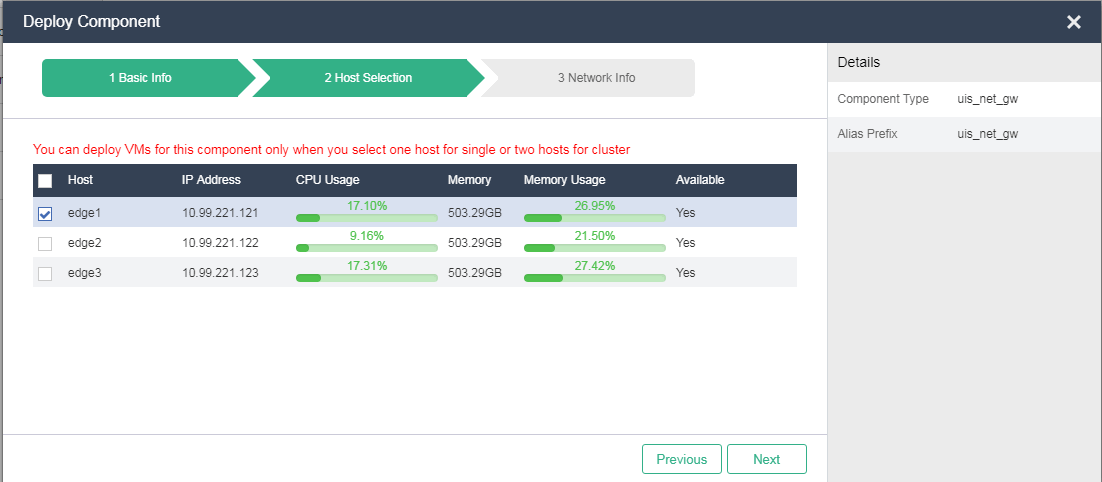
Select one or two hosts for VM deployment, and then click Next.
Figure-2 Selecting hosts
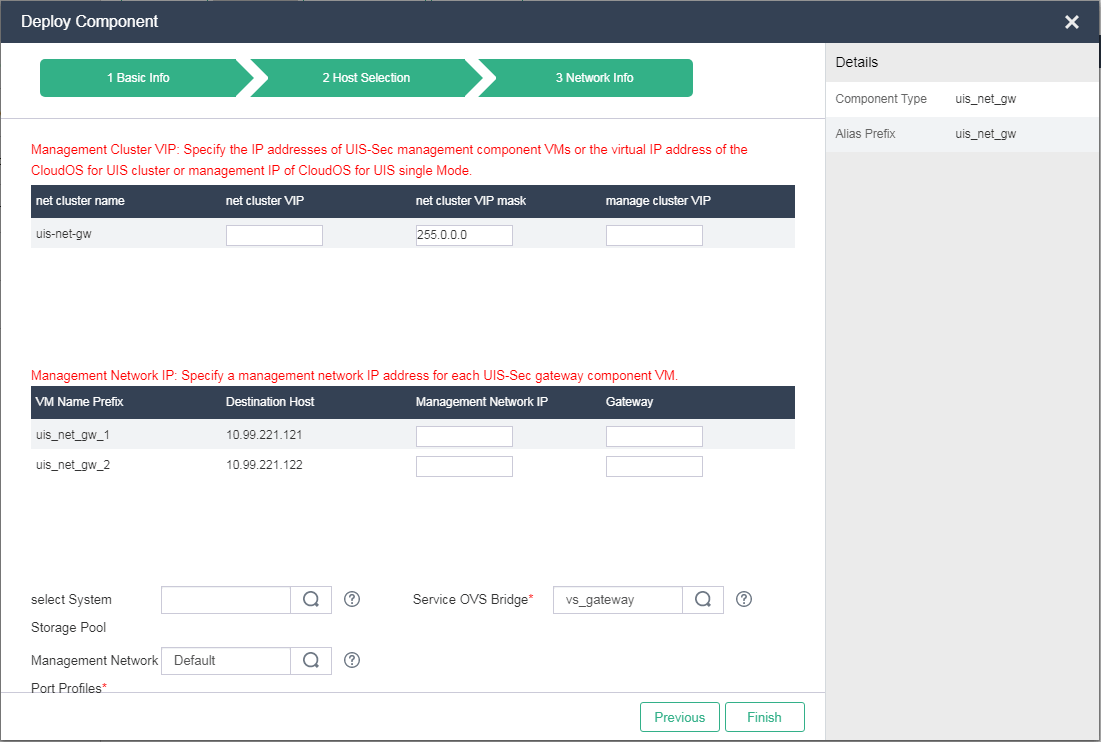
Configure the network parameters, and then click Finish. For more information about the parameters, see "Parameters."
After the deployment finishes, the UIS-Sec gateway component VMs will be displayed on the component VM page.
Figure-3 Configuring network settings
Parameters
Component Type: Select uis_net_gw as the component type to deployment UIS-Sec gateway component VMs. The VMs act as network nodes for the UIS standard edition or UIS Cloud to provide routers, LB services, firewalls, and public IP addresses for tenants.
Component Package: Select a component package you have uploaded.
Advanced Features: Configure advanced features as needed. For example, disable DPDK if you use a DPDK-disabled vSwitch.
VRRP_ID: Enter a VRRP ID for master election among the component VMs. You can leave this field empty for the system to automatically assign a VRRP ID.
Host Selection: Select one host for standalone deployment or two hosts for cluster deployment. You can deploy a maximum of two component VMs in one deployment task.
Component VM Cluster VIP: Specify the virtual IP address of the component VM cluster, which is used for communicating with UIS-Sec management component VMs or a UIS Cloud cluster. The virtual IP address must reside on the same network as the IP addresses of UIS-Sec management component VMs or the virtual IP address of the UIS Cloud cluster.
Component VM Cluster VIP Mask: Specify a subnet mask for the component VM cluster's virtual IP address. The subnet mask must be the same as that for the IP addresses of UIS-Sec management component VMs or the virtual IP address of the UIS Cloud cluster.
Management Cluster VIP: Specify the IP addresses of UIS-Sec management component VMs or the virtual IP address of the UIS Cloud cluster.
Management Network IP: Specify a management network IP address for each UIS-Sec gateway component VM.
Management Network Gateway: Specify a gateway address for the management network where UIS-Sec gateway component VMs reside.
System Storage Pool: Select a storage pool to accommodate the image of the component VM. As a best practice, select a shared storage pool. If you leave this field empty, the system automatically selects an optimal storage pool. If you select a local storage pool, the VM does not have HA capabilities. When you deploy a cluster, select the same storage pool with enough space for all hosts. If you leave this field empty, the system might distribute the VMs to multiple storage pools.
Service Network vSwitch: Select vSwitch vs_gateway. The system uses this vSwitch by default. If this vSwitch does not exist, create a vSwitch named vs_gateway and use it for component VM deployment as a best practice.
Management Network Port Profile: Select a port profile for the management network. In the current software version, only VLAN configuration takes effect. For successful deployment, make sure vswitch0, the management networks of UIS Cloud and the UIS-Sec management component, and the management network of the UIS-Sec gateway component have the same VLAN ID.