Specifying interface types and assign them to VLANs
Configure interface GE1/0/7 connected to the firewall and the GE interfaces connected to APs as follows:
From the left navigation pane on the Web interface of the switch, select
Network >Interfaces >Interfaces .Click the
Details icon for interface GE1/0/7 to access the page for editing interface settings.Configure the link type as
Trunk , and enter10,20 in thePermit VLAN List field.Use the default values for other parameters.
Click
Apply .
Figure-1 Configuring interface GE 1/0/7

Click the
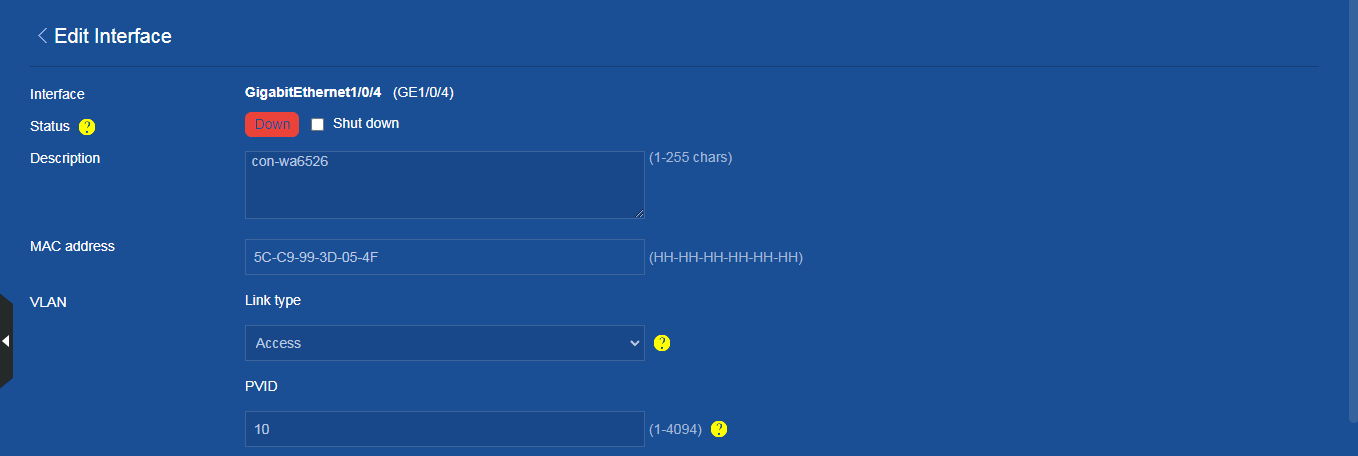
Details icon for interface GE1/0/4 interface connected to an AP to edit the interface settings as follows:Configure the link type as
Access , set the PVID to10 , and enter10 in thePermit VLAN List field.Use the default values for other parameters.
Click
Apply .
Figure-2 Configuring interface GE1/0/4