Configuring local MAC authentication
Configure an ISP domain:
# On the top navigation bar, click
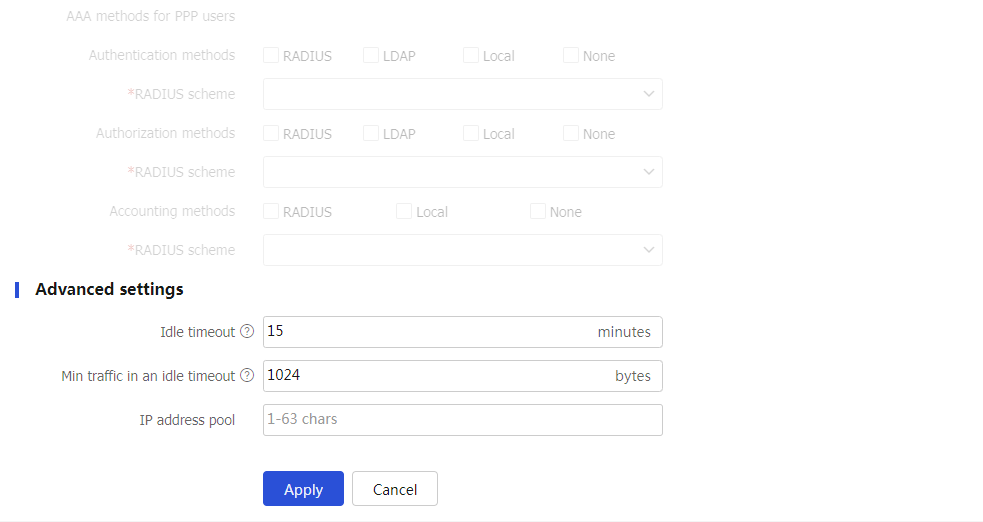
Object . From the left navigation pane, selectUser >Authentication >ISP Domains . ClickCreate to create an ISP domain as follows:Specify
mac-renzheng as the ISP domain name.Select the
LAN access as the access type.Select
Local for theAuthentication methods field,None for theAuthorization methods field, andNone for theAccounting methods field.Set the idle timeout for users to 15 minutes and the minimum data traffic in an idle timeout to 1024 bytes.
Retain the default settings for other parameters, and then click
Apply .
Figure-1 Editing an ISP domain


Configure a local user:
# From the left navigation pane, select
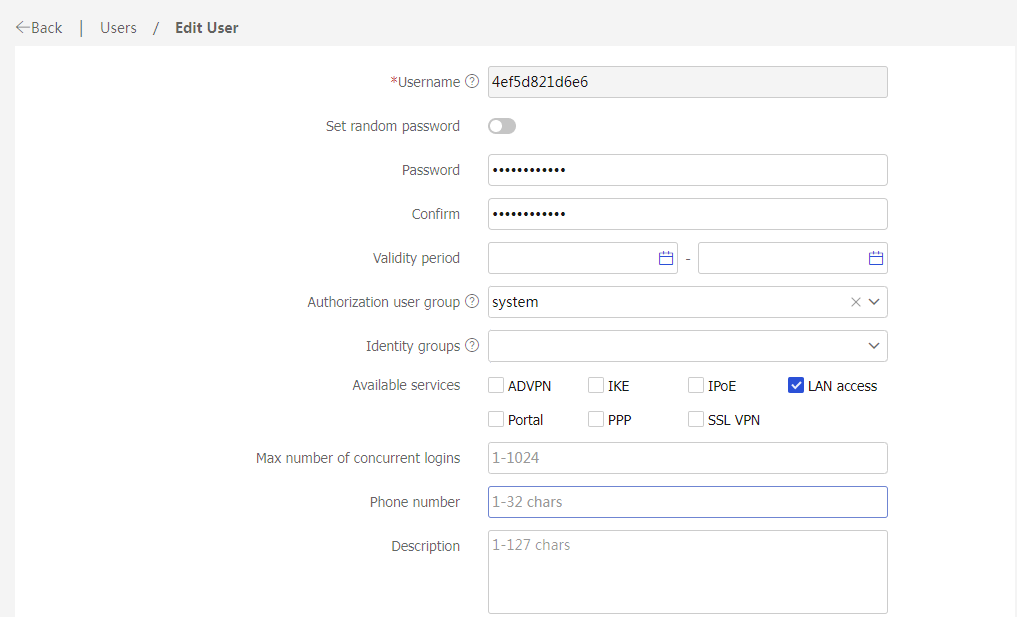
User >User Management >Local Users . Click theUsers tab and then clickCreate . Create a local user as follows:Use the MAC address of the client as the username and password.
Select LAN access for the
Available services field.Retain the default settings for other parameters, and then click
Apply .Each client must be configured with a local user. This example only creates one user.
Figure-2 Editing a user