Configuring NAT
On the top navigation bar, click
Object . From the left navigation pane, selectObject Groups >IPv4 Address Object Groups . ClickCreate to create an IPv4 address object group as follows:Specify the IPv4 address group name as
AP-client .Select the network segment object type and specify the segment as 172.20.1.0/255.255.255.0.
Click
Apply .
Figure-1 Configuring an IPv4 address object group

On the top navigation bar, click
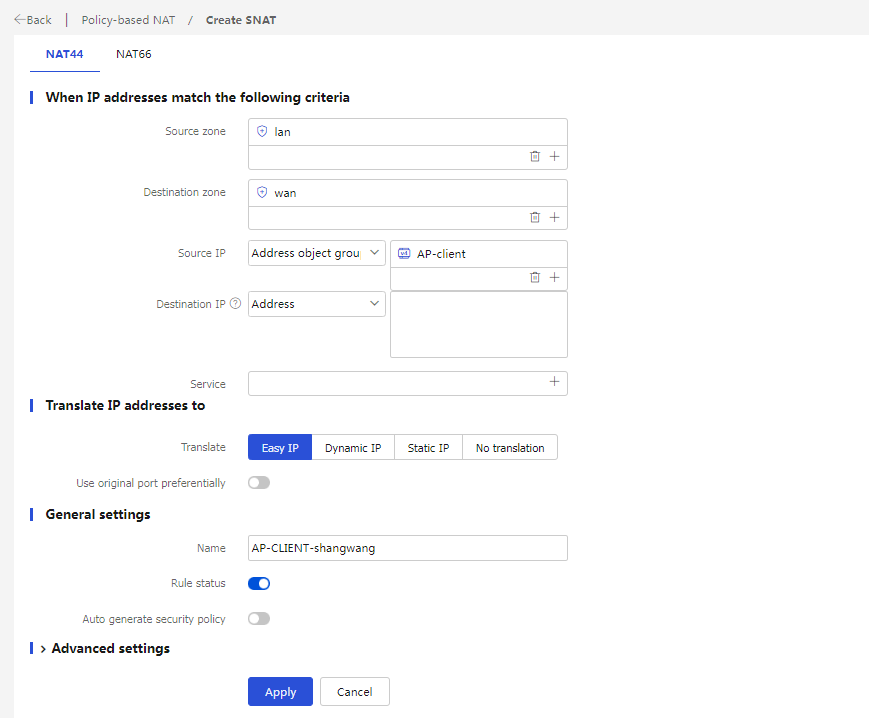
Policy . From the left navigation pane, selectPolicy-based NAT . ClickCreate to create a NAT policy as follows:The rule name is
AP-CLIENT-shangwang .The rule type is NAT44.
The translation mode is source address translation.
The source security zone is
lan .The destination security zone is
wan .Select the
AP-client group as the source address object group.The translation mode is dynamic
IP + port .The address type is
Easy IP .Enable this rule.
Click
Apply .
Figure-2 Creating a NAT policy