Creating VLANs
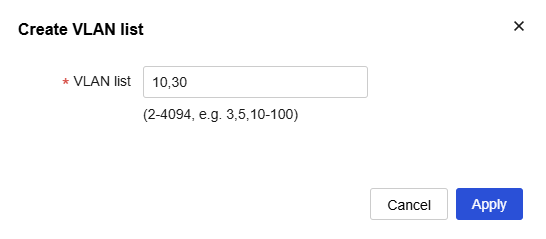
Create VLAN 10 and VLAN 30 according to the plan.
Navigate to the
Network >Links >VLAN page.Click the
Create VLAN icon. TheCreate VLAN list dialog box opens.Create VLAN 10 and VLAN 30
Click
OK .
Figure-1 Creating VLAN 10 and VLAN 30
Configure an IP address for VLAN-interface 10:
Click the
Details icon for VLAN 10.On the
Edit VLAN page that opens, selectConfigure VLAN interface .Set the IP address of VLAN-interface 10 to 172.10.1.1/24.
Use the default settings for the other parameters, and then click
Apply .
Figure-2 Configuring an IP address for VLAN-interface 10

Configure an IP address for VLAN-interface 30:
Click the
Details icon for VLAN 30.On the
Edit VLAN page that opens, selectConfigure VLAN interface .Set the IP address of VLAN-interface 30 to 172.30.1.254/24.
Use the default settings for the other parameters, and then click
Apply .
Figure-3 Configuring an IP address for VLAN-interface 30
