Web example: Configuring static port block mapping NAT444
Network configuration
As shown in Figure-1, a company has one public IP address 200.2.2.1/24. Configure static NAT444 port block mapping to allow internal network users to use this public IP address to access the Internet. Configure the port range as 10001 to 15000, and set the port block size to 500.
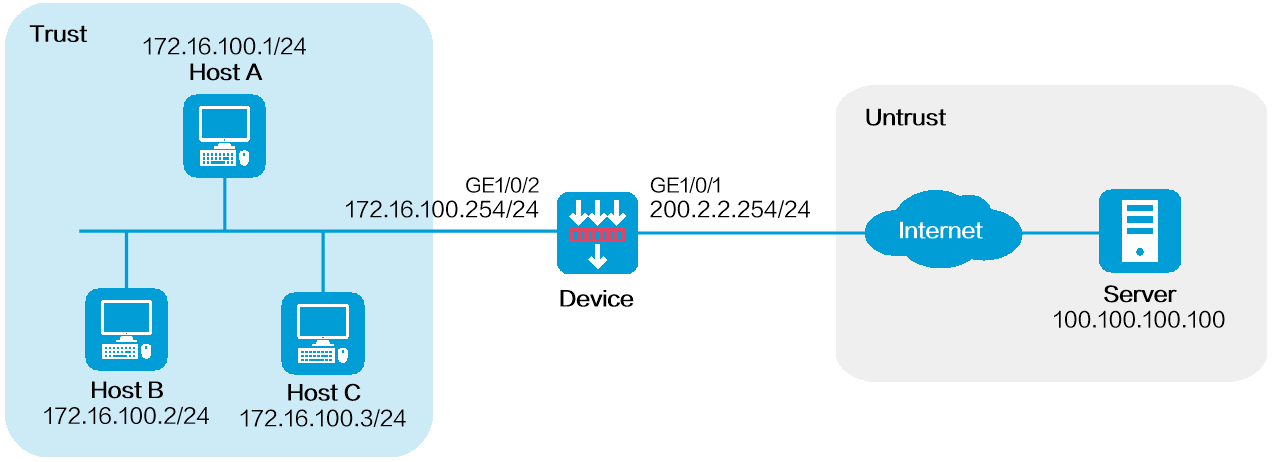
Software versions used
This configuration example was created and verified on R9900P25 of the M9000-X06 device.
Restrictions and guidelines
Do not configure both the NAT translation methods and a global NAT policy.
Procedure
Assign IP addresses to interfaces and add the interfaces to security zones.
# On the top navigation bar, click
Network .# From the navigation pane, select
Interface Configuration >Interfaces .# Click the
Edit icon for GE 1/0/1.# In the dialog box that opens, configure the interface:
Select the
Untrust security zone.On the
IPv4 Address tab, enter the IP address and mask of the interface. In this example, enter 200.2.2.254/24.Click
OK .
# Add GE 1/0/2 to the
Trust security zone and set its IP address to 172.16.100.254/24 in the same way you configure GE 1/0/1.Configure settings for routing.
This example configures a static route. If dynamic routes are required, configure a dynamic routing protocol.
# On the top navigation bar, click
Network .# From the navigation pane, select
Routing >Static Routing .# On the
IPv4 Static Routing tab, clickCreate .# In the dialog box that opens, configure a static route to permit packets from the hosts to the server:
Specify the IP address of the server as the destination IP address. In this example, the address is 100.100.100.100.
Enter the mask length. In this example, enter 24.
Specify the public address as the next-hop address as 200.2.2.253.
Click
Apply .
Configure a security policy.
# On the top navigation bar, click
Policies .# From the navigation pane, select
Security Policies >Security Policies .# Click
Create and clickCreate a policy .# In the dialog box that opens, configure policy parameters as follows:
Enter a policy name. In this example, the name is
Secpolicy .Select the source zone. In this example, the source zone is Trust.
Select the destination zone. In this example, the destination zone is Untrust.
Select
IPv4 as the type.Select
Permit as the action.Specify the IP addresses of the hosts as the source IPv4 addresses. In this example, the addresses are 172.16.100.1, 172.16.100.2, and 172.16.100.3.
Specify the IP address of the server as the destination IPv4 address. In this example, the address is 100.100.100.100.
Click
Apply .
Configure a port block group.
# On the top navigation bar, click
Policies .# From the navigation pane, select
Interface NAT >IPv4 >Static NAT444 >Port Blocks .# Click
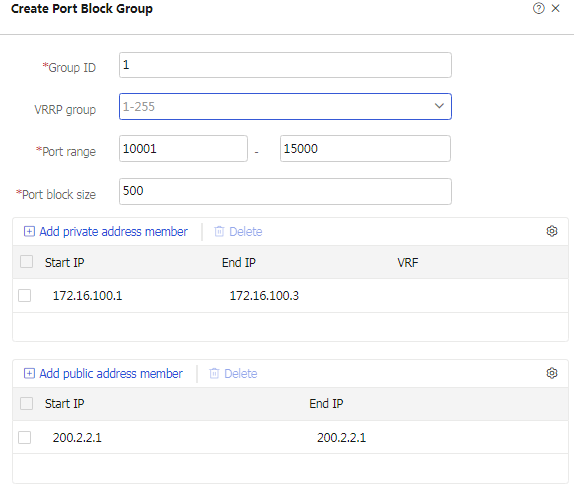
Create .# Create a port block group, as shown in Figure-2.
Figure-2 Creating a port block group
# Click
Apply .Configure a static NAT444 rule.
# On the top navigation bar, click
Policies .# From the navigation pane, select
Interface NAT >IPv4 >Static NAT444 .# Click
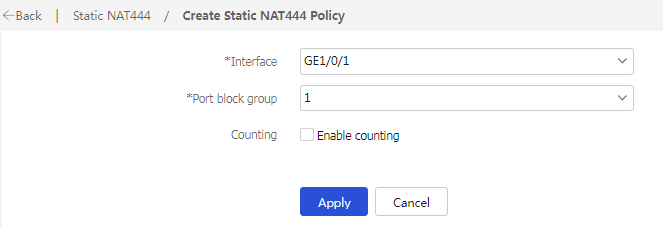
Create .# Create a static NAT444 rule, as shown in Figure-3.
Figure-3 Creating a static NAT444 rule
# Click
Apply .
Verifying the configuration
Verify that the host can successfully ping the server on the external network.
C:\Users\abc>ping 100.100.100.100
Pinging host.com [100.100.100.100] with 32 bytes of data:
Reply from 100.100.100.100: bytes=32 time<1ms TTL=253
Reply from 100.100.100.100: bytes=32 time<1ms TTL=253
Reply from 100.100.100.100: bytes=32 time<1ms TTL=253
Reply from 100.100.100.100: bytes=32 time<1ms TTL=253
Ping statistics for 100.100.100.100:
Packets: Sent = 4, Received = 4, Lost = 0 (0% loss),
Approximate round trip times in milli-seconds:
Minimum = 0ms, Maximum = 0ms, Average = 0ms
Verify that a NAT session is generated when the host accesses the server.
# On the top navigation bar, click
Monitor .# From the navigation pane, select
Sessions .Figure-4 Session list
