Server connection detection
This help contains the following topics:
Introduction
Server connection detection (SCD) enables the device to identify and classify legal and illegal connections initiated by given servers based on user-defined rules. This helps the administrators to monitor internal servers and prevent them from becoming part of a botnet and launching attacks or performing internal network penetration.
SCD configuration involves the following tasks:
Configure SCD learning —Configure the device to learn connections initiated by given servers. The learning results provide the basis for administrators to create SCD policies to monitor and log illegal connections initiated by the servers.Configure SCD policies —Create an SCD policy for a server and configure SCD rules to define the legal connections initiated by the server. The device can then log connections initiated by the server that do not match the SCD rules.
vSystem support information
Support of non-default vSystems for this feature depends on the device model. This feature is available on the Web interface only if it is supported.
Configure SCD
Analysis
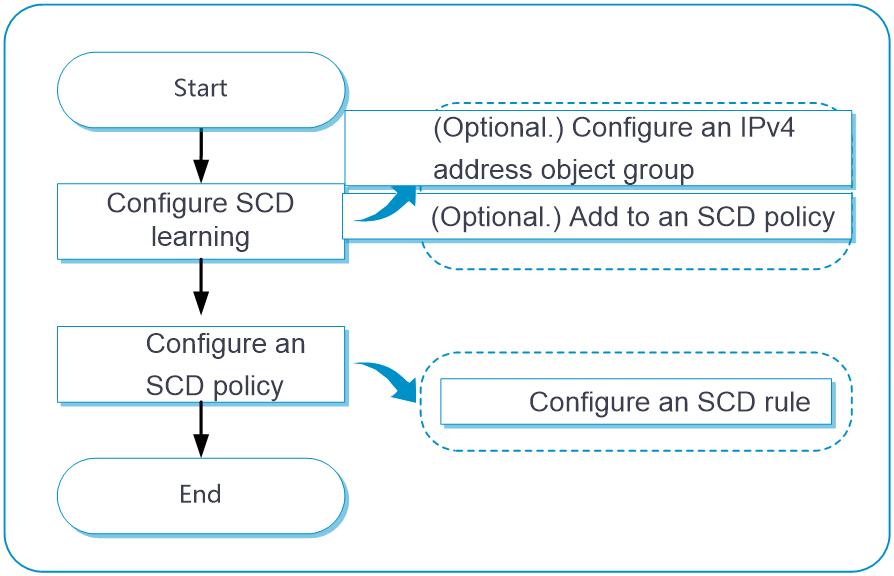
Configure SCD as shown in the following figure:
Figure-1 SCD configuration flow chart
Prerequisites
Complete the following tasks before you configure this feature:
Assign IP addresses to interfaces on the
Network >Interface Configuration >Interfaces page.Configure routes on the
Network >Routing page. Make sure the routes are available.Create security zones on the
Network >Security Zones page.Add interfaces to security zones. You can add interfaces to a security zone on the
Security Zones page or select a security zone for an interface on theInterfaces page.Configure security policies to permit the target traffic on the
Policies >Security Policies page.
Configure SCD learning
SCD learning enables the device to learn connections initiated by given servers. The learning results provide the basis for administrators to create SCD policies to monitor and log illegal connections initiated by the servers.
To configure SCD learning:
Click the
Policies tab.In the navigation pane, select
Active Defense >Server Connection Detection .Click the
SCD Learning tab.Figure-2 Configuring SCD learning
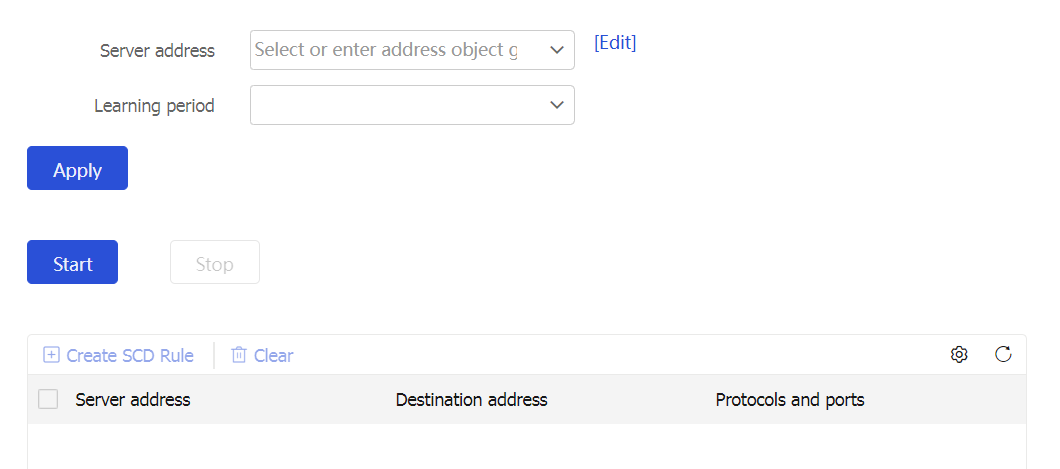
Enter or select the IP addresses of the servers for server-initiated connection learning and set the learning period.
To create an IPv4 address object group, see "Object groups."
Click
Start .The device starts to learn the connections initiated by the specified servers for the specified learning period and displays the learning results in a list.
To set a server-initiated connection as a legal connection, select the connection and click
Create SCD rule .The device automatically creates an SCD policy for the server and creates an SCD rule for the selected server connection in the policy.
Configure an SCD policy
Click the
Policies tab.In the navigation pane, select
Active Defense >Server Connection Detection .Click the
SCD Policy tab.Click
Create .Create an SCD policy.
Figure-3 Creating an SCD policy
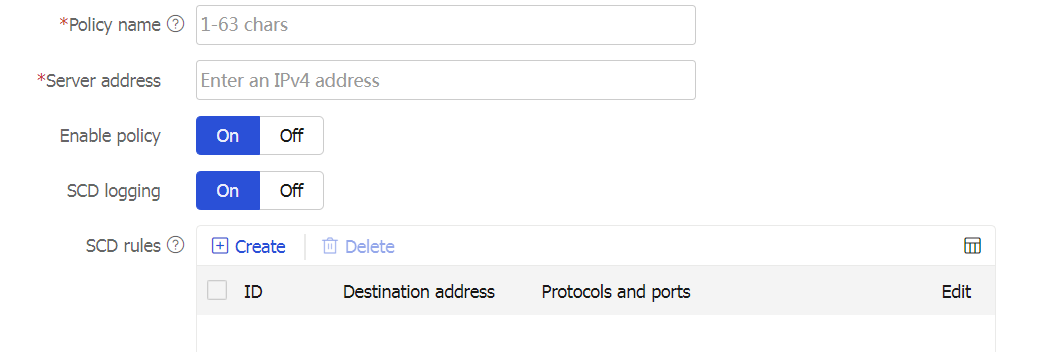
Figure-4 Creating an SCD rule
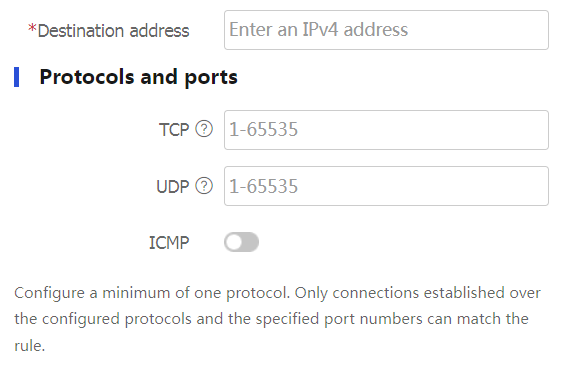
Table-1 SCD policy configuration items
Item
Description
Policy name
Enter a name for the SCD policy.
Server address
Enter a server IP address. The SCD policy will monitor connections initiated by the server.
Enable policy
Select whether to enable the SCD policy.
Logging
Select whether to log connections initiated by the server that do not match any SCD rules.
SCD rules
Each SCD rule defines a set of legal connections initiated by the server. Connections initiated by the server that do not match any SCD rules are considered illegal.
To create an SCD rule:
Click
Create .Enter the destination IP address for the connections.
Set the protocols and port numbers for the connections.
A minimum of one protocol must be configured for an SCD rule.
Click
OK .