PIM
This help contains the following topics:
Introduction
Protocol Independent Multicast (PIM) provides IP multicast forwarding by leveraging unicast static routes or unicast routing tables generated by any unicast routing protocol. PIM uses the underlying unicast routing to generate a multicast routing table without relying on any particular unicast routing protocol.
Based on the implementation mechanism, PIM includes the following categories:
Protocol Independent Multicast–Dense Mode (PIM-DM) —PIM-DM is suitable for small-sized networks with densely distributed multicast members.Protocol Independent Multicast–Sparse Mode (PIM-SM) —PIM-SM is suitable for large- and medium-sized networks with sparsely and widely distributed multicast group members.Protocol Independent Multicast Source-Specific Multicast (PIM-SSM) —PIM-SSM can be implemented by leveraging part of the PIM-SM technique. Before you configure PIM-SSM, you must first enable PIM-SM.
If you enable PIM-DM on an interface, the PIM-DM mode is used. If you enabled PIM-SM on an interface, the PIM mode on the interface varies by multicast group for which a multicast packet destines.
If the multicast group is in the SSM group range, the PIM-SSM mode is used.
If the multicast group is not in the SSM group range, the PIM-DM mode is used.
vSystem support information
Support of non-default vSystems for this feature depends on the device model. This feature is available on the Web interface only if it is supported.
Configure PIM
Prerequisites
Complete the following tasks before you configure this feature:
Assign IP addresses to interfaces on the
Network >Interface Configuration >Interfaces page.Configure routes on the
Network >Routing page. Make sure the routes are available.Create security zones on the
Network >Security Zones page.Add interfaces to security zones. You can add interfaces to a security zone on the
Security Zones page or select a security zone for an interface on theInterfaces page.Configure security policies to permit the target traffic on the
Policies >Security Policies page.
Enable PIM
PIM provides IP multicast forwarding by leveraging unicast static routes or unicast routing tables generated by any unicast routing protocol. PIM uses the underlying unicast routing to generate a multicast routing table without relying on any particular unicast routing protocol.
To enable PIM:
Select
Network >IP Multicast >PIM .Select the public network or a specific VPN instance.
Figure-1 PIM page

Click
Enable IPv4 PIM on interfaces orEnable IPv 6 PIM on interfaces , and then enable IPv4 or IPv6 PIM for the interfaces as needed.Figure-2 Selecting interfaces
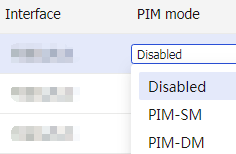
Click
Apply at the upper left corner of the page.
Advanced settings
Select
Network >IP Multicast >PIM .Click
Advanced settings , and configure the following settings:Figure-3 PIM page

Figure-4 Advanced settings page
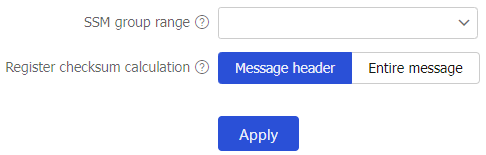
Table-1 Advanced setting items
Item
Description
SSM group range
When a PIM-SM enabled interface receives a multicast packet, it checks whether the multicast group address of the packet is in the SSM group range. If the multicast group address is in this range, the PIM mode for this packet is PIM-SSM. If the multicast group address is not in this range, the PIM mode is PIM-SM.
Register checksum calculation
Select a checksum computing method for register messages.
For information integrity of a register message, you can configure the device to calculate the checksum based on the entire register message. If a device cannot calculate the checksum based on the entire register message, you can configure the device to calculate the checksum based on the register message header.
Click
Apply .