Web example: Configuring SSL decryption
Network configuration
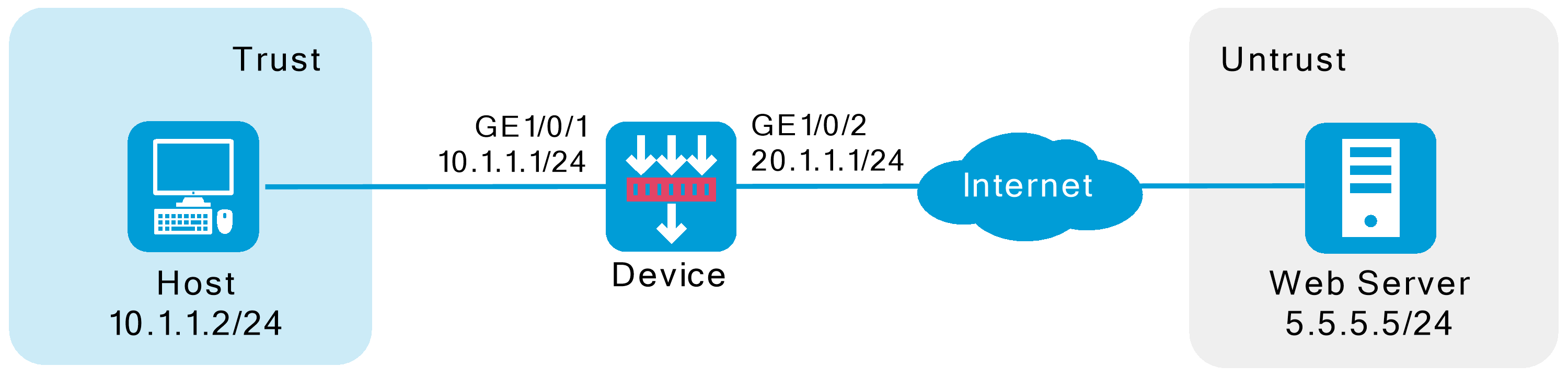
As shown in Figure-1, the device acts as the security gateway of an enterprise. The device cannot inspect SSL-encrypted packets (such as HTTPS packets), masking the security threats inside of the packets. To improve the internal network security, configure SSL decryption on the device to decrypt HTTPS packets for IPS inspection.
Software versions used
This configuration example was created and verified on R9900P2705 of the F5000-AI-55-G device.
Restrictions and guidelines
When configuring SSL decryption, make sure the security policies allow the source and destination security zones to intercommunicate with the
SSL decryption supports decrypting HTTPS, SMTPS, IMAPS, and POP3S protocol packets.
Procedure
Assign IP addresses to interfaces:
# On the top navigation bar, click
Network .# From the navigation pane, select
Interface Configuration >Interfaces .# Click the
Edit icon for GE 1/0/1.# In the dialog box that opens, configure the interface:
Select the
Trust security zone.On the
IPv4 Address tab, enter the IP address and mask of the interface. In this example, enter 10.1.1.2/24.Use the default settings for other parameters.
Click
OK .
# Add GE 1/0/2 to the
Untrust security zone and set its IP address to 20.1.1.1/24 in the same way you configure GE 1/0/1.Configure settings for routing:
This example configures a static route to reach the Web server, and the next hop in the route is 20.1.1.2.
# On the top navigation bar, click
Network .# From the navigation pane, select
Routing >Static Routing .# On the
IPv4 Static Routing tab, clickCreate .# In the dialog box that opens, configure a static IPv4 route to reach the Web server:
Enter destination IP address
5.5.5.0 .Enter mask length
24 .Enter next hop address
20.1.1 . 2 .Use the default settings for other parameters.
Click
OK .
Import the trusted SSL decryption certificate:
# On the top navigation bar, click
Policies .# From the navigation pane, select
Application Proxy >SSL Decryption Certificates .# Click
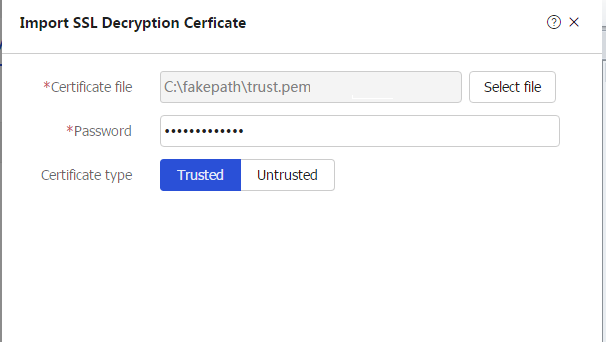
Import .# In the dialog box that opens, configure the following settings, as shown in Figure-2:
Select file
trust.pem .Enter the password of the file.
Set the certificate type to
Trusted .
# Click
OK .Figure-2 Importing the trusted SSL decryption certificate
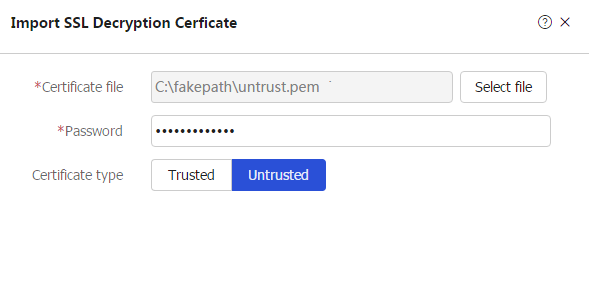
# Import the untrusted SSL decryption certificate in the same way you import the trusted SSL decryption certificate, as shown in Figure-3.
Figure-3 Importing the untrusted SSL decryption certificate
Install and trust the trusted SSL decryption certificate on the browser from the internal network . ( Details not shown. ) Configure a proxy policy: # On the top navigation bar, click
Policies .# From the navigation pane, select Application Proxy > Proxy Policy.
# Click
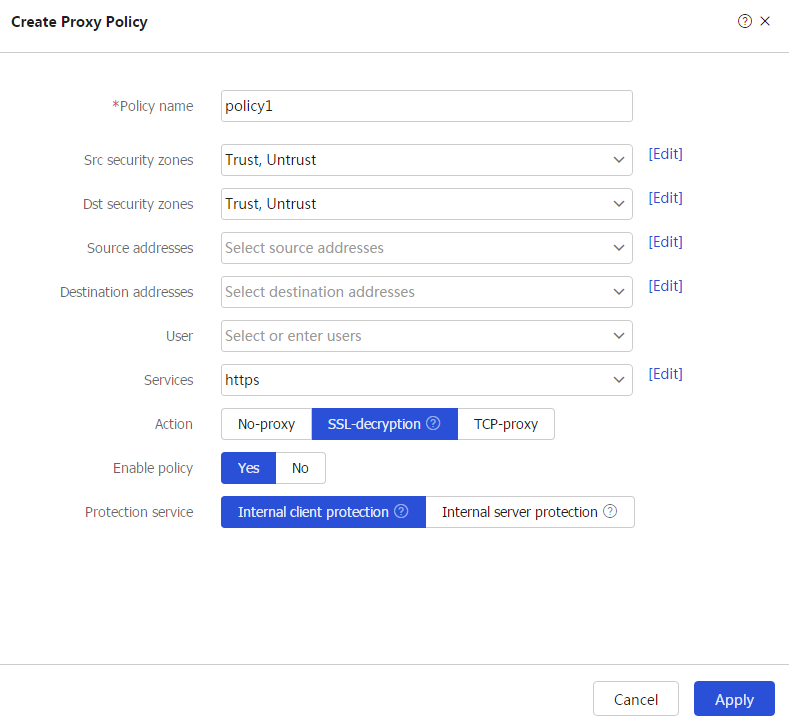
Create .# In the dialog box that opens, configure a proxy policy:
Enter policy name
policy1 .Select source security zones
Trust andUntrust .Select destination security zones
Trust andUntrust .Select service
https .Select action
SSL -decryption .Enable the policy.
Select
Internal client protection as the protection service.
# Click
OK . The device performs decryption on HTTPS packets that match the proxy policy.Figure-4 Creating a proxy policy
Configure IPS. For more information, see "IPS configuration examples."
Configure security policies:
# On the top navigation bar, click
Policies .# From the navigation pane, select Security Policies > Security Policies.
# Click Create, and then click
Create a policy .# Configure security policy
trust-untrust for IPS inspection on the traffic from the internal network to the external network:Enter policy name
trust-untrust .Select type
IPv4 .Select source zone
Trust .Select destination zone
Untrust .Select source IPv4 address
10.1.1.0/24 .Select action
Permit .Select IPS profile
ips in theContent security area.Use the default settings for other parameters.
Click
OK .
# Configure security policy
untr ust-trust for IPS inspection on the traffic from the external network to the internal network:Enter policy name
untrust- trust .Select type
IPv4 .Select source zone
Untrust .Select destination zone
Trust .Select source IPv4 addresses
10.1.1.0/24 .Select action
Permit .Select IPS profile
ips in theContent security area.Use the default settings for other parameters.
Click
OK .
# Create security policy
trust-local to e nsure that the device can act as a proxy server to proxy the traffic from the client to the server :Enter policy name
trust-local .Select type
IPv4 .Select source zones
Trust andLocal .Select destination zones
Local andTrust .Select action
Permit .Use the default settings for other parameters.
Click
OK .
# Create security policy
untrust-local to ensure thatthe device can act as a proxy client to proxy the traffic from the server to the client :Enter policy name
untrust-local .Select type
IPv4 .Select source zones
Untrust andLocal .Select destination zones
Local andUntrust .Select action
Permit .Use the default settings for other parameters.
Click
OK .
Verifying the configuration
Verify that the device can perform SSL decryption on HTTPS packets, and then perform IPS inspection on the encrypted packets.