Web example: Providing FTP service from an IPv6 network to the IPv4 Internet (policy-based NAT)
Network configuration
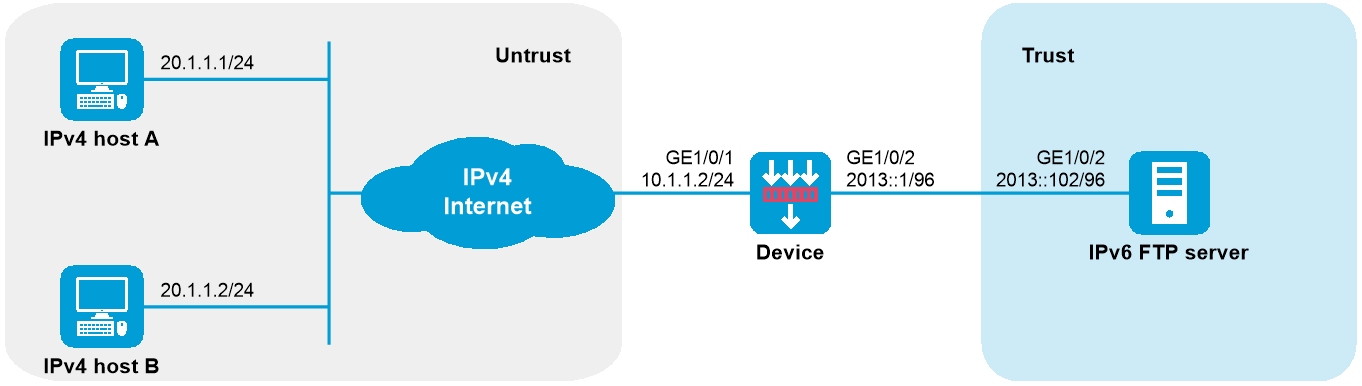
As shown in Figure-1, a company upgrades the network to IPv6, and it has an IPv4 address 10.1.1.1.
To allow the IPv6 FTP server to provide FTP services to IPv4 hosts, configure the following AFT policies on the device:
Map the IPv6 FTP server's IPv6 address and port number to the company's IPv4 address and port number.
Configure a NAT64 prefix to translate source IPv4 addresses of IPv4 packets to IPv6 addresses.
Software versions used
This configuration example was created and verified on R9900P2705 of the F5000-AI-55-G device.
Procedure
Assign IP addresses to interfaces and add the interfaces to security zones.
# On the top navigation bar, click
Network .# From the navigation pane, select
Interface Configuration >Interfaces .# Click the
Edit icon for GE1/0/1.# In the dialog box that opens, configure the interface as follows:
From the
Security zone list, selectUntrust .On the
IPv4 Address tab, set the IP address/mask length to10.1.1.2/24 .Use the default settings for other parameters.
# Click
Apply .# Add GE1/0/2 to the
T rust security zone and set its IPv6 address to 2013::1/96 in the same way you configure GE1/0/1.Configure settings for routing:
This example configures a static route. If dynamic routes are required, configure a dynamic routing protocol.
# On the top navigation bar, click
Network .# From the navigation pane, select
Routing >Static Routing .# On the
IPv4 Static Routing tab, clickCreate .# In the dialog box that opens, perform the following tasks:
Specify the destination IP address as 20.1.1.0.
Set the mask length to
24 .Specify the next-hop address as 10.1.1.100.
Use the default settings for other parameters.
# Click
Apply .Configure security policies:
# On the top navigation bar, click
Policies .# From the navigation pane, select
Security Policies .# On the
Security Policies tab, clickCreate .# On the page that opens, perform the following tasks to create the following security policies:
IPv4 security policy:
In the
Name field, enteraftlocalin .From the
Source zone list, selectUntrust .From the
Destination zone list, selectLocal .Select
IPv4 for theType field.Select
Permit for theAction field.Specify the destination IPv4 address as 10.1.1.1.
Use the default settings for other parameters.
Click
Apply .
IPv6 security policy 1:
In the
Name field, enteraftlocalout .From the
Source zone list, selectLocal .From the
Destination zone list, selectTrust .Select
IPv6 for theType field.Select
Permit for theAction field.Specify the source IPv6 address as 2012::96.
Specify the destination IPv6 address as 2013::102.
Use the default settings for other parameters.
Click
Apply .IPv6 security policy 2:
In the
Name field, entertrust-untrust .From the
Source zone list, selectUntrust .From the
Destination zone list, selectTrust .Select
IPv 6 for theType field.Select
Permit for theAction field.Specify the source IPv6 address as 2012:: 96.
Specify the destination IPv6 address as 2013::102.
Use the default settings for other parameters.
Click
Apply .
Create a policy-based NAT rule.
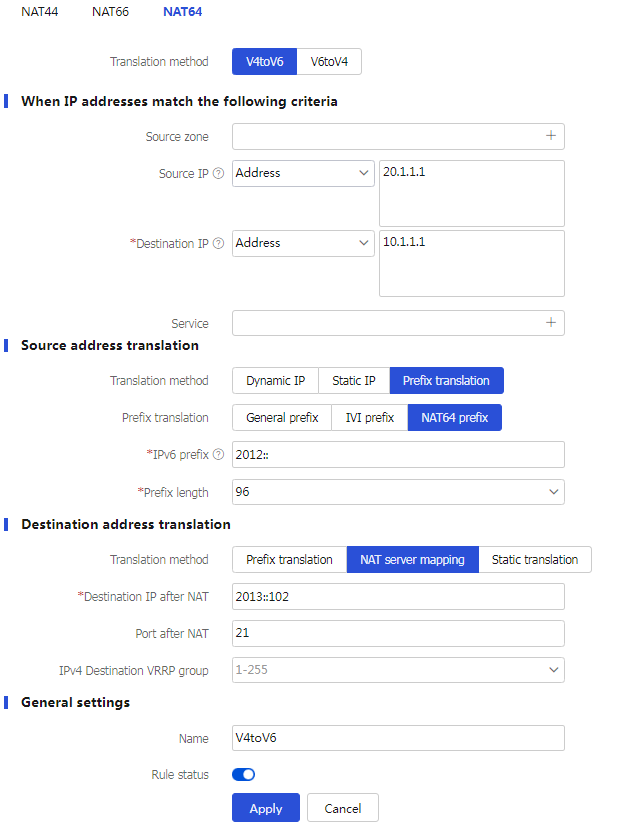
# Configure an AFT mapping for the IPv6 server so that IPv4 users can access the IPv6 server by using the IPv4 address and port specified in the AFT mapping.
# On the top navigation bar, click
Policies .# From the navigation pane, select
Policy-based NAT .# Click the chevron icon next to
Create SNAT , selectCreate SNAT+DNAT , and then click theNAT64 tab.# Select the
V4toV6 translation method.# Create a policy-based NAT rule, as shown in Figure-2.
Figure-2 Creating a policy-based NAT rule
# Click
Apply .Enable AFT on the interfaces connected to the IPv4 Internet and IPv6 network, respectively.
# Access the CLI of the device, enter the view of each interface, and then execute the
aft enable command on each interface.
Verifying the configuration
# Verify that IPv4 hosts can use FTP to access the IPv6 FTP server. (Details not shown.)
# Display detailed information about IPv4 AFT sessions on the device.
[Device] display aft session ipv4 verbose
Initiator:
Source IP/port: 20.1.1.1/11025
Destination IP/port: 10.1.1.1/21
DS-Lite tunnel peer: -
VPN instance/VLAN ID/Inline ID: -/-/-
Protocol: TCP(6)
Inbound interface: GigabitEthernet1/0/1
Source security zone: Untrust
Responder:
Source IP/port: 10.1.1.1/21
Destination IP/port: 20.1.1.1/11025
DS-Lite tunnel peer: -
VPN instance/VLAN ID/Inline ID: -/-/-
Protocol: TCP(6)
Inbound interface: GigabitEthernet1/0/2
Source security zone: Local
State: TCP_ESTABLISHED
Application: FTP
Rule ID: -/-/-
Rule name:
Start time: 2014-03-13 09:07:30 TTL: 3577s
Initiator->Responder: 3 packets 124 bytes
Responder->Initiator: 2 packets 108 bytes
Total sessions found: 1
# Display detailed information about IPv6 AFT sessions on the device.
[Device] display aft session ipv6 verbose
Initiator:
Source IP/port: 2012::1401:0101/1029
Destination IP/port: 2013::102/21
VPN instance/VLAN ID/Inline ID: -/-/-
Protocol: TCP(6)
Inbound interface: GigabitEthernet1/0/1
Source security zone: Local
Responder:
Source IP/port: 2013::102/21
Destination IP/port: 2012::1401:0101/1029
VPN instance/VLAN ID/Inline ID: -/-/-
Protocol: TCP(6)
Inbound interface: GigabitEthernet1/0/2
Source security zone: Trust
State: TCP_ESTABLISHED
Application: FTP
Rule ID: 0
Rule name: aftlocalout
Start time: 2014-03-13 09:07:30 TTL: 3582s
Initiator->Responder: 3 packets 184 bytes
Responder->Initiator: 2 packets 148 bytes