CLI example: Configuring Web access
Network configuration
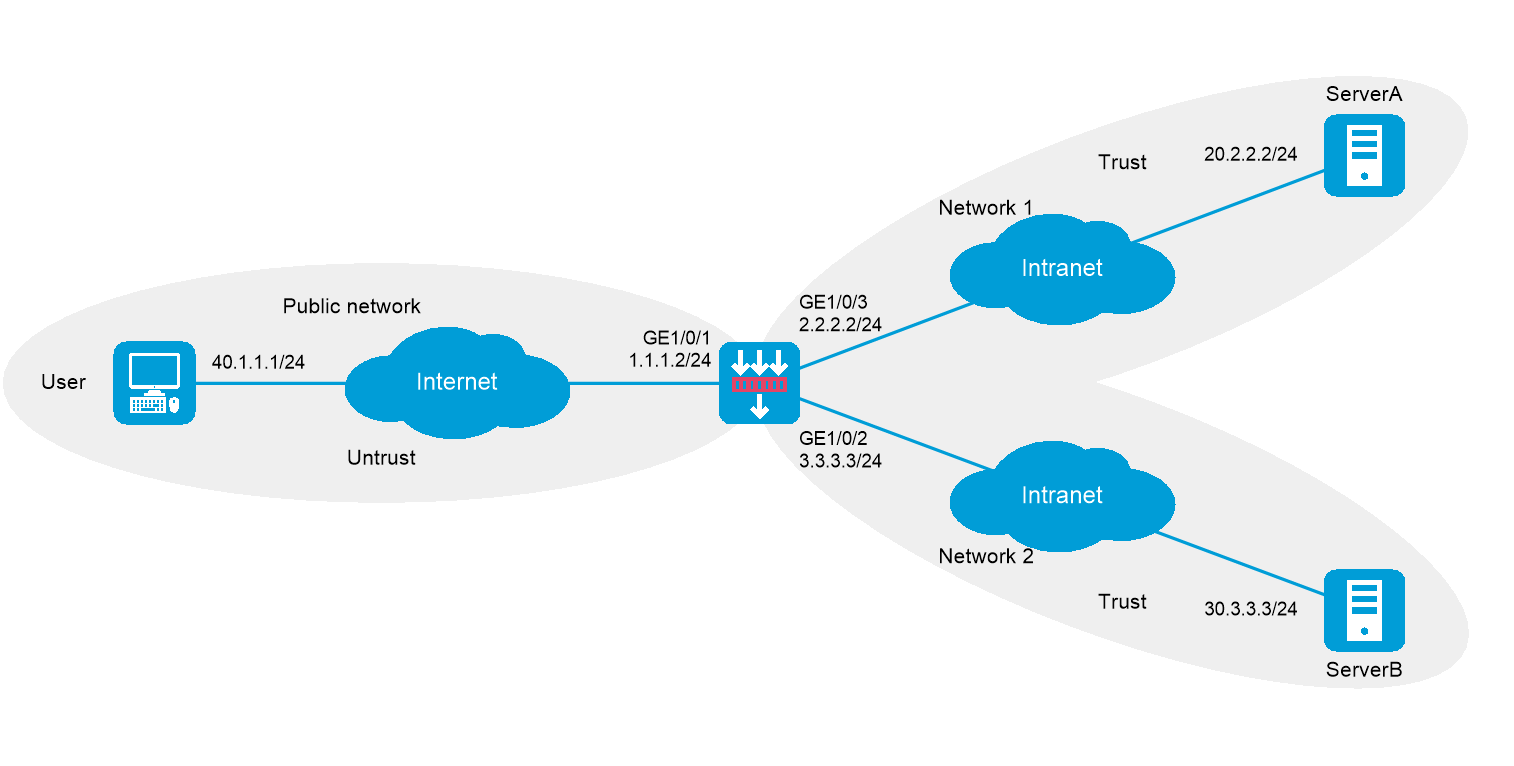
As shown in Figure-1, the device acts as the SSL VPN gateway that connects the public network and private networks Network 1 and Network 2. Server A and Server B are internal Web servers. Server A uses HTTP over port 80. Server B uses HTTPS over port 443.
The device uses a CA-signed SSL server certificate. If no SSL server policy is applied to the device, the device uses a self-signed SSL server certificate.
Configure SSL VPN Web access on the device to allow the user to access Server A in Network 1 and Server B in Newark 2.
Configure the device to perform local authentication and authorization for the user.
Software versions used
This configuration example was created and verified on R9900P2705 of the F5000-AI-55-G device.
Procedures
Obtain CA certificate file
ca.cer and local certificate fileserver.pfx for the device. (Details not shown.)Assign IP addresses to interfaces:
# Assign an IP address to interface GigabitEthernet 1/0/1.
<Device> system-view
[Device] interface gigabitethernet 1/0/1
[Device-GigabitEthernet1/0/1] ip address 1.1.1.2 255.255.255.0
[Device-GigabitEthernet1/0/1] quit
# Assign IP addresses to other interfaces in the same way. (Details not shown.)
Configure settings for routing.
This example configures static routes, and the next hop in the routes is 2.2.2.3 to Server A, 3.3.3.4 to Server B, and 1.1.1.3 to the user.
[Device] ip route-static 20.2.2.2 24 2.2.2.3
[Device] ip route-static 30.3.3.3 24 3.3.3.4
[Device] ip route-static 40.1.1.1 24 1.1.1.3
Add interfaces to security zones.
[Device] security-zone name untrust
[Device-security-zone-Untrust] import interface gigabitethernet 1/0/1
[Device-security-zone-Untrust] quit
[Device] security-zone name trust
[Device-security-zone-Trust] import interface gigabitethernet 1/0/2
[Device-security-zone-Trust] import interface gigabitethernet 1/0/3
[Device-security-zone-Trust] quit
Configure rules in a security policy to permit the traffic between the
Untrust andLocal security zones for the user to access the SSL VPN gateway:# Configure a rule named
sslvpnlocalout1 to permit the packets from the device to the user.[Device] security-policy ip
[Device-security-policy-ip] rule name sslvpnlocalout1
[Device-security-policy-ip-1-sslvpnlocalout1] source-zone local
[Device-security-policy-ip-1-sslvpnlocalout1] destination-zone untrust
[Device-security-policy-ip-1-sslvpnlocalout1] source-ip-host 1.1.1.2
[Device-security-policy-ip-1-sslvpnlocalout1] destination-ip-host 40.1.1.1
[Device-security-policy-ip-1-sslvpnlocalout1] action pass
[Device-security-policy-ip-1-sslvpnlocalout1] quit
# Configure a rule named
sslvpnlocalin1 to permit the packets from the user to the device.[Device-security-policy-ip] rule name sslvpnlocalin1
[Device-security-policy-ip-2-sslvpnlocalin1] source-zone untrust
[Device-security-policy-ip-2-sslvpnlocalin1] destination-zone local
[Device-security-policy-ip-2-sslvpnlocalin1] source-ip-host 40.1.1.1
[Device-security-policy-ip-2-sslvpnlocalin1] destination-ip-host 1.1.1.2
[Device-security-policy-ip-2-sslvpnlocalin1] action pass
[Device-security-policy-ip-2-sslvpnlocalin1] quit
# Configure a rule named
sslvpnlocalout2 to permit the packets from the device to Server A or Server B.[Device-security-policy-ip] rule name sslvpnlocalout2
[Device-security-policy-ip-3-sslvpnlocalout2] source-zone local
[Device-security-policy-ip-3-sslvpnlocalout2] destination-zone trust
[Device-security-policy-ip-3-sslvpnlocalout2] source-ip-host 2.2.2.2
[Device-security-policy-ip-3-sslvpnlocalout2] source-ip-host 3.3.3.3
[Device-security-policy-ip-3-sslvpnlocalout2] destination-ip-host 20.2.2.2
[Device-security-policy-ip-3-sslvpnlocalout2] destination-ip-host 30.3.3.3
[Device-security-policy-ip-3-sslvpnlocalout2] action pass
[Device-security-policy-ip-3-sslvpnlocalout2] quit
# Configure a rule named
sslvpnlocalin2 to permit the packets from Server A and Server B to the device.[Device-security-policy-ip] rule name sslvpnlocalin2
[Device-security-policy-ip-4-sslvpnlocalin2] source-zone trust
[Device-security-policy-ip-4-sslvpnlocalin2] destination-zone local
[Device-security-policy-ip-4-sslvpnlocalin2] source-ip-host 20.2.2.2
[Device-security-policy-ip-4-sslvpnlocalin2] source-ip-host 30.3.3.3
[Device-security-policy-ip-4-sslvpnlocalin2] destination-ip-host 2.2.2.2
[Device-security-policy-ip-4-sslvpnlocalin2] destination-ip-host 3.3.3.3
[Device-security-policy-ip-4-sslvpnlocalin2] action pass
[Device-security-policy-ip-4-sslvpnlocalin2] quit
[Device-security-policy-ip] quit
Configure a PKI domain named
sslvpn and certificate-related parameters.[Device] pki domain sslvpn
[Device-pki-domain-sslvpn] public-key rsa general name sslvpn
[Device-pki-domain-sslvpn] undo crl check enable
[Device-pki-domain-sslvpn] quit
[Device] pki import domain sslvpn der ca filename ca.cer
[Device] pki import domain sslvpn p12 local filename server.pfx
Create an SSL server policy named
ssl and specify PKI domainsslvpn [Device] ssl server-policy ssl
[Device-ssl-server-policy-ssl] pki-domain sslvpn
[Device-ssl-server-policy-ssl] quit
Configure the SSL VPN gateway for user access. Configure the IP address for SSL VPN gateway
gw as 1.1.1.2 and port number as 2000, and then apply server policyssl to the gateway.[Device] sslvpn gateway gw
[Device-sslvpn-gateway-gw] ip address 1.1.1.2 port 2000
[Device-sslvpn-gateway-gw] ssl server-policy ssl
[Device-sslvpn-gateway-gw] service enable
[Device-sslvpn-gateway-gw] quit
Configure SSL VPN contexts to provide Web access service:
# Create SSL VPN context
ctx1 , specify gatewaygw and domaindomain1 for the context, and then associate the context with VPN instanceVPN1 .[Device] sslvpn context ctx1
[Device-sslvpn-context-ctx1] gateway gw domain domain1
[Device-sslvpn-context-ctx1] vpn-instance VPN1
[Device-sslvpn-context-ctx1] url-item urlitem
[Device-sslvpn-context-ctx1-url-item-urlitem] url http://20.2.2.2
[Device-sslvpn-context-ctx1-url-item-urlitem] quit
[Device-sslvpn-context-ctx1] url-list urllist
[Device-sslvpn-context-ctx1-url-list-urllist] heading web
[Device-sslvpn-context-ctx1-url-list-urllist] resources url-item urlitem
[Device-sslvpn-context-ctx1-url-list-urllist] quit
[Device-sslvpn-context-ctx1] policy-group pgroup
[Device-sslvpn-context-ctx1-policy-group-pgroup] resources url-list urllist
[Device-sslvpn-context-ctx1-policy-group-pgroup] quit
[Device-sslvpn-context-ctx1] default-policy-group pgroup
[Device-sslvpn-context-ctx1] service enable
[Device-sslvpn-context-ctx1] quit
# Create SSL VPN context
ctx2 , specify gatewaygw and domaindomain2 for the context, and then associate the context with VPN instanceVPN2 .[Device] sslvpn context ctx2
[Device-sslvpn-context-ctx2] gateway gw domain domain2
[Device-sslvpn-context-ctx2] url-item urlitem
[Device-sslvpn-context-ctx2-url-item-urlitem] url https://30.3.3.3
[Device-sslvpn-context-ctx2-url-item-urlitem] quit
[Device-sslvpn-context-ctx2] url-list urllist
[Device-sslvpn-context-ctx2-url-list-urllist] heading web
[Device-sslvpn-context-ctx2-url-list-urllist] resources url-item urlitem
[Device-sslvpn-context-ctx2-url-list-urllist] quit
[Device-sslvpn-context-ctx2] policy-group pgroup
[Device-sslvpn-context-ctx2-policy-group-pgroup] resources url-list urllist
[Device-sslvpn-context-ctx2-policy-group-pgroup] quit
[Device-sslvpn-context-ctx2] default-policy-group pgroup
[Device-sslvpn-context-ctx2] service enable
[Device-sslvpn-context-ctx2] quit
Create a local user named
sslvpn , set the password to123 456 , service type tosslvpn , and user role tonetwork- operator . Authorize the user to use policy grouppgroup .[Device] local-user sslvpn class network
[Device-luser-network-sslvpn] password simple 123456
[Device-luser-network-sslvpn] service-type sslvpn
[Device-luser-network-sslvpn] authorization-attribute user-role network-operator
[Device-luser-network-sslvpn] authorization-attribute sslvpn-policy-group pgroup
[Device-luser-network-sslvpn] quit
Verifying the configuration
# Verify that SSL VPN gateway
[Device] display sslvpn gateway
Gateway name: gw
Operation state: Up
IP: 1.1.1.2 Port: 2000
SSL server policy configured: ssl
SSL server policy in use: ssl
Front VPN instance: Not configured
# Verify that SSL VPN contexts
[Device] display sslvpn context
Context name: ctx1
Operation state: Up
AAA domain: Not specified
Certificate authentication: Disabled
Password authentication: Enabled
Authentication use: All
SMS auth type: Not configured
Urlmasking: Disabled
Code verification: Disabled
Default policy group: pgroup
Associated SSL VPN gateway: gw
Domain name: domain1
Maximum users allowed: 1048575
VPN instance: Not configured
Idle timeout: 30 min
Authentication server-type: aaa
Password changing: Enabled
Context name: ctx2
Operation state: Up
AAA domain: Not specified
Certificate authentication: Disabled
Password authentication: Enabled
Authentication use: All
SMS auth type: Not configured
Urlmasking: Disabled
Code verification: Disabled
Default policy group: pgroup
Associated SSL VPN gateway: gw
Domain name: domain2
Maximum users allowed: 1048575
VPN instance: Not configured
Idle timeout: 30 min
Authentication server-type: aaa
Password changing: Enabled
# On the user PC, enter
Figure-2 Domain list page
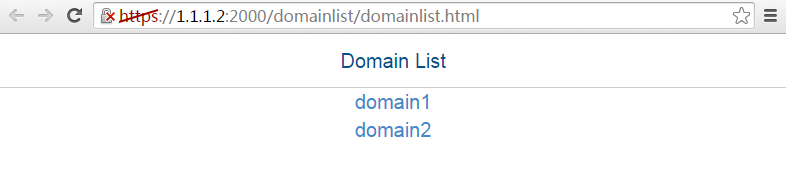
# Select
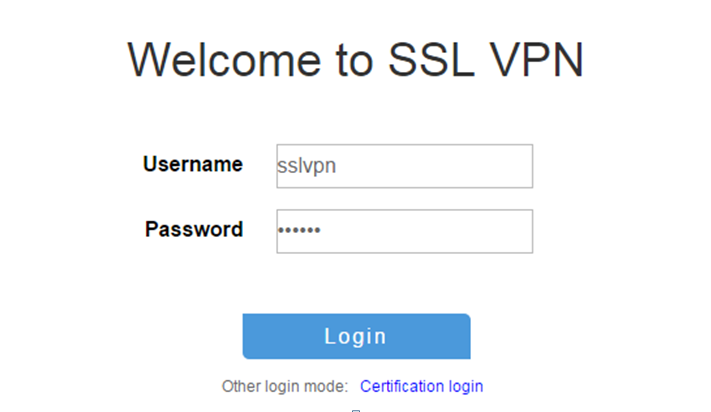
# On the login page, enter username
Figure-3 Login page
# Display SSL VPN session information on the device after the user logged in.
[Device] display sslvpn session context ctx1
SSL VPN context: ctx1
Users: 1
Username Connections Idle time Created User IP
sslvpn 6 0/00:12:05 0/00:04:14 40.1.1.1
# On the SSL VPN gateway home page, click the
Figure-4 SSL VPN gateway home page

# Log out and restart the browser. Enter
# Display SSL VPN session information on the device after the user logged in.
[Device] display sslvpn session context ctx2
SSL VPN context: ctx2
Users: 1
Username Connections Idle time Created User IP
sslvpn 6 0/00:02:05 0/00:01:11 40.1.1.1
# On the SSL VPN gateway home page, click the
Figure-5 SSL VPN gateway home page

Configuration files
#
interface GigabitEthernet1/0/1
ip address 1.1.1.2 255.255.255.0
#
interface 33
ip address 3.3.3.3 255.255.255.0
#
interface GigabitEthernet1/0/3
ip address 2.2.2.2 255.255.255.0
#
security-zone name Trust
import interface 33
import interface GigabitEthernet1/0/3
#
security-zone name Untrust
import interface GigabitEthernet1/0/1
#
ip route-static 20.2.2.0 24 2.2.2.3
ip route-static 30.3.3.0 24 3.3.3.4
ip route-static 40.1.1.0 24 1.1.1.3
#
local-user sslvpn class network
password simple 123456
service-type sslvpn
authorization-attribute user-role network-operator
authorization-attribute sslvpn-policy-group pgroup
#
pki domain sslvpn
public-key rsa general name sslvpn
undo crl check enable
#
pki import domain sslvpn der ca filename ca.cer
pki import domain sslvpn p12 local filename server.pfx
#
ssl server-policy ssl
pki-domain sslvpn
#
sslvpn gateway gw
ip address 1.1.1.2 port 2000
ssl server-policy ssl
service enable
#
sslvpn context ctx1
vpn-instance VPN1
gateway gw domain domain1
url-item urlitem
url http://20.2.2.2
url-list urllist
heading web
resources url-item urlitem
policy-group pgroup
resources url-list urllist
default-policy-group pgroup
service enable
#
sslvpn context ctx2
vpn-instance VPN2
gateway gw domain domain2
url-item urlitem
url https://30.3.3.3
url-list urllist
heading web
resources url-item urlitem
policy-group pgroup
resources url-list urllist
default-policy-group pgroup
service enable
#
security-policy ip
rule 0 name sslvpnlocalout1
action pass
source-zone local
destination-zone untrust
source-ip-host 1.1.1.2
destination-ip-host 40.1.1.1
rule 1 name sslvpnlocalin1
action pass
source-zone untrust
destination-zone local
source-ip-host 40.1.1.1
destination-ip-host 1.1.1.2
rule 2 name sslvpnlocalout2
action pass
source-zone local
destination-zone trust
source-ip-host 2.2.2.2
source-ip-host 3.3.3.3
destination-ip-host 20.2.2.2
destination-ip-host 30.3.3.3
rule 3 name sslvpnlocalin2
action pass
source-zone trust
destination-zone local
source-ip-host 20.2.2.2
source-ip-host 30.3.3.3
destination-ip-host 2.2.2.2
destination-ip-host 3.3.3.3
#