CLI example: Configuring the HA group in dual-active mode in collaboration with a routing protocol (IPv6)
Network configuration
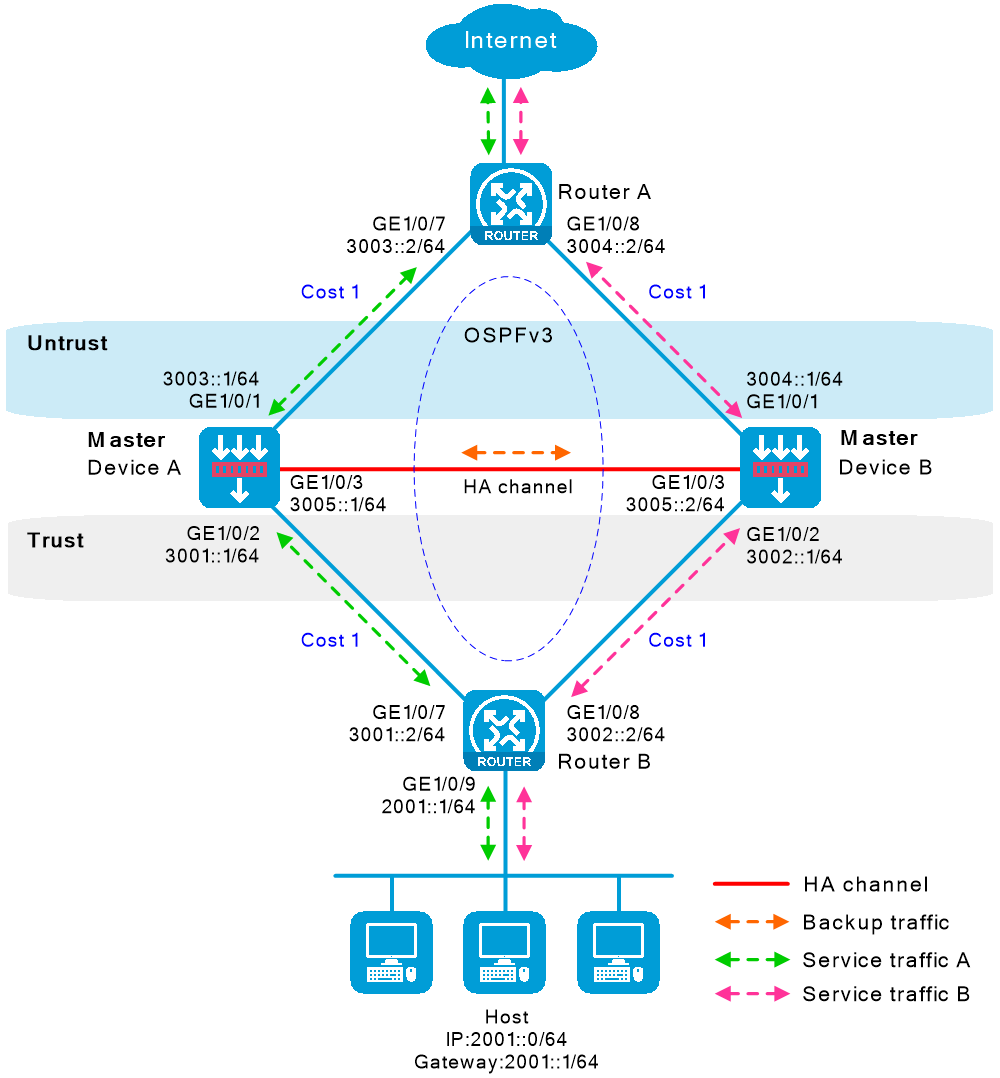
As shown in Figure-1, set up the HA group at the border between the Internet and the internal network of an enterprise to ensure service continuity.
Configure the HA group to collaborate with OSPFv3.
Configure the HA group to operate in dual-active mode.
Configure Device A and Device B to load share traffic.
Software versions used
This configuration example was created and verified on R9900P2705 of the F5000-AI-55-G device.
Restrictions and guidelines
Hardware environment consistency
Before you configure hot backup, verify that the following hardware settings are the same on the devices to be assigned to a hot backup system:
Device model.
Number and type of management interfaces, service interfaces, and interfaces for setting up the hot backup channels. Do not use one interface for multiple purposes.
Location, number, and type of disks. A device not with disks installed has small log storage and do not support some types of logs or reports.
Software environment consistency
Before you configure hot backup, verify that the following software settings are the same on the devices to be assigned to a hot backup system:
Software environment and version, including boot packages, system packages, feature packages, and patches.
Licensed signature libraries and features, such as signature library types, signature library version, validation time, and number of licensed resources.
Interface numbers.
Type, speed, and number of the interfaces for setting up the hot backup channels. As a best practice, use aggregate interfaces.
Aggregate interface numbers and aggregation member port numbers.
Security zone configuration on the interfaces at the same location.
Multi-CPU packet distribution policy (configurable with the
forwarding policy command).
Procedures
Configure Router A
Configure IPv6 addresses for interfaces.
# Assign an IPv6 address to GigabitEthernet 1/0/7.
<RouterA>
system-view [RouterA]
interface gigabitethernet 1/0/7 [RouterA-GigabitEthernet1/0/7]
ipv6 address 3003::2/64 [RouterA-GigabitEthernet1/0/7]
quit # Assign IP addresses to other interfaces in the same way. (Details not shown.)
Specify 3007::15/64 as the next hop of the route to the Internet.
[RouterA]
ipv6 route-static 0::0 64 3007::15 Configure OSPFv3 on the device, and use the default OSPFv3 link cost as a best practice.
[RouterA]
ospfv3 1 [RouterA-ospfv3-1]
router id 1.1.1.1 [RouterA-ospfv3-1]
quit [RouterA]
interface gigabitethernet 1/0/7 [RouterA-GigabitEthernet1/0/7]
ospfv3 1 area 0 [RouterA-GigabitEthernet1/0/7]
quit [RouterA]
interface gigabitethernet 1/0/8 [RouterA-GigabitEthernet1/0/8]
ospfv3 1 area 0 [RouterA-GigabitEthernet1/0/8]
quit Configure per-flow load sharing.
[RouterA]
ip load-sharing mode per-flow global
Configure Router B
Configure IPv6 addresses for interfaces.
# Assign an IPv6 address to GigabitEthernet 1/0/7.
<RouterB>
system-view [RouterB]
interface gigabitethernet 1/0/7 [RouterB-GigabitEthernet1/0/7]
ipv6 address 3001::2/64 [RouterB-GigabitEthernet1/0/7]
quit # Assign IP addresses to other interfaces in the same way. (Details not shown.)
Configure OSPFv3 on the device, and use the default OSPFv3 link cost as a best practice.
[RouterB]
ospfv3 1 [RouterB-ospfv3-1]
router id 4.1.1.1 [RouterB-ospfv3-1]
quit [RouterB]
interface gigabitethernet 1/0/7 [RouterB-GigabitEthernet1/0/7]
ospfv3 1 area 0 [RouterB-GigabitEthernet1/0/7]
quit [RouterB]
interface gigabitethernet 1/0/8 [RouterB-GigabitEthernet1/0/8]
ospfv3 1 area 0 [RouterB-GigabitEthernet1/0/8]
quit [RouterB]
interface gigabitethernet 1/0/9 [RouterB-GigabitEthernet1/0/8]
ospfv3 1 area 0 [RouterB-GigabitEthernet1/0/8]
quit Configure per-flow load sharing.
[RouterB]
ip load-sharing mode per-flow global
Configure Device A
Configure IPv6 addresses for interfaces.
# Assign an IPv6 address to GigabitEthernet 1/0/1.
<DeviceA>
system-view [DeviceA]
interface gigabitethernet 1/0/1[DeviceA-GigabitEthernet1/0/1]
ipv6 address 3003::1/64 [DeviceA-GigabitEthernet1/0/1]
ipv6 address auto link-local [DeviceA-GigabitEthernet1/0/1]
quit # Assign IP addresses to other interfaces in the same way. (Details not shown.)
Add interfaces to security zones.
[DeviceA]
security-zone name untrust [DeviceA-security-zone-Untrust]
import interface gigabitethernet 1/0/1[DeviceA-security-zone-Untrust]
quit [DeviceA]
security-zone name trust [DeviceA-security-zone-Trust]
import interface gigabitethernet 1/0/2[DeviceA-security-zone-Trust]
quit Configure OSPFv3 on the device, and use the default OSPFv3 link cost as a best practice.
[DeviceA]
ospfv3 1 [DeviceA-ospfv3-1]
router-id 2.1.1.1 [DeviceA-ospfv3-1]
quit [DeviceA]
interface gigabitethernet 1/0/1[DeviceA-GigabitEthernet1/0/1]
ospfv3 1 area 0 [DeviceA-GigabitEthernet1/0/1]
quit [DeviceA]
interface gigabitEthernet1/0/2 [DeviceA-33]
ospfv3 1 area 0 [DeviceA-33]
quit Configure a security policy.
Perform this task only on the primary device. After the HA group is set up, the secondary device automatically synchronizes its security policy configuration with the primary device.
# Configure security policy rule named
trust-untrust to permit the packets from 2001::0/64 to the Internet.[DeviceA]
security-policy ipv6 [DeviceA-security-policy-ipv6]
rule name trust-untrust [DeviceA-security-policy-ipv6-0-trust-untrust]
source-zone trust [DeviceA-security-policy-ipv6-0-trust-untrust]
destination-zone untrust [DeviceA-security-policy-ipv6-0-trust-untrust]
source-ip-subnet 2001::0 64 [DeviceA-security-policy-ipv6-0-trust-untrust]
action pass [DeviceA-security-policy-ipv6-0-trust-untrust]
quit # Configure rules to permit OSPFv3 protocol packets.
[DeviceA-security-policy-ipv6]
rule name ospf1 [DeviceA-security-policy-ipv6-1-ospf1]
source-zone trust [DeviceA-security-policy-ipv6-1-ospf1]
destination-zone local [DeviceA-security-policy-ipv6-1-ospf1]
service ospf [DeviceA-security-policy-ipv6-1-ospf1]
action pass [DeviceA-security-policy-ipv6-1-ospf1]
quit [DeviceA-security-policy-ipv6]
rule name ospf2 [DeviceA-security-policy-ipv6-2-ospf2]
source-zone local [DeviceA-security-policy-ipv6-2-ospf2]
destination-zone trust [DeviceA-security-policy-ipv6-2-ospf2]
service ospf [DeviceA-security-policy-ipv6-2-ospf2]
action pass [DeviceA-security-policy-ipv6-2-ospf2]
quit [DeviceA-security-policy-ipv6]
rule name ospf3 [DeviceA-security-policy-ipv6-3-ospf3]
source-zone untrust [DeviceA-security-policy-ipv6-3-ospf3]
destination-zone local [DeviceA-security-policy-ipv6-3-ospf3]
service ospf [DeviceA-security-policy-ipv6-3-ospf3]
action pass [DeviceA-security-policy-ipv6-3-ospf3]
quit [DeviceA-security-policy-ipv6]
rule name ospf4 [DeviceA-security-policy-ipv6-4-ospf4]
source-zone local [DeviceA-security-policy-ipv6-4-ospf4]
destination-zone untrust [DeviceA-security-policy-ipv6-4-ospf4]
service ospf [DeviceA-security-policy-ipv6-4-ospf4]
action pass [DeviceA-security-policy-ipv6-7-ospf4]
quit [DeviceA-security-policy-ipv6]
quit Configure HA group settings.
# Associate track entries with interfaces.
[DeviceA] track 1 interface gigabitethernet 1/0/1
[DeviceA-track-1] quit
[DeviceA] track 2 interface gigabitethernet 1/0/2
[DeviceA-track-2] quit
# Set up an HA group.
[DeviceA] remote-backup group
[DeviceA-remote-backup-group] remote-ipv6 3005::2
[DeviceA-remote-backup-group] local-ipv6 3005::1
[DeviceA-remote-backup-group] data-channel interface gigabitethernet 1/0/3
[DeviceA-remote-backup-group] device-role primary
RBM_P[DeviceA-remote-backup-group] backup-mode dual-active
RBM_P[DeviceA-remote-backup-group] hot-backup enable
RBM_P[DeviceA-remote-backup-group] configuration auto-sync enable
RBM_P[DeviceA-remote-backup-group] configuration sync-check interval 12
RBM_P[DeviceA-remote-backup-group] delay-time 1
# Configure the HA group to change the link costs advertised in OSPFv3 routes to 1.
RBM_P[ DeviceA-remote-backup-group] adjust-cost ospfv3 enable absolute 1# Configure the HA group to monitor the status of track entry 1 and track entry 2.
RBM_P[DeviceA-remote-backup-group] track 1
RBM_P[DeviceA-remote-backup-group] track 2
RBM_P[DeviceA-remote-backup-group] quit
Configure security services on Device A. (Details not shown.)
Configure Device B
Assign IP addresses to interfaces.
<DeviceB> system-view
[DeviceB] interface gigabitethernet 1/0/1
[DeviceB-GigabitEthernet1/0/1] ipv6 address 3004::1/64
[DeviceB-GigabitEthernet1/0/1] ipv6 address auto link-local
[DeviceB-GigabitEthernet1/0/1] quit
# Assign IP addresses to other interfaces in the same way. (Details not shown.)
Add interfaces to security zones.
[DeviceB] security-zone name untrust
[DeviceB-security-zone-Untrust] import interface gigabitethernet 1/0/1
[DeviceB-security-zone-Untrust] quit
[DeviceB] security-zone name trust
[DeviceB-security-zone-Trust] import interface gigabitethernet 1/0/2
[DeviceB-security-zone-Trust] quit
Configure OSPFv3. Use the default OSPFv3 link cost configuration.
[DeviceB] ospfv3 1
[DeviceB-ospfv3-1] router-id 3.1.1.1
[DeviceB-ospfv3-1] quit
[DeviceB] interface gigabitethernet 1/0/1
[DeviceB-GigabitEthernet1/0/1] ospfv3 1 area 0
[DeviceB-GigabitEthernet1/0/1] quit
[DeviceB] interface 33
[DeviceB-33] ospfv3 1 area 0
[DeviceB-33] quit
Configure HA group settings.
# Associate track entries with interfaces.
[DeviceB] track 1 interface gigabitethernet 1/0/1
[DeviceB-track-1] quit
[DeviceB] track 2 interface gigabitethernet 1/0/2
[DeviceB-track-2] quit
# Set up an HA group.
[DeviceB] remote-backup group
[DeviceB-remote-backup-group] remote-ipv6 3005::1
[DeviceB-remote-backup-group] local-ipv6 3005::2
[DeviceB-remote-backup-group] data-channel interface gigabitethernet 1/0/3
[DeviceB-remote-backup-group] device-role secondary
RBM_S[DeviceB-remote-backup-group] backup-mode dual-active
RBM_S[DeviceB-remote-backup-group] hot-backup enable
RBM_S[DeviceB-remote-backup-group] configuration auto-sync enable
RBM_S[DeviceB-remote-backup-group] configuration sync-check interval 12
RBM_S[DeviceB-remote-backup-group] delay-time 1
# Configure the HA group to change the link costs advertised in OSPFv3 routes to 1.
RBM_S[ DeviceB-remote-backup-group] adjust-cost ospfv3 enable absolute 1# Configure the HA group to monitor the status of track entry 1 and track entry 2.
RBM_S[DeviceB-remote-backup-group] track 1
RBM_S[DeviceB-remote-backup-group] track 2
RBM_S[DeviceB-remote-backup-group] quit
Configure the hosts
# On the hosts, specify 2001::1 as the default gateway. (Details not shown.)
Verifying the configuration
Device A
# Verify that the HA channels have been set up.
RBM_P[DeviceA] display remote-backup-group status
Remote backup group information:
Data channel interface: GigabitEthernet1/0/3
Local IPv6: 3005::1
Remote IPv6: 3005::2 Destination port: 60064
Keepalive interval: 1s
Keepalive count: 10
Configuration consistency check interval: 12 hour
Configuration consistency check result: Not Performed
Configuration backup status: Auto sync enabled
Session backup status: Hot backup enabled
Delay-time: 1 min
Uptime since last switchover: 0 days, 3 hours, 11 minutes
Switchover records:
Time Status change Cause
2021-06-22 13:33:33 Initial to Active Local device rebooted
# Verify that the OSPFv3 routes advertised by Device A and Device B include the same link cost.
RBM_P[DeviceA] display ospfv3 interface
OSPFv3 Process 1 with Router ID 2.1.1.1
Area: 0.0.0.0
-------------------------------------------------------------------------
ID State Cost Pri DR BDR Ins Name
2 DR
3 BDR
Device B
# Verify that the HA channels have been set up.
RBM_S[DeviceB] display remote-backup-group status
Remote backup group information:
Data channel interface: GigabitEthernet1/0/3
Local IPv6: 3005::2
Remote IPv6: 3005::1 Destination port: 60064
Keepalive interval: 1s
Keepalive count: 10
Configuration consistency check interval: 12 hour
Configuration consistency check result: Not Performed
Configuration backup status: Auto sync enabled
Session backup status: Hot backup enabled
Delay-time: 1 min
Uptime since last switchover: 0 days, 3 hours, 11 minutes
Switchover records:
Time Status change Cause
2021-06-22 13:33:33 Initial to Active Local device rebooted
# Verify that the OSPFv3 routes advertised by Device A and Device B include the same link cost.
RBM_S[DeviceB] display ospfv3 interface
OSPFv3 Process 1 with Router ID 3.1.1.1
Area: 0.0.0.0
-------------------------------------------------------------------------
ID State Cost Pri DR BDR Ins Name
2 DR
3 BDR
Configuration files
Router A:
#
ospfv3 1
router-id 1.1.1.1
area 0.0.0.0
#
ip load-sharing mode per-flow global
#
interface GigabitEthernet1/0/7
port link-mode route
ospfv3 1 area 0.0.0.0
ipv6 address 3003::2/64
#
interface GigabitEthernet1/0/8
port link-mode route
ospfv3 1 area 0.0.0.0
ipv6 address 3004::2/64
#
interface GigabitEthernet1/0/9
port link-mode route
ipv6 address 3007::14/64
#
ipv6 route-static :: 64 3007::15
Router B:
#
ospfv3 1
router-id 4.1.1.1
area 0.0.0.0
#
ip load-sharing mode per-flow global
#
interface GigabitEthernet1/0/7
port link-mode route
ospfv3 1 area 0.0.0.0
ipv6 address 3001::2/64
#
interface GigabitEthernet1/0/8
port link-mode route
ospfv3 1 area 0.0.0.0
ipv6 address 3002::2/64
#
interface GigabitEthernet1/0/9
port link-mode route
ospfv3 1 area 0.0.0.0
ipv6 address 2001::1/64
Device A:
#
track 1 interface GigabitEthernet1/0/1
#
track 2 interface 33
#
ospfv3 1
router-id 2.1.1.1
area 0.0.0.0
#
interface GigabitEthernet1/0/1
port link-mode route
ospfv3 1 area 0.0.0.0
ipv6 address 3003::1/64
ipv6 address auto link-local
#
interface 33
port link-mode route
ospfv3 1 area 0.0.0.0
ipv6 address 3001::1/64
ipv6 address auto link-local
#
interface GigabitEthernet1/0/3
port link-mode route
ipv6 address 3005::1/64
ipv6 address auto link-local
#
security-zone name Trust
import interface 33
#
security-zone name Untrust
import interface GigabitEthernet1/0/1
#
security-policy ipv6
rule 0 name trust-untrust
action pass
source-zone trust
destination-zone untrust
source-ip-subnet 2001::/64
rule 1 name ospf1
action pass
source-zone trust
destination-zone local
service ospf
rule 2 name ospf2
action pass
source-zone local
destination-zone trust
service ospf
rule 3 name ospf3
action pass
source-zone untrust
destination-zone local
service ospf
rule 4 name ospf4
action pass
source-zone local
destination-zone untrust
service ospf
#
remote-backup group
backup-mode dual-active
data-channel interface GigabitEthernet1/0/3
configuration sync-check interval 12
delay-time 1
adjust-cost ospfv3 enable absolute 6000
track 1
track 2
local-ipv6 3005::1
remote-ipv6 3005::2
device-role primary
Device B:
#
track 1 interface GigabitEthernet1/0/1
#
track 2 interface 33
#
ospfv3 1
router-id 3.1.1.1
area 0.0.0.0
#
interface GigabitEthernet1/0/1
port link-mode route
ospfv3 1 area 0.0.0.0
ipv6 address 3004::1/64
#
interface 33
port link-mode route
ospfv3 1 area 0.0.0.0
ipv6 address 3002::1/64
ipv6 address auto link-local
#
interface GigabitEthernet1/0/3
port link-mode route
ipv6 address 3005::2/64
ipv6 address auto link-local
#
security-zone name Trust
import interface 33
#
security-zone name Untrust
import interface GigabitEthernet1/0/1
#
remote-backup group
backup-mode dual-active
data-channel interface GigabitEthernet1/0/3
configuration sync-check interval 12
delay-time 1
adjust-cost ospfv3 enable absolute 6000
track 1
track 2
local-ipv6 3005::2
remote-ipv6 3005::1
device-role secondary