CLI example: Configuring static port block mapping NAT444
Network configuration
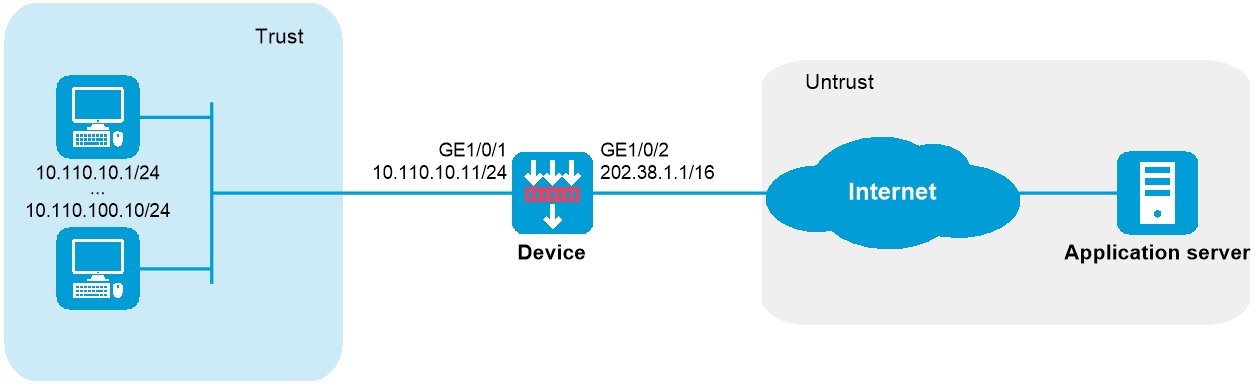
As shown in Figure-1, configure static NAT444 to allow users at private IP addresses 10.110.10.1 to 10.110.10.10 to use public IP address 202.38.1.100 for accessing the Internet. Configure the port range as 10001 to 15000, and set the port block size to 500.
Software versions used
This configuration example was created and verified on R9900P2705 of the F5000-AI-55-G device.
Procedures
# Assign IP addresses to interfaces and configure routes, security zones, zone pairs, and interzone policies. Make sure the network connections are available. (Details not shown.)
# Create NAT port block group 1.
<Device> system-view
[Device] nat port-block-group 1
# Add the private IP addresses from 10.110.10.1 to 10.110.10.10 to the port block group.
[Device-port-block-group-1] local-ip-address 10.110.10.1 10.110.10.10
# Add the public IP address 202.38.1.100 to the port block group.
[Device-port-block-group-1] global-ip-pool 202.38.1.100 202.38.1.100
# Set the port block size to 500.
[Device-port-block-group-1] block-size 500
# Configure the port range as 10001 to 15000.
[Device-port-block-group-1] port-range 10001 15000
[Device-port-block-group-1] quit
# Configure a static outbound port block mapping on GigabitEthernet 1/0/2.
[Device] interface gigabitethernet 1/0/2
[Device-GigabitEthernet1/0/2] nat outbound port-block-group 1
[Device-GigabitEthernet1/0/2] quit
Verifying the configuration
# Verify that users at the private IP addresses can access the Internet. (Details not shown.)
# Display all NAT configuration and statistics.
[Device] display nat all
NAT logging:
Log enable : Disabled
Flow-begin : Disabled
Flow-end : Disabled
Flow-active : Disabled
Port-block-assign : Disabled
Port-block-withdraw : Disabled
Alarm : Disabled
NO-PAT IP usage : Disabled
NAT mapping behavior:
Mapping mode : Address and Port-Dependent
ACL : ---
Config status: Active
NAT ALG:
DNS : Enabled
FTP : Enabled
H323 : Disabled
ICMP-ERROR : Enabled
ILS : Disabled
MGCP : Disabled
NBT : Disabled
PPTP : Enabled
RTSP : Enabled
RSH : Disabled
SCCP : Disabled
SCTP : Disabled
SIP : Disabled
SQLNET : Disabled
TFTP : Disabled
XDMCP : Disabled
Static NAT load balancing: Disabled
NAT configuration-for-new-connection: Disabled
# Display static NAT444 mappings.
[Device] display nat port-block static
Slot 1:
Local VPN Local IP Global IP Port block Connections
--- 10.110.10.7 202.38.1.100 13001-13500 1
--- 10.110.10.5 202.38.1.100 12001-12500 1
--- 10.110.10.9 202.38.1.100 14001-14500 1
--- 10.110.10.3 202.38.1.100 11001-11500 1
--- 10.110.10.2 202.38.1.100 10501-11000 1
--- 10.110.10.4 202.38.1.100 11501-12000 1
--- 10.110.10.6 202.38.1.100 12501-13000 1
--- 10.110.10.1 202.38.1.100 10001-10500 1
--- 10.110.10.10 202.38.1.100 14501-15000 1
--- 10.110.10.8 202.38.1.100 13501-14000 1
Total mappings found: 10
Configuration files
#
interface GigabitEthernet1/0/1
ip address 10.110.10.11 255.255.255.0
#
interface GigabitEthernet1/0/2
ip address 202.38.1.1 255.255.0.0
nat outbound port-block-group 1
#
security-zone name Trust
import interface GigabitEthernet1/0/1
#
security-zone name Untrust
import interface GigabitEthernet1/0/2
#
nat port-block-group 1
local-ip-address 10.110.10.1 10.110.10.10
global-ip-pool 202.38.1.100 202.38.1.100
block-size 500
port-range 10001 15000
#
security-policy ip
rule 0 name trust-untrust
action pass
source-zone trust
destination-zone untrust
rule 1 name untrust-trust
action pass
source-zone untrust
destination-zone trust
#