NetShare control
This help contains the following topics:
Introduction
NetShare control allows you to identify and control network sharing behaviors.
Basic concepts
Max terminals per IP
This item specifies the maximum number of terminals that can share an IP address.
NetShare control determines the action for a packet based on the number of terminals sharing the source IP address of the packet:
If the number of terminals sharing the IP address exceeds the limit, the action specified in the NetShare policy is taken.
If the number of terminals sharing the IP address is below the limit, the packet is permitted to pass through.
Freeze and unfreeze
When an IP address is frozen, all packets sourced from the IP address will be dropped.
The device automatically freezes an IP address for the freezing time when the following conditions are met:
The number of terminals sharing the IP address exceeds the limit of
Max terminals per IP .The
Freeze action is configured for IP addresses shared by terminals exceeding the limit ofMax terminals per IP .
You can also manually freeze and unfreeze an IP address on the
NetShare list
The NetShare list lists all IP addresses that are detected to be shared by terminals and their related information, including:
Position.
User name.
VRF.
Number of terminals sharing the IP address.
NetShare policy name.
Whether the IP address is frozen and if yes, the remaining time before expiration of the freezing time.
You can access the NetShare list by selecting
NetShare detection methods
The following methods are available for detecting networking sharing behaviors of terminals:
APR-based detection —The device extracts the application information in packets based on Application Recognition (APR) to detect NetShare behaviors.IPID trail tracking —The device tracks the values of the IPID fields in packets to detect NetShare behaviors.Packets sent by the same host contain incremented IPID values of a unique sequential pattern that starts at a random number. NetShare control tracks the IPID values of packets sourced from the same IP address. If the IPID values in the packets within a time period belong to the same unique sequential pattern, only one terminal is using the IP address. If the IPID values belong to different sequential patterns, the source IP address is shared by multiple terminals.
NetShare control mechanism
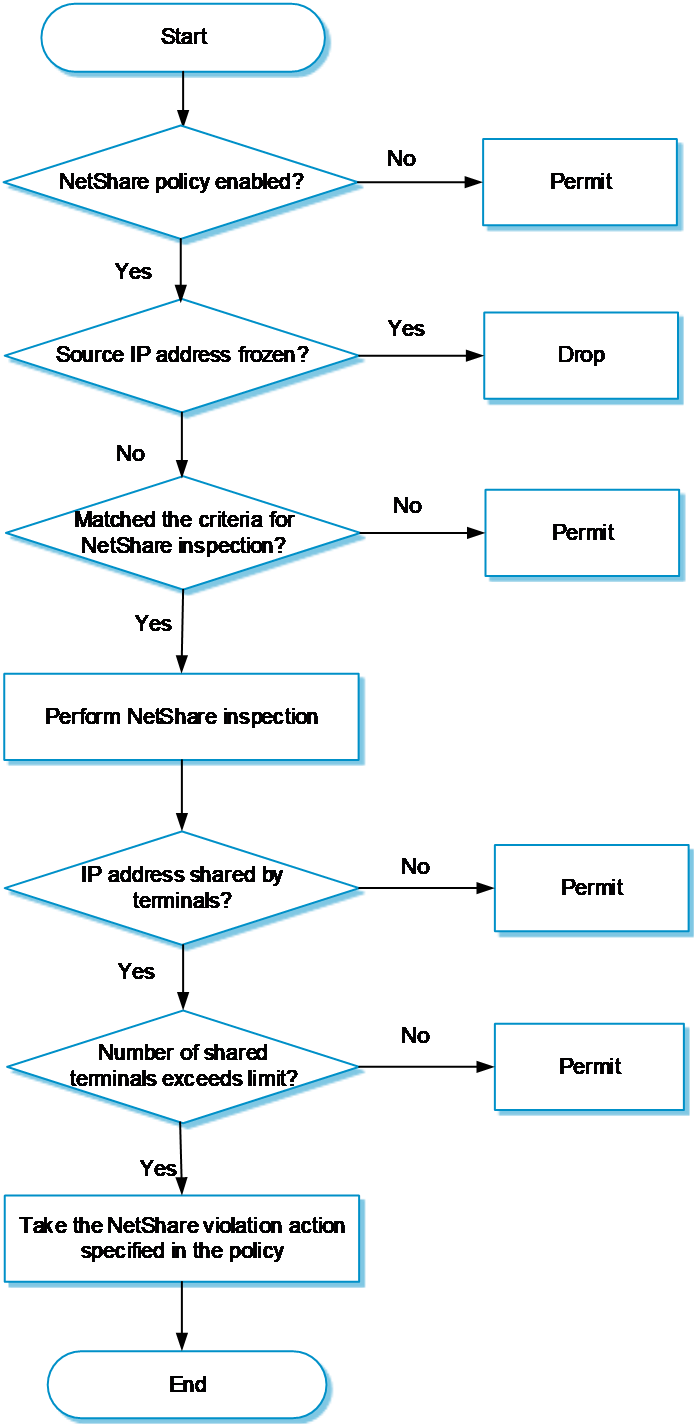
As shown in Figure-1, the NetShare control module processes a packet as follows:
Determines if the NetShare policy is enabled.
If the policy is disabled, NetShare control permits the packet to pass through.
If the policy is enabled, NetShare control proceeds to step 2.
Determines if the source IP address of the packet is frozen,
If yes, NetShare control drops the packet.
If not, NetShare control proceeds to step 3.
Compares the packet with the filters in the NetShare policy to determine if the packet matches the policy.
If the packet does not match the policy, NetShare control permits the packet to pass through.
If the packet matches the policy, NetShare control proceeds to step 4.
Determines if the source IP address of the packet is shared by multiple terminals:
If not, NetShare control permits the packet to pass through.
If yes, NetShare control further determines whether the number of terminals sharing the IP address exceeds the limit of
Max terminals per IP :If the limit is exceeded, NetShare control takes the action specified in the NetShare policy.
If the limit is not exceeded, NetShare control permits the packet to pass through.
Figure-1 NetShare control mechanism
vSystem support information
Support of non-default vSystems for this feature depends on the device model. This feature is available on the Web interface only if it is supported.
Restrictions and guidelines
After you create, edit, or delete the NetShare policy, click
Submit to commit the configuration. This operation will interrupt DPI services and DPI-based services. For example, a security policy cannot control access to applications.After you submit the configuration, the system prompts
Configuration succeeded . However, the configuration might not have been activated completely. The device cannot recognize packets as expected before the activation completes.NetShare control applies only to traffic permitted by security policies. For more information about security policies, see security policy help.
Before using this feature, upgrade the APR signature library to the latest version.
The device supports only one NetShare control policy, which must be manually created.
When you use the APR-based detection to detect NetShare behaviors, follow these rules:
This detection method only inspects specific applications, such as QQ and WeChat.
If an application is encrypted, this detection method cannot inspect it.
When you use the IPID trail tracking to detect NetShare behaviors, follow these rules:
This feature supports detecting the terminals that are running the Windows system, and detecting packets in which values of the IPID fields change regularly. Mobile terminals are not supported.
This detection method supports inspecting IPv4 packets.
Configure NetShare control
Analysis
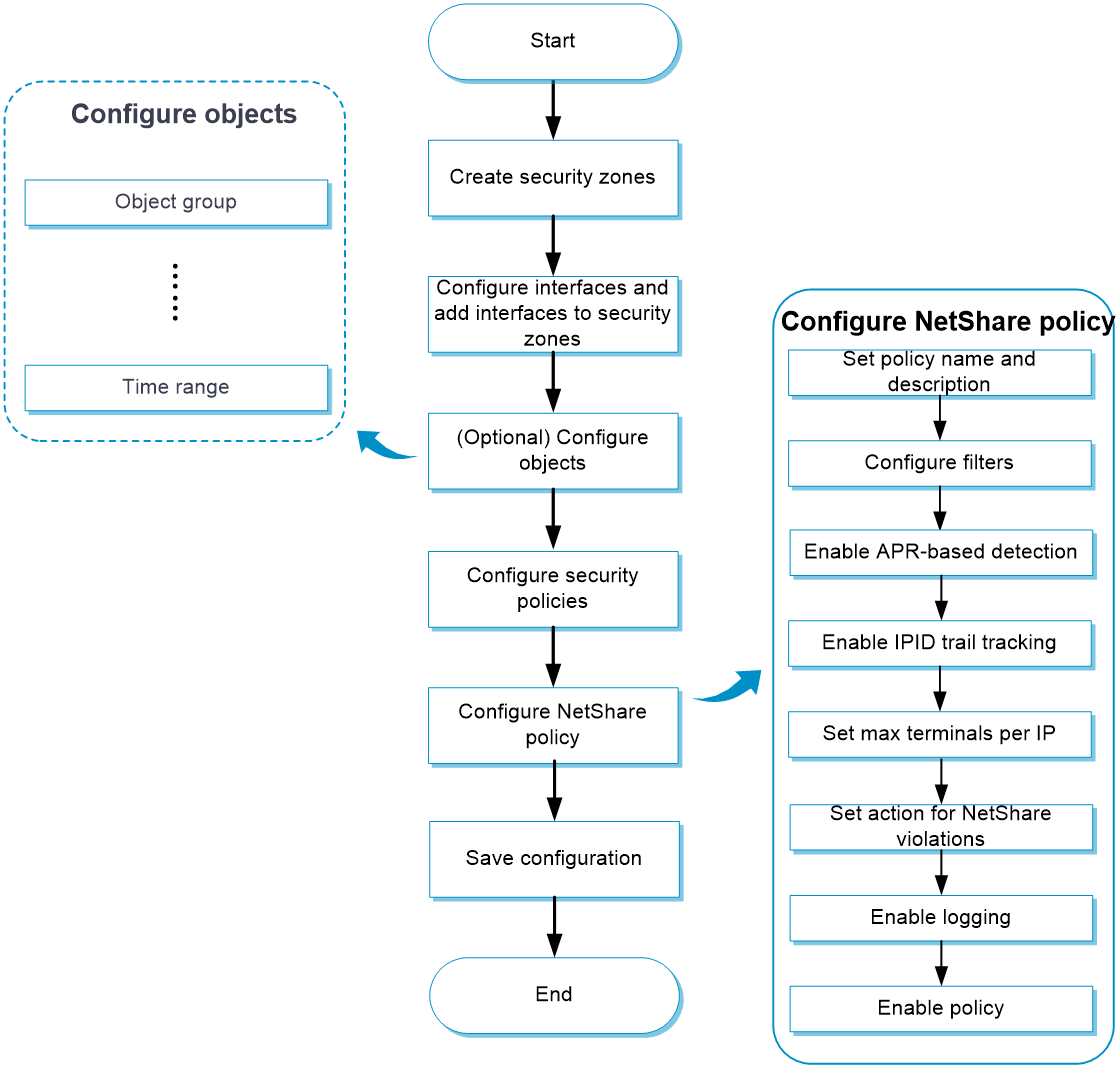
Configure NetShare control as shown in Figure-2.
Figure-2 NetShare control configuration procedure
Prerequisites
Complete the following tasks before you configure this feature:
Assign IP addresses to interfaces on the
Network >Interface Configuration >Interfaces page.Configure routes on the
Network >Routing page. Make sure the routes are available.Create security zones on the
Network >Security Zones page.Add interfaces to security zones. You can add interfaces to a security zone on the
Security Zones page or select a security zone for an interface on theInterfaces page.Configure security policies to permit the target traffic on the
Policies >Security Policies page.
Configure a NetShare policy
Procedure
Click the
Policies tab.In the navigation pane, select
NetShare Control >NetShare Policy .Click
Create to create a NetShare policy.Figure-3 Creating a NetShare policy

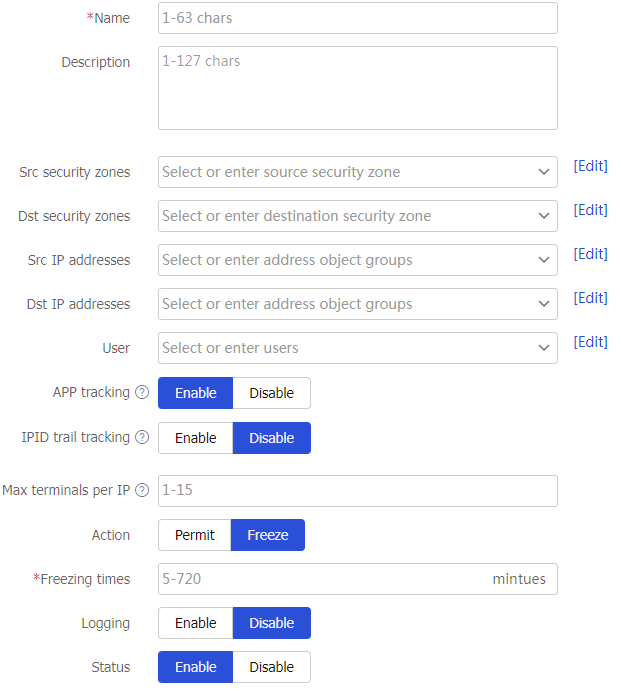
Table-1 NetShare policy configuration items
Item
Description
Name
Enter a name for the NetShare policy.
Description
Enter a description for the NetShare policy.
Src security zones
Specify the source security zones to which the policy applies.
Dst security zones
Specify the destination security zones to which the policy applies.
Src IP addresses
Specify the source IP addresses to which the policy applies.
Dst IP addresses
Specify the destination IP addresses to which the policy applies.
User
Specify the users to whom the policy applies.
APR-based detection
Select whether to enable APR-based detection. This feature detects NetShare behaviors based on APR, such as QQ, WeChat, 58.com, and Meituan. For more information, see "
APR ."IPID trail tracking
Select whether to enable IPID trail tracking. This feature tracks the values of the IPID fields in packets to detect NetShare behaviors.
Max terminals per IP
Enter the maximum number of terminals that can share the same IP address.
Action
Select the action to take when the number of terminals sharing an IP address exceeds the limit.
Options are:
Permit —Permits the packet to pass through.Freeze —Freezes the IP address so all packets sourced from the IP address will be dropped.
Freezing time
This item is required only when the
Freeze action is selected.Enter the number of minutes an IP address will be frozen.
Logging
Select whether to enable NetShare control logging.
When an IP address is detected to be shared by an excessive number of terminals (exceeding the limit of
Max terminals per IP ), the device generates a log message to record the IP address and the NetShare policy information.Status
Enable or disable the NetShare policy. The policy takes effect only after you enable it.
Click
OK .Figure-4 Created NetShare policy

Click
Submit