Track
This help contains the following topics:
Introduction
The Track module works between application modules and detection modules. It shields the differences between various detection modules from application modules.
Collaboration mechanism
The Track module collaborates with detection modules and application modules.
As shown in Figure-1, collaboration is enabled when you associate the Track module with a detection module and an application module, and it operates as follows:
The detection module probes specific objects such as interface status, link status, network reachability, and network performance, and informs the Track module of detection results.
The Track module sends the detection results to the application module.
When notified of changes for the tracked object, the application modules can react to avoid communication interruption and network performance degradation.
Figure-1 Collaboration through the Track module
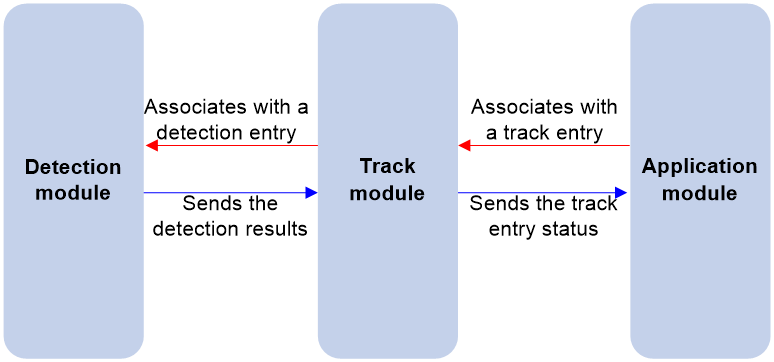
Collaboration between the Track module and a detection module
The detection module sends the detection result of the tracked object to the Track module. The Track module changes the status of the track entry as follows:
If the tracked object operates correctly, the state of the track entry is Positive. For example, the track entry state is Positive in one of the following conditions:
The target interface is up.
The target network is reachable.
If the tracked object does not operate correctly, the state of the track entry is Negative. For example, the track entry state is Negative in one of the following conditions:
The target interface is down.
The target network is unreachable.
If the detection result is invalid, the state of the track entry is NotReady. For example, the track entry state is NotReady if its associated NQA operation does not exist.
You can also associate a track entry with a list of objects called a track list. The state of a track list is determined by the states of all objects in the list. The following types of track lists are supported:
Boolean AND list—The state of a Boolean AND list is determined by the states of the tracked objects using the Boolean AND operation.
Boolean OR list—The state of a Boolean OR list is determined by the states of the tracked objects using the Boolean OR operation.
Percentage threshold list—The state of a percentage threshold list is determined by comparing the percentage of Positive and Negative objects in the list with the percentage thresholds configured for the list.
Weight threshold list—The state of a weight threshold list is determined by comparing the weight of Positive and Negative objects in the list with the weight thresholds configured for the list.
Collaboration between the Track module and an application module
The track module reports the track entry status changes to the application module. The application module can then take correct actions to avoid communication interruption and network performance degradation
vSystem support information
Support of non-default vSystems for this feature depends on the device model. This feature is available on the Web interface only if it is supported.
Restrictions and guidelines
When configuring Track-BFD association, do not use the virtual IP address of the VRRP group as the local or remote IP address of the BFD session.
Configure Track
Select System > High Availability > Track.
Click Add.
Create a track entry.
Table-1 Basic Track configuration items
Item
Description
Track entry
Enter the track entry ID that uniquely identifies a track entry.
Detection module
Select a detection module to be associated with Track. The system supports associating Track with the following detection modules:
BFD. For more information, see Table-2.
NQA. For more information, see Table-3.
Interface. For more information, see Table-4.
Routing. For more information, see Table-5.
Boolean AND list. For more information, see Table 6.
Boolean OR list. For more information, see Table 7.
Percentage threshold list. For more information, see Table 8.
Weight threshold list. For more information, see Table 9.
Type
Select IPv4 or IPv6 to monitor.
Positive notification delay
Specify the delay for notifying the application module that the track entry state has changed to Positive.
If the Track module immediately notifies the application module of a track entry state change but the route convergence is not complete, a communication failure might occur. In such cases, you can set a notification delay to avoid immediate notification of track entry state changes.
The notification delay settings do not take effect if the track entry is not associated with an application module.
Negative notification delay
Specify the delay for notifying the application module that the track entry state has changed to Negative.
If the Track module immediately notifies the application module of a track entry state change but the route convergence is not complete, a communication failure might occur. In such cases, you can set a notification delay to avoid immediate notification of track entry state changes.
The notification delay settings do not take effect if the track entry is not associated with an application module.
Table-2 Track-BFD association configuration items
Item
Description
BFD packet output interface
Select an interface to send BFD echo packets. Track can be associated with only echo-mode BFD sessions.
Local IP
Enter the local IP address of the BFD session.
Remote IP
Enter the remote IP address of the BFD session.
Table-3 Track-NQA association configuration items
Item
Description
NQA operation administrator
Enter the name of the NQA operation administrator who creates the NQA operation.
Operation tag
Enter the NQA operation tag.
Sequence number
Enter the ID of the reaction entry to be associated with the track entry.
Table-4 Track-interface association configuration items
Item
Description
Monitored interface
Select an interface to be associated with Track.
Monitored interface attribute
Select an interface attribute, which can be physical state, data link layer state, IPv4, or IPv6.
Table-5 Track-route association configuration items
Item
Description
VPN instance
Select the VPN instance for the route to be associated with Track.
IP
Enter the IP address of the route entry, in dotted decimal notation.
Mask length
Enter the mask length of the IP address.
Table-6 Track-Boolean AND list association configuration items
Item
Description
Track list type
Select Boolean AND list for Track list type.
A Boolean AND list is set to the Positive state only when all objects are in Positive state. If one or more objects are in Negative state, the track list is set to the Negative state.
Add track entry
Add a track entry as an object for the track list.
Negate track entry state
Turn on the option to negate the state of the track entry.
Table-7 Track-Boolean OR list association configuration items
Item
Description
Track list type
Select Boolean OR list for Track list type.
A Boolean OR list is set to the Positive state if any object is in Positive state. If all objects are in Negative state, the tracked list is set to the Negative state.
Add track entry
Add a track entry as an object for the track list.
Negate track entry state
Turn on the option to negate the state of the track entry.
Table-8 Track-percentage threshold list association configuration items
Item
Description
Track list type
Select Percentage threshold list for Track list type.
If the percentage of Positive objects is equal to or above the positive state threshold, the list is set to the Positive state.
If the percentage of Positive objects is equal to or below the negative state threshold, the list is set to the Negative state.
The state of a percentage threshold list remains unchanged if the percentage of Positive objects is below the positive state threshold and above the negative state threshold.
Add track entry
Add a track entry as an object for the track list.
Positive state threshold
Set the positive state threshold (in percentage) used to determine the positive state of the percentage threshold list.
Negative state threshold
Set the negative state threshold (in percentage) used to determine the negative state of the percentage threshold list.
Table-9 Track-weight threshold list association configuration items
Item
Description
Track list type
Select Weight threshold list for Track list type.
If the total weight of Positive objects is equal to or above the positive state threshold, the list is set to the Positive state.
If the total weight of Positive objects is equal to or below the negative state threshold, the list is set to the Negative state.
The state of a weight threshold list remains unchanged if the total weight of Positive objects is below the positive state threshold and above the negative state threshold.
Add track entry
Add a track entry as an object for the track list.
Positive state threshold
Set the positive state threshold used to determine the positive state of the weight threshold list.
Negative state threshold
Set the negative state threshold used to determine the negative state of the weight threshold list.