IoT device security management
This help contains the following topics:
Introduction
The Internet of Things (IoT) is one of the most important technologies in the era of digital transformation, and is intended to connect everything to the Internet. Compared with the traditional Internet, IoT connects a huge number of devices with various types and application scenarios, many of which are located in remote areas and are unattended. This exposes the devices to increased dangers and vulnerabilities. For example, many cameras in video security systems are installed in remote corners to monitor the surrounding environment.
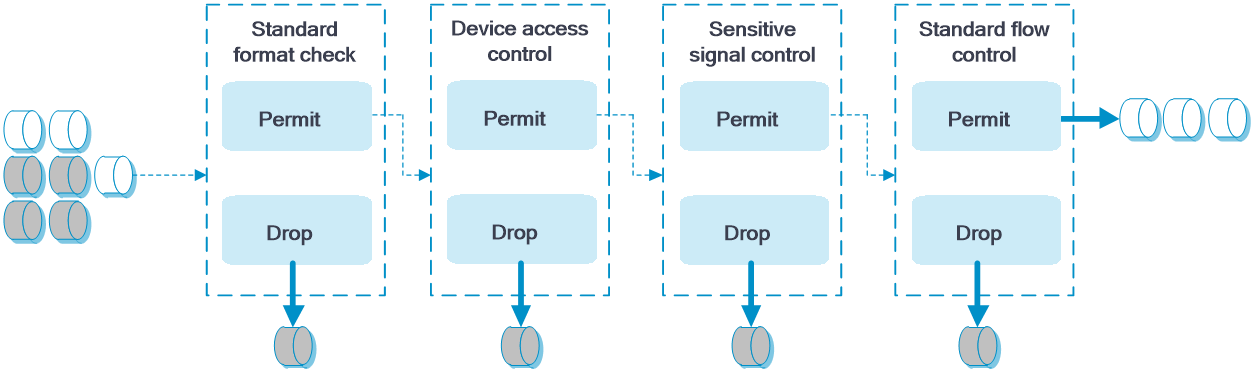
IoT device security management is a technology implementing intelligent detection and security management on IoT devices. The main features include standard format check, device access control, sensitive signal control, and standard flow control.
If a device is configured with more than one of the above features, the device processes a packet in the sequence of standard format check, device access control, sensitive signal control, and standard flow control.
Figure-1 Packet processing procedure
Standard format check
This feature checks IoT device traffic based on different IoT device standards to avoid non-standard devices from accessing IoT networks.
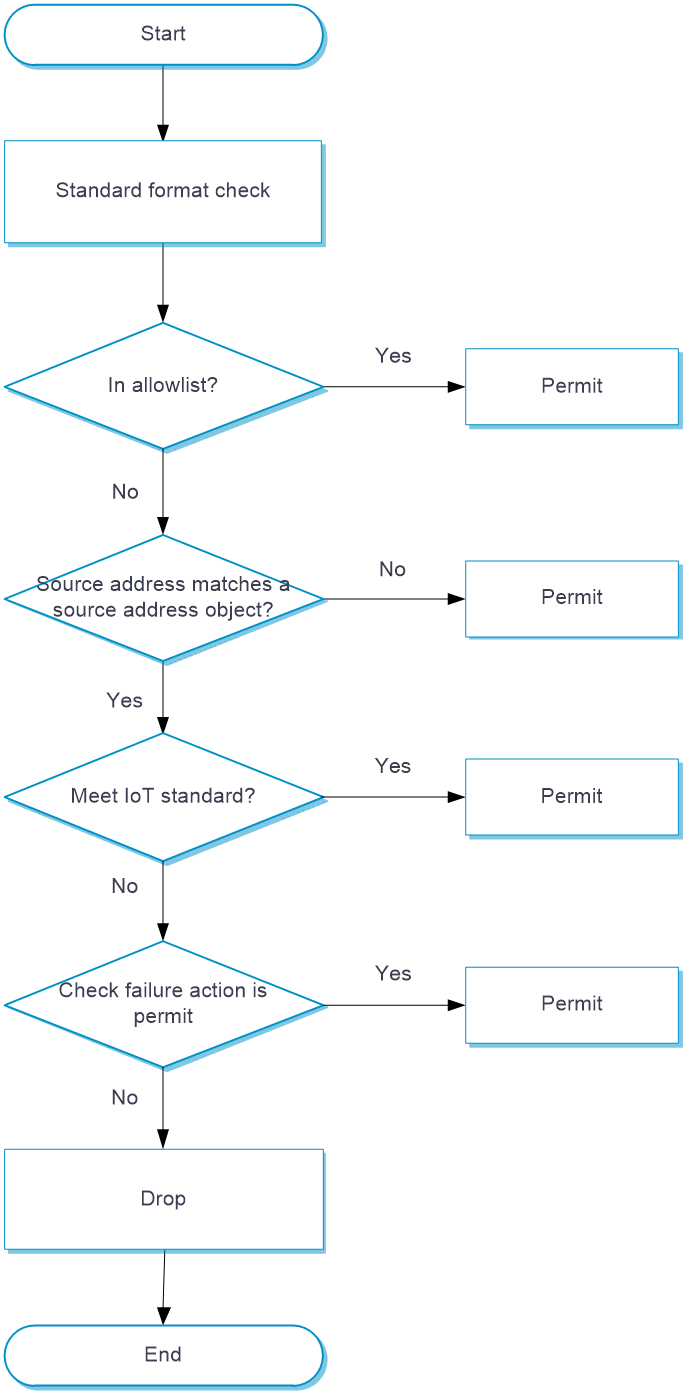
Upon receiving an IoT packet, the device configured with standard format check operates as follows:
Verify whether the packet source address is in the allowlist.
If the address is in the allowlist, the device allows the packets to pass.
If the address is not in the allowlist, the device proceeds to the next step.
Compare the packet source addresses against addresses in the source address object groups to determine whether format check is required.
If format check is not required, the device allows the packet to pass.
If format check is required, the device proceeds to the next step.
You can configure an IPv4 source address object group, an IPv6 source address object group, and a MAC address object group to filter packets. A match is found if the packet matches any object group.
Check the administrative area, device ID, IoT device type, and interface method to identify whether the packet match the corresponding IoT standard.
If all the packet attributes match the standard requirements, the device allows the packets to pass.
If a packet attribute does not meet the standard requirement, the device allows the packets to pass or drops the packets as configured.
Figure-2 Standard format check processing
Device access control
This feature examines IoT device traffic based on different IoT device standards and the device information configured by the administrators to allow only traffic from permitted IoT devices to pass. This can avoid devices from being tampered.
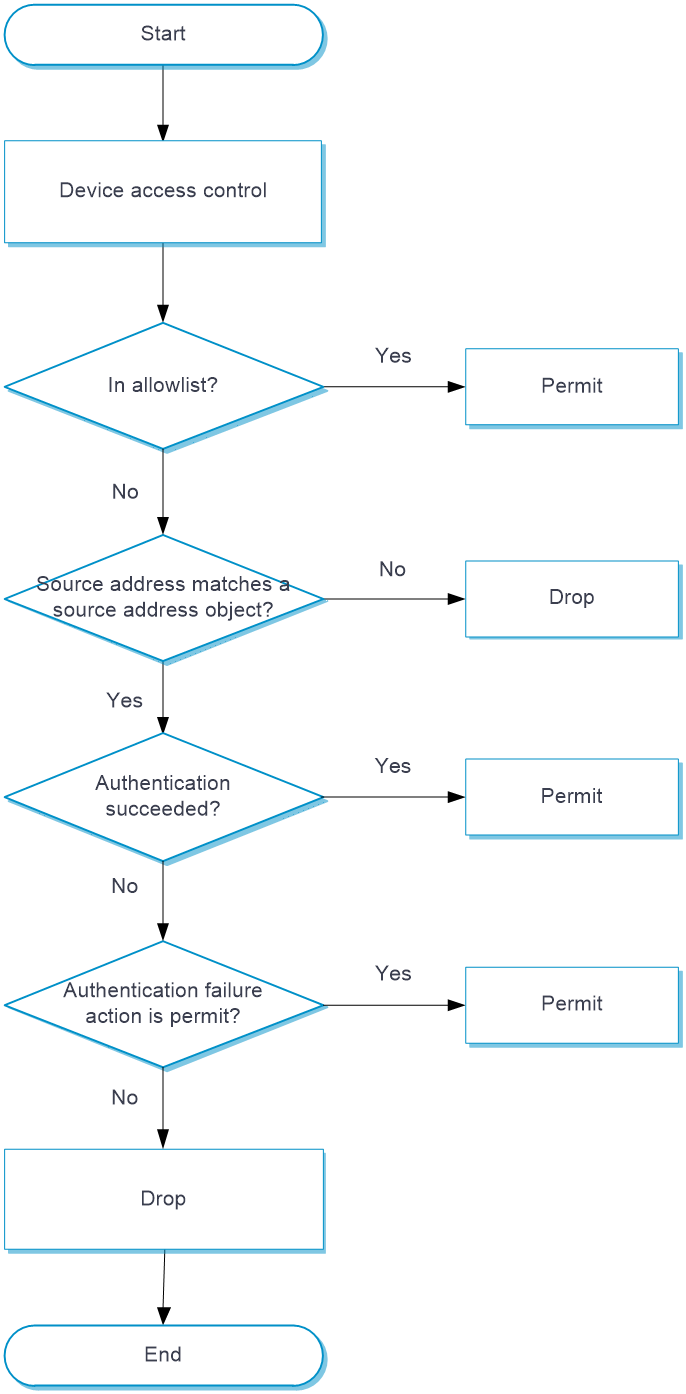
Upon receiving an IoT packet, the device configured with device access control operates as follows:
Verify whether the packet source address is in the allowlist.
If the address is in the allowlist, the device allows the packets to pass.
If the address is not in the allowlist, the device proceeds to the next step.
Compare the packet source addresses against addresses in the source address object groups to determine whether access control is required.
If access control is not required, the device allows the packet to pass.
If access control is required, the device proceeds to the next step.
You can configure an IPv4 source address object group, an IPv6 source address object group, and a MAC address object group to filter packets. A match is found if the packet matches any object group.
Check whether the packets can be forwarded by checking the authentication information such as the IP address, MAC address, device ID, and standard.
If packet authentication information meets all requirements, the device allows packets to pass directly.
If packet authentication information fails to meet the requirements, the device allows the packets to pass or drops the packets as configured.
Figure-3 Device access control processing
Sensitive signal control
This feature filters traffic by sensitive signals based on different IoT device standards to control sensitive user behaviors, such as querying, access, and control, to avoid data breaches and date tampering.
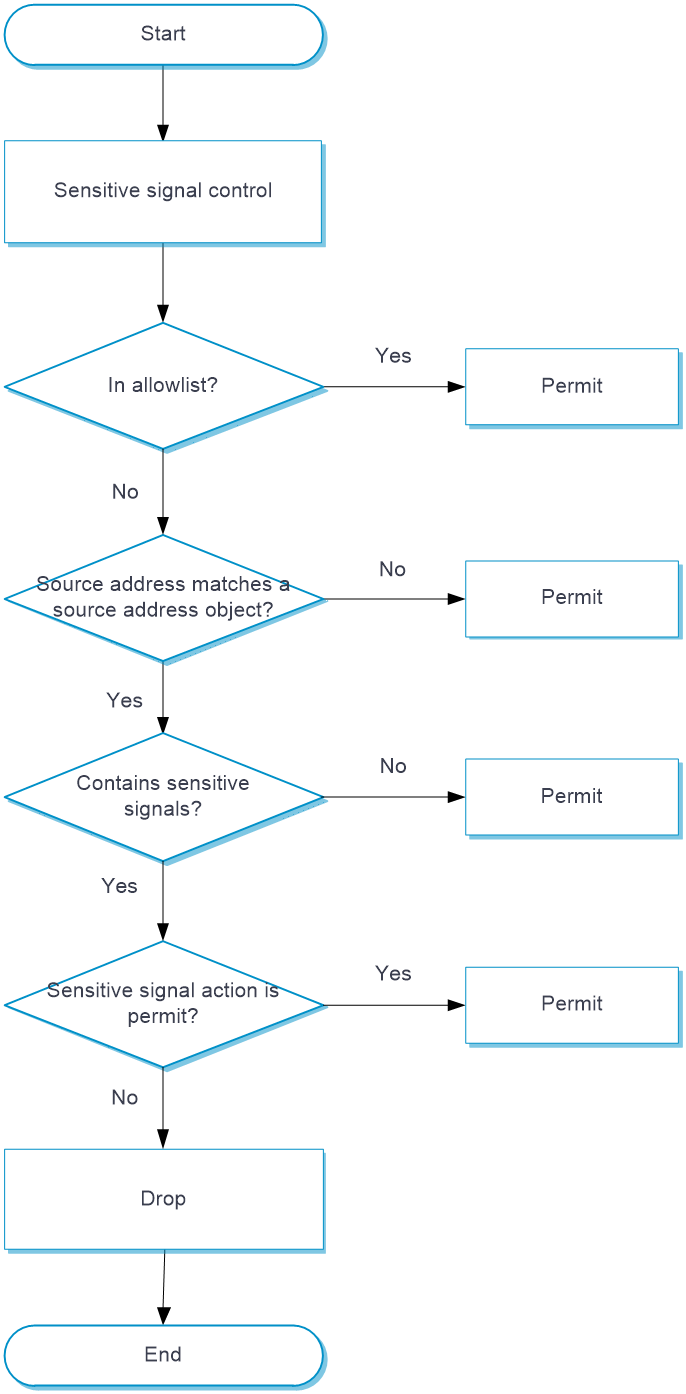
Upon receiving an IoT packet, the device configured with sensitive signal control operates as follows:
Verify whether the packet source address is in the allowlist.
If the address is in the allowlist, the device allows the packets to pass.
If the address is not in the allowlist, the device proceeds to the next step.
Compare the packet source addresses against addresses in the source address object groups to determine whether sensitive signal check is required.
If sensitive signal check is not required, the device allows the packet to pass.
If sensitive signal check is required, the device proceeds to the next step.
You can configure an IPv4 source address object group, an IPv6 source address object group, and a MAC address object group to filter packets. A match is found if the packet matches any object group.
Check whether the packet information contains specified sensitive signals.
If packets do not contain sensitive signals, the device allows the packets to pass directly.
If packets have sensitive signals, the device allows the packets to pass or drops the packets as configured.
Figure-4 Sensitive signal control processing
Standard flow control
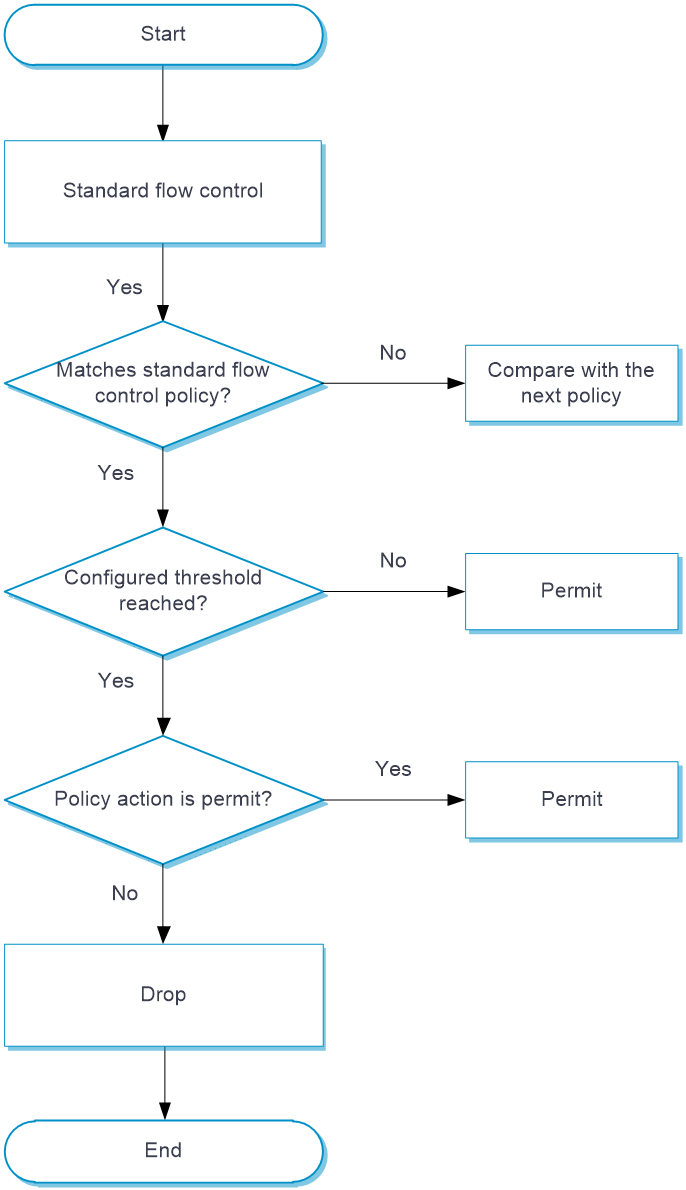
This feature checks IoT device traffic based on different standard flow control policies. By comparing the total number of requests per device and request rate per device with the configured thresholds, this feature controls device request traffic and avoids DoS attacks.
When a device receives IoT packets, it compares the packets with standard flow control policies in the sequence as displayed. Once a match is found, the device takes the action defined in the policy on the packet. If no match is found, the device allows the packet to pass directly.
Upon receiving an IoT packet, the device configured with standard flow control operates as follows:
Check the requester ID, IP address, MAC address, and IoT standard by policies to verify whether the packets require standard flow control.
If a packet matches all criterion types in a policy, the packet matches the policy successfully and standard flow control is required for the packet. Note that each criterion type includes one or more criteria, and a packet matches a criterion type if it matches any criterion of the type.
If a packet fails to match one of the criteria types in a policy, the packet continues to compare with the next policy until it is successfully matched. If the packet fails to match any of the policies, standard flow control is not required.
Check whether the request times and rate information in the packet reaches the configured thresholds.
If the request times and rate information in the packet reaches the configured thresholds, the device executes the action configured in the policy on a packet.
If the thresholds are not reached, the device allows the packet to pass directly.
Figure-5 Standard traffic control processing
vSystem support information
Support of non-default vSystems for this feature depends on the device model. This feature is available on the Web interface only if it is supported.
Licensing requirements
The identification of sensitive signals is based on the APR signature library, which requires a license. After the license expires, the existing APR signature library is still available but you cannot update the signature library. For more information about licensing, see the license management help.
Restrictions and guidelines
Intelligent check and management is available only for IoT devices that use the GB/T 28181, GB 35114, and GA/T 1400 standards.
Device access control denies all traffic that does not match the filtering criteria, including but not limited to traffic using the GBT28181, GB35114, and GAT1400 standards. As a best practice, disable device access control when it is not required.
Configure features
Configure standard format check
Configure the global allowlist.
Select Policies > IoT Device Security Management > Standard Format Check.
Configure the global allowlist. To improve the system processing efficiency and reduce incorrect reporting, you can add address object groups of trusted devices or devices that are reported incorrectly by format check to the allowlist.
Enable standard format check for different standards. Supported standards include GB/T 28181, GB 35114, and GA/T 1400.
Select Policies > IoT Device Security Management > Standard Format Check.
Configure settings on the Standard Format Check page.
Table-1 Standard format check configuration items
Item
Description
Standards
GB/T 28181
Enable format check for the specified standard.
GB 35114
GA/T 1400
Logging
Enable logging standard format check failures.
Action
Specify the action to take upon standard format check failure. Options include:
Pass.
Drop.
Detection Attributes
Configure detection attributes for standard format check. A packet passes the standard format check only after it passes the examination on all the specified detection attributes.
Source Address Check
Configure source address object groups to filter out devices for standard format check. The device performs standard format check on packets that match any configured source address object group.
Click Apply.
Configure device access control
Select Polices > IoT Device Security Management > Device Access Control.
Configure settings on the Device Access Control page.
Table-2 Device access control configuration items
Item
Description
Device Access Control
Enable device access control.
Global Allowlist
To improve the device processing efficiency and reduce incorrect report, you can add address object groups of trusted devices or devices that are reported incorrectly by device access control to the allowlist.
Source Address Check
Configure source address object groups to filter out devices for standard format check. The device performs standard format check on packets that match any configured source address object group.
Device Authentication Information
Used to authenticate IoT devices, such as device address, device ID, and device standard. If the IoT device information collected in a packet matches the configured device authentication information, the system permits the packet to pass. To import device authentication information, click Import.
Authentication inaccuracy might occur if you access an IoT management platform to edit the device ID or standard information for an authenticated device. To resolve this issue, click Re-Authenticate for the device after changing the device authentication information.
Detection Duration
Specify the time during which the system continuously collects IoT information in each packet received to authenticate a device. This setting avoids device authentication failure caused by incomplete IoT information in a single packet.
Action
Specify the action to take upon an authentication failure. Options include:
Pass.
Drop.
Logging
Enable logging device authentication failures.
Click Apply.
Configure sensitive signal control
Configure the global allowlist.
Select Policies > IoT Device Security Management > Sensitive Signal Control.
Configure the global allowlist. To improve the system processing efficiency and reduce incorrect reporting, you can add address object groups of trusted devices or devices that are reported incorrectly by sensitive signal control to the allowlist.
Enable sensitive signal control for different standards. Supported standards include GB/T 28181, GB 35114, and GA/T 1400.
Select Policies > IoT Device Security Management > Sensitive Signal Control.
Configure settings on the Sensitive Signal Control page.
Table-3 Sensitive signal control configuration items
Item
Description
Standards
GB/T 28181
Enable sensitive signal control for the specified standard.
GB 35114
GA/T 1400
Logging
After logging is enabled, the system reports corresponding logs when sensitive signals are detected.
Action
Specify the action upon format check failure. Options include:
Pass.
Drop.
Source Address Check
Configure source address object groups to filter out devices for standard format check. The device performs standard format check on packets that match any configured source address object group.
Select Sensitive Signals
Select sensitive signals to be detected. The system will check whether packets contain the specified operations, such as edit and delete.
Click Apply.
Configure standard traffic control
Select Polices > IoT Device Security Management > Standard Flow Control.
Click Add to access the Add Standard Flow Control page.
Configure settings to create a policy.
Table-4 Standard traffic control policy configuration items
Item
Description
Policy Name
Configure a policy name.
Status
Whether the standard flow control policy is enabled.
Source Address Check
Configure source address object groups to filter out devices for standard format check. The device performs standard format check on packets that match any configured source address object group.
Match Criteria
Standard type
Standard type used by the packet.
Device information
Basic device information including device ID and address.
Detection Attributes
Requests Per ID
Total number of requests sent by an IoT device.
Request Rate Per ID
Request rate (number of requests per minute) of an IoT device.
Logical Operation
Logical relation between the detection attributes. Options include:
Or: Execute the specified action in the policy when either of the detection attribute of a packet reaches the configured threshold.
And: Execute the specified action in the policy only when both of the detection attributes of a packet reach the configured thresholds.
Action
Specify the action to take when a packet matches a policy and the detection attributes of the packet reach the thresholds. Options include:
Pass.
Drop.
Logging
After logging is enabled, the system reports the corresponding logs when a packet matches a policy and the detection attributes of the packet reach the thresholds.
Click OK. The created policy is displayed on the Standard Flow Control page.
(Optional.) Set the logging interval on the Standard Flow Control page. When an IoT device is considered matching a policy, the system examines the elapsed time between the previous policy hit time of the device with the same policy and the current time.
If the elapsed time exceeds the logging interval, the system generates a new log message.
If the elapsed time does not exceed the logging interval, the system does not generate a new log message.