Anti-virus
This help contains the following topics:
Introduction
Anti-virus identifies viruses in the application layer of packets based on an up-to-date virus signature library and takes actions to prevent a network from being infected. This feature is typically deployed on a gateway to insulate the internal network from viruses and protect the internal data.
Application scenario
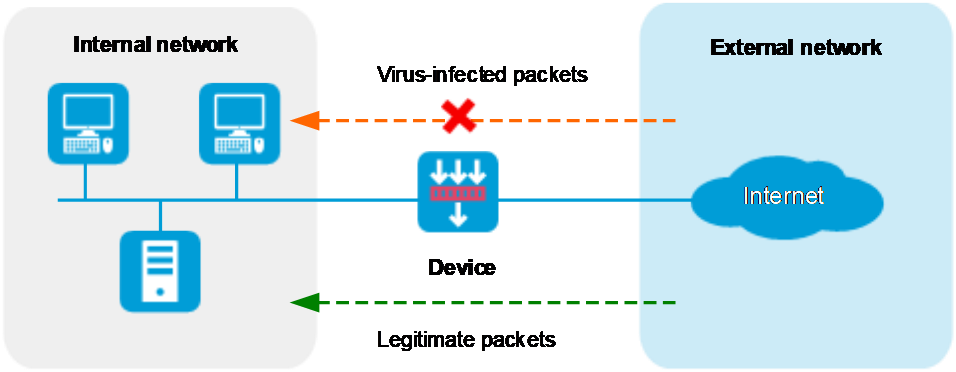
As shown in Figure-1, the device is the gateway of an internal network. Internal users access the external network and download data from the external network. The internal server accepts data uploaded by external users.
In this scenario, you can configure anti-virus on the gateway to protect the internal network. Anti-virus inspects incoming packets, permits legitimate packets to pass, and takes actions, such as alert, block, or redirect, on packets containing viruses.
Figure-1 Anti-virus application scenario
Basic concepts
Virus signature
A virus signature is a character string that uniquely identifies a specific virus. The virus signature library contains the predefined virus signatures.
MD5 rules
An MD5 rule is generated by the system based on the virus signatures in the virus signature library to identify virus-infected files.
Virus exception
Typically, anti-virus takes anti-virus actions on packets matching virus signatures. If a virus proves to be a false alarm, you can set the virus signature as a virus exception. Packets matching the virus exception are permitted to pass.
Application exception
Typically, anti-virus action is protocol specific and applies to all applications carried by the protocol. To take a different action on an application, you can set the application as an exception and specify a different anti-virus action for the application. Application exceptions use application-specific actions and the other applications use protocol-specific actions. For example, the anti-virus action for HTTP is permit. To block the games carried by HTTP, you can set the games as application exceptions and specify the block action for them.
MD5 value exception
If a packet is detected to contain a virus but actually the packet is safe, you can set the MD5 value of the virus as an MD5 value exception. The device will permit subsequent packets matching the MD5 value exception to pass.
You can get the MD5 value of a virus through the threat log.
Anti-virus action
Anti-virus actions apply to the packets that match virus signatures. The actions include the following types:
Alarm—Permits matching packets and generates logs.
Block—Blocks matching packets and generates logs.
Redirect—Redirects matching HTTP connections to a URL and generates logs.
Permit—Permits matching packets.
Virus detection methods
The device supports the following virus detection methods:
Virus signature-based detection—The device matches packets against virus signatures in the virus signature library, and determines that a packet contains viruses if a match is found.
MD5 rule-based detection—The device generates an MD5 hash value for a file to be inspected and compares the value with the system-defined MD5 rules. If a match is found, the file is identified to be virus-infected.
Cloud query
You can enable cloud query in an anti-virus profile. If the file in a packet does not match any local virus signature or MD5 rule, the device will send the MD5 value of the file to the cloud server for cloud query. The device determines the action to apply according to the query result returned from the cloud server.
If the MD5 value of the file matches an MD5 rule, the file is considered to be virus-infected and the anti-virus action will apply.
If no matching rule is found for the MD5 value or if the file is verified to be virus-free, the packet will be permitted to pass through.
The Datagram Transport Layer Security (DTLS) protocol protects datagram protocols. It is suitable for low-delay scenarios such as real-time communication (VoIP and video conferences), IoT devices (wireless sensor networks), and streaming services.
The HyperText Transfer Protocol Secure (HTTPS) protocol transmits hypertext data via a secure communication channel. It is suitable for scenarios requiring secure data transfer, such as online banks, social media platforms, email services, and Web applications that require user authentication and data encryption.
Enhanced inspection
If no viruses are detected by the anti-virus service, the device can send the file to be inspected to the intelligent service platform module or file engine for further inspection to improve the virus recognition rate.
Anti-virus mechanism
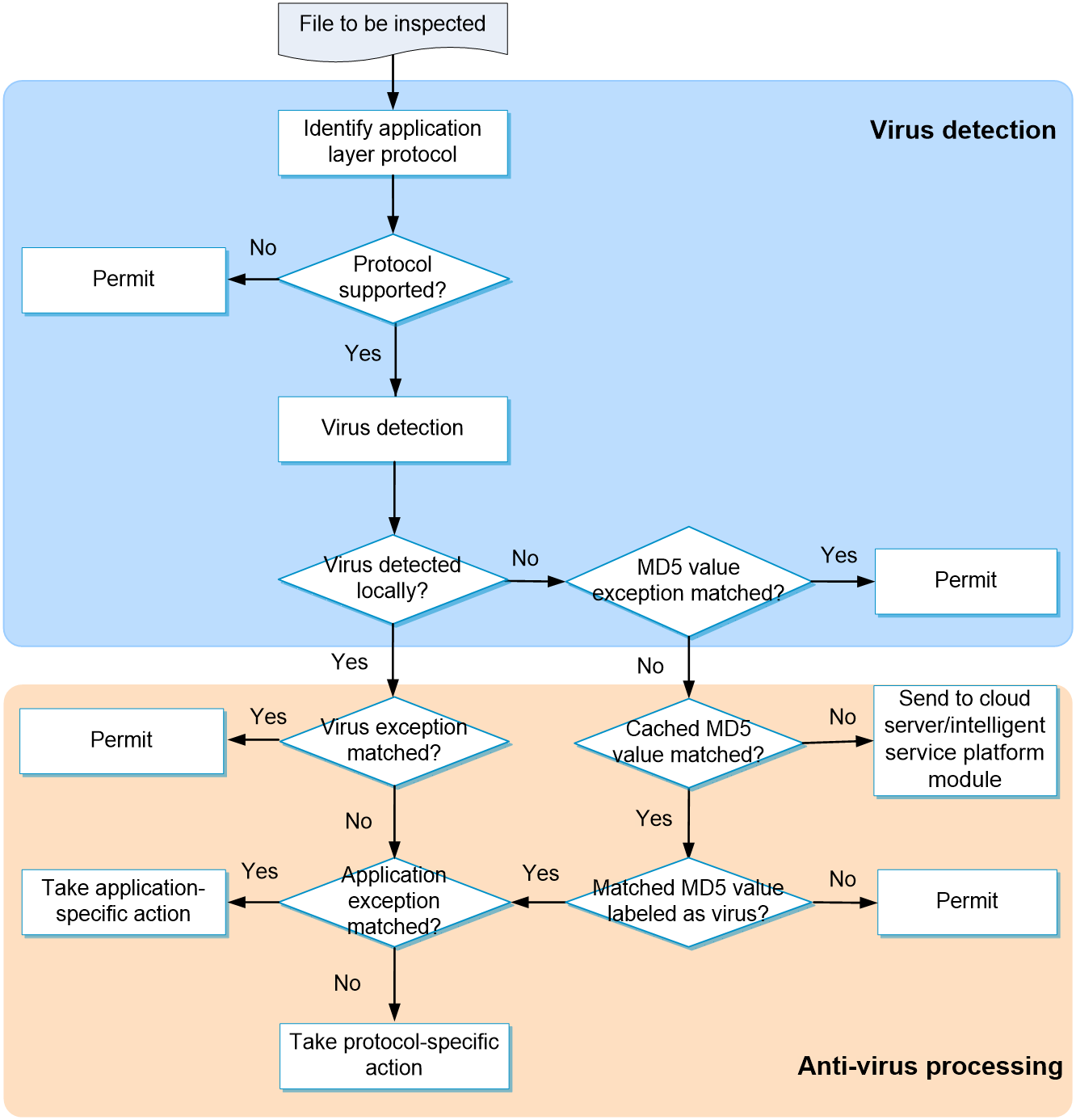
As shown in Figure-2, upon receiving a packet, the anti-virus device performs the following operations:
The device compares the packet with the security policies.
If the packet matches a security policy that is associated with an anti-virus policy, the device continues to identify the application layer protocol of the packet.
The device identifies whether the anti-virus supports the application layer protocol of the packet.
If not, the device permits the packet to pass without anti-virus inspection.
If yes, the device compares the packet with the virus signatures and MD5 rules.
If a matching signature or MD5 rule is found, the device performs following operations:
Determines if the matching signature is an exception. If yes, the device permits the packet to pass. If not, the device examines whether the application is an exception.
If the application is an exception, the device takes the application-specific action (alert, block, or permit). If the application is not an exception, the device takes the protocol-specific action (alert, block, or redirect).
If no matching signature or MD5 rule is found, the device determines if the MD5 value of the file in the packet is an MD5 value exception.
If yes, the device permits the packet to pass.
If not, the device performs the next processing.
The device compares the packet with the cached MD5 values, which are the history virus detection results performed by the cloud server and intelligent service platform module. The cached MD5 entries include the MD5 values labeled virus or non-virus.
If the packet matches a cached MD5 value labeled as virus, the device determines if the packet matches an application exception. If yes, the device takes the application-specific action (alert, block, or permit). If not, the device takes the protocol-specific action (alert, block, or redirect).
If the packet matches a cached MD5 value labeled as non-virus, the device permits the packet to pass.
If the packet does not match any cached MD5 value, the device permits the packet to pass and at the same time, sends the MD5 value of the file in the packet to the cloud server and intelligent service platform module for further virus detection. After the detection is finished, the device will cache the detection results returned by the server to facilitate subsequent virus detections on the local device.
If application proxy is enabled, the device caches the packet before it sends the MD5 value of the file in the packet to the cloud server and intelligent service platform module. Then, the device processes the packet according to the detection result from the intelligent service platform module. If a virus is detected, the device drops the packet. If no virus is detected, the device permits the packet to pass.
vSystem support information
Support of non-default vSystems for this feature depends on the device model. This feature is available on the Web interface only if it is supported.
Licensing requirements
To use the anti-virus feature, you must purchase and install the required license. After the license expires, the anti-virus feature is still available but you can no longer update the virus signature library on the device or use the cloud query, enhanced inspection, or sandbox collaboration features. For more information about licensing, see the license management help.
Restrictions and guidelines
The system stops DPI services when you click Submit. It might cause that services based on the DPI services are interrupted. For example, a security policy cannot control application accesses.
After you submit the configuration, the system prompts Configuration succeeded. However, the configuration might not have been activated completely. The device cannot recognize packets as expected before the activation completes.
The device sends the MD5 values only of files extracted from the innermost layer of a compressed file the device can decompress to the cloud server for query.
The enhanced inspection feature supports real-time blocking of packets only if the application proxy feature is enabled. For more information about application proxy, see the application proxy help.
The enhanced inspection feature of the intelligent service platform module is supported only on devices where the intelligent service platform module is installed. Support for the intelligent service platform module depends on the device model.
The enhanced inspection feature of the file engine is supported only on devices where the file engine file for anti-virus enhanced inspection is installed. Support for the enhanced inspection feature of the file engine depends on the device model.
Enhanced inspection of the intelligent service platform module and enhanced inspection of the file engine cannot be both configured.
After you configure an alarm message template, the device will perform proxy on HTTP traffic that matches the anti-virus configuration file, affecting device performance. Please be cautious.
Configure anti-virus
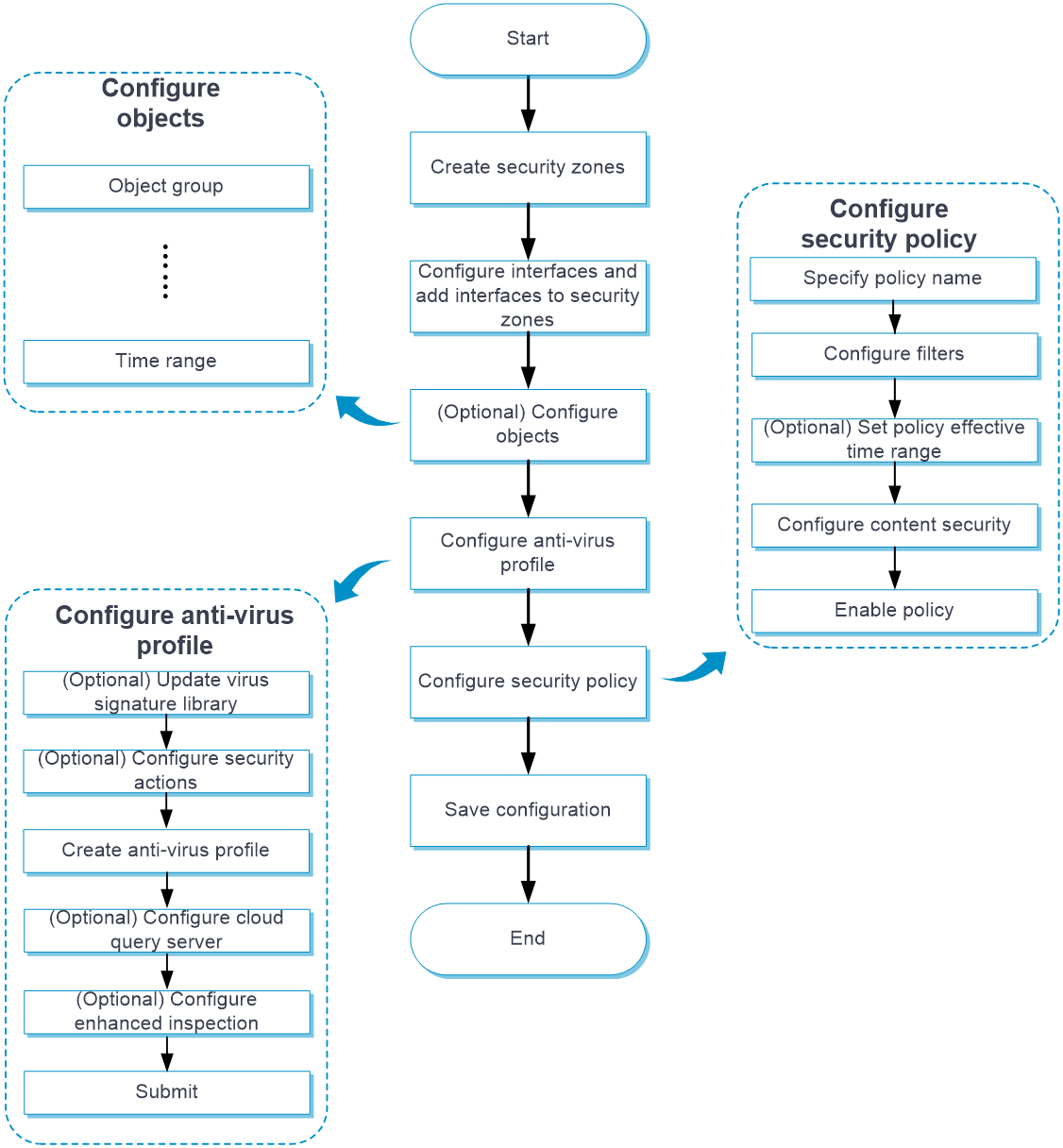
Configure anti-virus as shown in Figure-3.
Figure-3 Anti-virus configuration procedure
Configure an anti-virus profile
By default, the device provides a predefined anti-virus profile named default, which cannot be modified or deleted.
You can customize anti-virus profiles as needed.
For all protocols that anti-virus supports, the connection requests are always initiated by the client. For anti-virus to work correctly, make sure the security policy that uses the anti-virus profile meets the following requirements:
The security zone where the client resides is set as the source security zone.
The security zone where the server resides is set as the destination security zone.
Procedure
Click the Objects tab.
In the navigation pane, select APP Security > Anti-Virus > Profiles.
Click Create.
Create an anti-virus profile.
Table-1 Anti-virus profile configuration items
Item
Description
Name
Enter a name for the anti-virus profile.
Description
Enter a description for the anti-virus profile.
Enable cloud query
Select this item to enable cloud query.
Alarm message template
Select an alarm template. This template enables the device to send an alarm message to the client when a virus is detected.
This item is supported only when you define the Block action on the upload and download HTTP traffic.
After creating or applying an alarm message template, you can click Edit to import an alarm message.
Only TXT or HTML files are supported.
Upload
Select this item for a protocol to apply the profile to the upload traffic of the protocol.
This item is not available for the POP3 protocol.
Download
Select this item for a protocol to apply the profile to the download traffic of the protocol.
This item is not available for the SMTP protocol.
Action
Select the action for matching packets from the Action list of a protocol.
Supported actions are Alarm, Block, and Redirect.
The IMAP protocol supports only the Alarm action.
Application exceptions
To set an application as an application exception, select the application, and then click Add to add it to the application exception list. On the application exception list, select the action for the application exception from the Action list.
Virus exceptions
To set a virus as a virus exception, enter the virus ID, and then click Add to add it to the virus exception list.
MD5 value exceptions
To set the MD5 value of a virus as an MD5 value exception, enter the MD5 value, and then click Add to add it to the MD5 value exception list.
Click OK.
Use the anti-virus profile in a security policy. For more information about security policies, see the security policy online help.
To have the configuration activated, click Submit.
This operation can cause temporary DPI service outage. As a best practice, perform the operation after all DPI service configurations are complete.
Configure the cloud query server
Perform this task to configure the cloud query server for anti-virus.
Procedure
Click the Objects tab.
In the navigation pane, select APP Security > Anti-Virus > Profiles.
Click Configure next to the Cloud server connectivity field.
Configure the cloud query server.
Table-2 Cloud query server configuration items
Item
Description
Server address
Enter the IP address or hostname of the cloud query server. Only the cloud query server of our company is supported.
Max cached MD5 entries
Specify the maximum number of MD5 entries that can be cached in the hit entry list and non-hit entry list.
The non-hit entry list is a list of MD5 values submitted to the cloud server that cannot be determined as viruses.
The hit entry list is a list of MD5 values that are determined as viruses.
Min cache time
Specify the minimum cache time for an MD5 entry in minutes.
Setting the minimum cache time for MD5 entries ensures that the entries will not be deleted during the specified period of time.
However, if the configured max cached MD5 entries are less than the currently cached entries, the system will delete the oldest cache entries even if their cache periods are equal to or less than the minimum cache time.
Protocol
Protocol for the cloud server, including:
DTLS—Suitable for low-delay scenarios such as real-time communication (VoIP and video conferences), IoT devices (wireless sensor networks), and streaming services.
HTTPS—Suitable for scenarios requiring secure data transfer, such as online banks, social media platforms, email services, and Web applications that require user authentication and data encryption.
Configure Proxy Server
Configure the proxy server's address, port, and the username and password for logging in to the proxy server. This field is available only when the cloud server protocol is HTTPS.
Click OK.
Configure enhanced inspection
Click the Objects tab.
In the navigation pane, select APP Security > Anti-Virus > Profiles.
Click Configure next to the Enhanced inspection connectivity field.
Configure enhanced inspection.
Table-3 Enhanced inspection configuration items
Item
Description
Detection mode
Select a mode for enhanced inspection. Options include:
File engine.
Intelligent service platform.
Source IPv4 address
Enter the IP address for the enhanced inspection service.
The service is provided by the intelligent service platform module. For the device to send the file to be inspected to the module, specify the IP address of the internal interface on the intelligent service platform module as the source IPv4 address.
Cache file size limit
Set the maximum size of the cached file.
After enhanced inspection is enabled, the device sends the cached file to the intelligent service platform module or file engine for virus detection. If the size of the cached file exceeds the limit, the device does not send the file to the intelligent service platform module.
Enhanced inspection
Enable or disable enhanced inspection.
After enhanced inspection is enabled, if no viruses are detected by the anti-virus service, the device sends the file to be inspected to the intelligent service platform module or file engine for further inspection to improve the virus recognition rate.
File types
Select file types to be inspected. Options include:
All: All file types.
Custom: Custom file type names, which are case-insensitive.
Click OK.
View virus family information
A virus family is a collection of virus samples that have similar characteristics and behaviors. Virus families are typically developed by the same author or team and share similar codes, spread methods, and attack targets. Virus families are typically named based on their characteristics or the first discovered sample. By studying and analyzing virus families, security vendors can develop corresponding virus signature libraries to promptly identify and prevent the spread of these viruses.
To view information about virus families:
Click the Objects tab.
In the navigation pane, select APP Security > Anti-Virus > Virus Family.
On the page that opens, you can view the IDs and names of virus families. You can also enter a virus family ID or name to search for the matching virus family.
Click Configure next to the Enhanced inspection connectivity field.
Configure enhanced inspection.
Table-4 Enhanced inspection configuration items
Item
Description
Source IPv4 address
Enter the IP address for the enhanced inspection service.
The service is provided by the intelligent service platform module. For the device to send the file to be inspected to the module, specify the IP address of the internal interface on the intelligent service platform module as the source IPv4 address.
Cache file size limit
Set the maximum size of the cached file.
After enhanced inspection is enabled, the device sends the cached file to the intelligent service platform module for virus detection. If the size of the cached file exceeds the limit, the device does not send the file to the intelligent service platform module.
Enhanced inspection
Enable or disable enhanced inspection.
After enhanced inspection is enabled, if no viruses are detected by the anti-virus service, the device sends the file to be inspected to the intelligent service platform module for further inspection to improve the virus recognition rate.
Click OK.