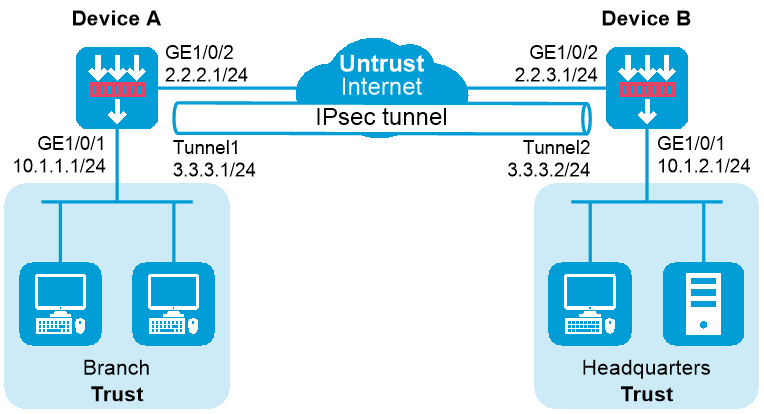
As shown in Figure 1, both the branch and the headquarters use fixed IP addresses to access the Internet.
Configure IPsec tunnel interface-based IPsec on Device A and Device B to protect the traffic between the branch (10.1.1.0/24) and the headquarters (10.1.2.0/24). This IPsec implementation ensures that the IPsec configuration of the headquarters remains stable despite of changes of the branch subnet.
This configuration example was created and verified on R9071 of the M9000-AI-E8 device.
1. Assign IP addresses to interfaces:
# Assign an IP address to interface GigabitEthernet 1/0/1.
<DeviceA> system-view
[DeviceA] interface gigabitethernet 1/0/1
[DeviceA-GigabitEthernet1/0/1] ip address 10.1.1.1 255.255.255.0
[DeviceA-GigabitEthernet1/0/1] quit
# Assign IP addresses to other interfaces in the same way. (Details not shown.)
2. Configure settings for routing.
This example configures static routes
# Configure static routes to reach the headquarters' gateway and network. The next hop in the routes is 2.2.2.2.
[DeviceA] ip route-static 10.1.2.0 24 2.2.2.2
[DeviceA] ip route-static 2.2.3.1 24 2.2.2.2
# Configure a static route to direct the traffic to be protected to the IPsec tunnel interface.
[DeviceA] ip route-static 10.1.2.0 255.255.255.0 tunnel 1
3. Add interfaces to security zones.
[DeviceA] security-zone name trust
[DeviceA-security-zone-Trust] import interface gigabitethernet 1/0/1
[DeviceA-security-zone-Trust] quit
[DeviceA] security-zone name untrust
[DeviceA-security-zone-Untrust] import interface gigabitethernet 1/0/2
[DeviceA-security-zone-Untrust] import interface tunnel 1
[DeviceA-security-zone-Untrust] quit
4. Configure a security policy:
Configure rules to permit traffic between the Untrust and Local security zones, so the devices can set up an IPsec tunnel:
# Configure a rule named ipseclocalout to allow Device A to send IPsec negotiation packets to Device B.
[DeviceA] security-policy ip
[DeviceA-security-policy-ip] rule name ipseclocalout
[DeviceA-security-policy-ip-1-ipseclocalout] source-zone local
[DeviceA-security-policy-ip-1-ipseclocalout] destination-zone untrust
[DeviceA-security-policy-ip-1-ipseclocalout] source-ip-host 2.2.2.1
[DeviceA-security-policy-ip-1-ipseclocalout] destination-ip-host 2.2.3.1
[DeviceA-security-policy-ip-1-ipseclocalout] action pass
[DeviceA-security-policy-ip-1-ipseclocalout] quit
# Configure a rule named ipseclocalin to allow Device A to receive the IPsec negotiation packets sent from Device B.
[DeviceA-security-policy-ip] rule name ipseclocalin
[DeviceA-security-policy-ip-2-ipseclocalin] source-zone untrust
[DeviceA-security-policy-ip-2-ipseclocalin] destination-zone local
[DeviceA-security-policy-ip-2-ipseclocalin] source-ip-host 2.2.3.1
[DeviceA-security-policy-ip-2-ipseclocalin] destination-ip-host 2.2.2.1
[DeviceA-security-policy-ip-2-ipseclocalin] action pass
[DeviceA-security-policy-ip-2-ipseclocalin] quit
Configure rules to permit the traffic between Host A and Host B:
# Configure a rule named trust-untrust to permit the packets from Host A to Host B.
[DeviceA-security-policy-ip] rule name trust-untrust
[DeviceA-security-policy-ip-3-trust-untrust] source-zone trust
[DeviceA-security-policy-ip-3-trust-untrust] destination-zone untrust
[DeviceA-security-policy-ip-3-trust-untrust] source-ip-subnet 10.1.1.0 24
[DeviceA-security-policy-ip-3-trust-untrust] destination-ip-subnet 10.1.2.0 24
[DeviceA-security-policy-ip-3-trust-untrust] action pass
[DeviceA-security-policy-ip-3-trust-untrust] quit
# Configure a rule named untrust-trust to permit the packets from Host B to Host A.
[DeviceA-security-policy-ip] rule name untrust-trust
[DeviceA-security-policy-ip-4-untrust-trust] source-zone untrust
[DeviceA-security-policy-ip-4-untrust-trust] destination-zone trust
[DeviceA-security-policy-ip-4-untrust-trust] source-ip-subnet 10.1.2.0 24
[DeviceA-security-policy-ip-4-untrust-trust] destination-ip-subnet 10.1.1.0 24
[DeviceA-security-policy-ip-4-untrust-trust] action pass
[DeviceA-security-policy-ip-4-untrust-trust] quit
[DeviceA-security-policy-ip] quit
5. Configure an IPsec profile to establish an IPsec tunnel to protect the specified data.
[DeviceA] ike keychain abc
[DeviceA-ike-keychain-abc] pre-shared-key address 2.2.3.1 255.255.255.0 key simple 123456TESTplat&!
[DeviceA-ike-keychain-abc] quit
[DeviceA] ike profile abc
[DeviceA-ike-profile-abc] keychain abc
[DeviceA-ike-profile-abc] local-identity address 2.2.2.1
[DeviceA-ike-profile-abc] match remote identity address 2.2.3.1 24
[DeviceA-ike-profile-abc] exchange-mode aggressive
[DeviceA-ike-profile-abc] quit
[DeviceA] ipsec transform-set abc
[DeviceA-ipsec-transform-set-abc] esp encryption-algorithm aes-cbc-128
[DeviceA-ipsec-transform-set-abc] esp authentication-algorithm sha1
[DeviceA-ipsec-transform-set-abc] quit
[DeviceA] ipsec profile abc isakmp
[DeviceA-ipsec-profile-isakmp-abc] transform-set abc
[DeviceA-ipsec-profile-isakmp-abc] ike-profile abc
[DeviceA-ipsec-profile-isakmp-abc] quit
6. Configure an IPsec tunnel interface, which encapsulates the traffic to be protected with IPsec.
[DeviceA] interface tunnel 1 mode ipsec
[DeviceA-Tunnel1] ip address 3.3.3.1 255.255.255.0
[DeviceA-Tunnel1] source 2.2.2.1
[DeviceA-Tunnel1] destination 2.2.3.1
[DeviceA-Tunnel1] tunnel protection ipsec profile abc
[DeviceA-Tunnel1] quit
1. Assign IP addresses to interfaces:
# Assign an IP address to interface GigabitEthernet 1/0/1.
<DeviceB> system-view
[DeviceB] interface gigabitethernet 1/0/1
[DeviceB-GigabitEthernet1/0/1] ip address 10.1.2.1 255.255.255.0
[DeviceB-GigabitEthernet1/0/1] quit
# Assign IP addresses to other interfaces in the same way. (Details not shown.)
2. Configure settings for routing.
This example configures static routes
# Configure static routes to reach the branch's gateway and network. The next hop in the routes is 2.2.3.2.
[DeviceB] ip route-static 10.1.1.0 24 2.2.3.2
[DeviceB] ip route-static 2.2.2.1 24 2.2.3.2
# Configure a static route to direct the traffic to be protected to the IPsec tunnel interface.
[DeviceA] ip route-static 10.1.1.0 255.255.255.0 tunnel 1
3. Add interfaces to security zones.
[DeviceB] security-zone name trust
[DeviceB-security-zone-Trust] import interface gigabitethernet 1/0/1
[DeviceB-security-zone-Trust] quit
[DeviceB] security-zone name untrust
[DeviceB-security-zone-Untrust] import interface gigabitethernet 1/0/2
[DeviceA-security-zone-Untrust] import interface tunnel 1
[DeviceB-security-zone-Untrust] quit
4. Configure a security policy:
Configure rules to permit traffic between the Untrust and Local security zones, so the devices can set up an IPsec tunnel:
# Configure a rule named ipseclocalout to allow Device B to send IPsec negotiation packets to Device A.
[DeviceB] security-policy ip
[DeviceB-security-policy-ip] rule name ipseclocalout
[DeviceB-security-policy-ip-1-ipseclocalout] source-zone local
[DeviceB-security-policy-ip-1-ipseclocalout] destination-zone untrust
[DeviceB-security-policy-ip-1-ipseclocalout] source-ip-host 2.2.3.1
[DeviceB-security-policy-ip-1-ipseclocalout] destination-ip-host 2.2.2.1
[DeviceB-security-policy-ip-1-ipseclocalout] action pass
[DeviceB-security-policy-ip-1-ipseclocalout] quit
# Configure a rule named ipseclocalin to allow Device B to receive the IPsec negotiation packets sent from Device A.
[DeviceB-security-policy-ip] rule name ipseclocalin
[DeviceB-security-policy-ip-2-ipseclocalin] source-zone untrust
[DeviceB-security-policy-ip-2-ipseclocalin] destination-zone local
[DeviceB-security-policy-ip-2-ipseclocalin] source-ip-host 2.2.2.1
[DeviceB-security-policy-ip-2-ipseclocalin] destination-ip-host 2.2.3.1
[DeviceB-security-policy-ip-2-ipseclocalin] action pass
[DeviceB-security-policy-ip-2-ipseclocalin] quit
Configure rules to permit traffic between Host B and Host A:
# Configure a rule named trust-untrust to permit the packets from Host B to Host A.
[DeviceB-security-policy-ip] rule name trust-untrust
[DeviceB-security-policy-ip-3-trust-untrust] source-zone trust
[DeviceB-security-policy-ip-3-trust-untrust] destination-zone untrust
[DeviceB-security-policy-ip-3-trust-untrust] source-ip-subnet 10.1.2.0 24
[DeviceB-security-policy-ip-3-trust-untrust] destination-ip-subnet 10.1.1.0 24
[DeviceB-security-policy-ip-3-trust-untrust] action pass
[DeviceB-security-policy-ip-3-trust-untrust] quit
# Configure a rule named untrust-trust to permit the packets from Host A to Host B.
[DeviceB-security-policy-ip] rule name untrust-trust
[DeviceB-security-policy-ip-4-untrust-trust] source-zone untrust
[DeviceB-security-policy-ip-4-untrust-trust] destination-zone trust
[DeviceB-security-policy-ip-4-untrust-trust] source-ip-subnet 10.1.1.0 24
[DeviceB-security-policy-ip-4-untrust-trust] destination-ip-subnet 10.1.2.0 24
[DeviceB-security-policy-ip-4-untrust-trust] action pass
[DeviceB-security-policy-ip-4-untrust-trust] quit
[DeviceB-security-policy-ip] quit
5. Configure an IPsec profile to establish an IPsec tunnel to protect the specified data.
[DeviceB] ike keychain abc
[DeviceB-ike-keychain-abc] pre-shared-key address 2.2.2.1 255.255.255.0 key simple 123456TESTplat&!
[DeviceB-ike-keychain-abc] quit
[DeviceB] ike profile abc
[DeviceB-ike-profile-abc] keychain abc
[DeviceB-ike-profile-abc] local-identity address 2.2.3.1
[DeviceB-ike-profile-abc] match remote identity address 2.2.2.1 24
[DeviceB-ike-profile-abc] exchange-mode aggressive
[DeviceB-ike-profile-abc] quit
[DeviceB] ipsec transform-set abc
[DeviceB-ipsec-transform-set-abc] esp encryption-algorithm aes-cbc-128
[DeviceB-ipsec-transform-set-abc] esp authentication-algorithm sha1
[DeviceB-ipsec-transform-set-abc] quit
[DeviceB] ipsec profile abc isakmp
[DeviceB-ipsec-profile-isakmp-abc] transform-set abc
[DeviceB-ipsec-profile-isakmp-abc] ike-profile abc
[DeviceB-ipsec-profile-isakmp-abc] quit
6. Configure an IPsec tunnel interface, which encapsulates the traffic to be protected with IPsec.
[DeviceB] interface tunnel 1 mode ipsec
[DeviceB-Tunnel1] ip address 3.3.3.2 255.255.255.0
[DeviceB-Tunnel1] source 2.2.3.1
[DeviceB-Tunnel1] destination 2.2.2.1
[DeviceB-Tunnel1] tunnel protection ipsec profile abc
[DeviceB-Tunnel1] quit
After the configuration is completed, Device A will automatically initiate IKE negotiation with Device B. After IKE negotiation succeeds, the tunnel interface will come up and traffic between the branch and the headquarters will be IPsec-protected. This example uses Device A to verify the configuration.
# Display brief IP configuration for interfaces on Device A.
<DeviceA> display ip interface brief
*down: administratively down
(s): spoofing (l): loopback
Interface Physical Protocol IP address/Mask VPN instance Description
GE1/0/1 up up 10.1.1.1/24 -- --
GE1/0/2 up up 2.2.2.1/24 -- --
Tun1 up up 3.3.3.1/24 -- --
# Display tunnel interface information on Device A.
<DeviceA> display interface Tunnel 1
Tunnel1
Current state: UP
Line protocol state: UP
Description: Tunnel1 Interface
Bandwidth: 64 kbps
Maximum transmission unit: 1444
Internet address: 3.3.3.1/24 (primary)
Tunnel source 2.2.2.1, destination 2.2.3.1
Tunnel TTL 255
Tunnel protocol/transport IPsec/IP
Output queue - Urgent queuing: Size/Length/Discards 0/100/0
Output queue - Protocol queuing: Size/Length/Discards 0/500/0
Output queue - FIFO queuing: Size/Length/Discards 0/75/0
Last clearing of counters: Never
Last 300 seconds input rate: 0 bytes/sec, 0 bits/sec, 0 packets/sec
Last 300 seconds output rate: 0 bytes/sec, 0 bits/sec, 0 packets/sec
Input: 0 packets, 0 bytes, 0 drops
Output: 0 packets, 0 bytes, 0 drops
# Display IPsec SAs on Device A.
<DeviceA> display ipsec sa
-------------------------------
Interface: Tunnel1
-------------------------------
-----------------------------
IPsec profile: abc
Alias: profile-abc
Mode: ISAKMP
-----------------------------
Tunnel id: 0
Encapsulation mode: tunnel
Perfect Forward Secrecy:
Transmitting entity: Initiator
Path MTU: 1388
Tunnel:
local address/port: 2.2.2.1/500
remote address/port: 2.2.3.1/500
Flow:
sour addr: 0.0.0.0/0.0.0.0 port: 0 protocol: ip
dest addr: 0.0.0.0/0.0.0.0 port: 0 protocol: ip
[Inbound ESP SAs]
SPI: 2701952073 (0xa10c8449)
Connection ID: 4294967296
Transform set: ESP-ENCRYPT-AES-CBC-128 ESP-AUTH-SHA1
SA duration (kilobytes/sec): 1843200/3600
SA remaining duration (kilobytes/sec): 1843200/3180
Max received sequence-number: 0
Anti-replay check enable: Y
Anti-replay window size: 64
UDP encapsulation used for NAT traversal: N
Status: Active
[Outbound ESP SAs]
SPI: 3607077598 (0xd6ffa2de)
Connection ID: 12884901889
Transform set: ESP-ENCRYPT-AES-CBC-128 ESP-AUTH-SHA1
SA duration (kilobytes/sec): 1843200/3600
SA remaining duration (kilobytes/sec): 1843200/3180
Max sent sequence-number: 0
UDP encapsulation used for NAT traversal: N
Status: Active
# Verify that a private IP address in the branch subnet can ping a private IP address in the headquarters subnet successfully.
<DeviceA> ping -a 10.1.1.1 10.1.2.1
Ping 10.1.2.1 (10.1.2.1) from 10.1.1.1: 56 data bytes, press CTRL_C to break
56 bytes from 10.1.2.1: icmp_seq=0 ttl=255 time=1.000 ms
56 bytes from 10.1.2.1: icmp_seq=1 ttl=255 time=1.000 ms
56 bytes from 10.1.2.1: icmp_seq=2 ttl=255 time=0.000 ms
56 bytes from 10.1.2.1: icmp_seq=3 ttl=255 time=1.000 ms
56 bytes from 10.1.2.1: icmp_seq=4 ttl=255 time=0.000 ms
--- Ping statistics for 10.1.2.1 ---
5 packet(s) transmitted, 5 packet(s) received, 0.0% packet loss
round-trip min/avg/max/std-dev = 0.000/0.600/1.000/0.490 ms
Device A
#
interface GigabitEthernet1/0/1
ip address 10.1.1.1 255.255.255.0
#
interface GigabitEthernet1/0/2
ip address 2.2.2.1 255.255.255.0
#
interface Tunnel1 mode ipsec
ip address 3.3.3.1 255.255.255.0
source 2.2.2.1
destination 2.2.3.1
tunnel protection ipsec profile abc
#
security-zone name Trust
import interface GigabitEthernet1/0/1
#
security-zone name Untrust
import interface GigabitEthernet1/0/2
import interface Tunnel1
#
ip route-static 2.2.3.0 24 2.2.2.2
ip route-static 10.1.2.0 24 2.2.2.2
ip route-static 10.1.2.0 24 Tunnel1
#
ipsec transform-set abc
encapsulation-mode tunnel
protocol esp
esp encryption-algorithm aes-cbc-128
esp authentication-algorithm sha1
#
ipsec profile abc isakmp
transform-set abc
ike-profile abc
#
ike profile abc
keychain abc
exchange-mode aggressive
local-identity address 2.2.2.1
match remote identity address 2.2.3.1 255.255.255.0
#
ike keychain abc
pre-shared-key address 2.2.3.1 255.255.255.0 key simple 123456TESTplat&!
#
security-policy ip
rule 0 name ipseclocalout
action pass
source-zone local
destination-zone untrust
source-ip-host 2.2.2.1
destination-ip-host 2.2.3.1
rule 1 name ipseclocalin
action pass
source-zone untrust
destination-zone local
source-ip-host 2.2.3.1
destination-ip-host 2.2.2.1
rule 2 name trust-untrust
action pass
source-zone trust
destination-zone untrust
source-ip-subnet 10.1.1.0 255.255.255.0
destination-ip-subnet 10.1.2.0 255.255.255.0
rule 3 name untrust-trust
action pass
source-zone untrust
destination-zone trust
source-ip-subnet 10.1.2.0 255.255.255.0
destination-ip-subnet 10.1.1.0 255.255.255.0
#
Device B
#
interface GigabitEthernet1/0/1
ip address 10.1.2.1 255.255.255.0
#
interface GigabitEthernet1/0/2
ip address 2.2.3.1 255.255.255.0
#
interface Tunnel1 mode ipsec
ip address 3.3.3.2 255.255.255.0
source 2.2.3.1
destination 2.2.2.1
tunnel protection ipsec profile abc
#
security-zone name Trust
import interface GigabitEthernet1/0/1
#
security-zone name Untrust
import interface GigabitEthernet1/0/2
import interface Tunnel1
#
ip route-static 2.2.2.0 24 2.2.3.2
ip route-static 10.1.1.0 24 2.2.3.2
ip route-static 10.1.1.0 24 tunnel1
#
ipsec transform-set abc
encapsulation-mode tunnel
protocol esp
esp encryption-algorithm aes-cbc-128
esp authentication-algorithm sha1
#
ipsec profile abc isakmp
transform-set abc
ike-profile abc
#
ike profile abc
keychain abc
exchange-mode aggressive
local-identity address 2.2.3.1
match remote identity address 2.2.2.1 255.255.255.0
#
ike keychain abc
pre-shared-key address 2.2.2.1 255.255.255.0 key simple 123456TESTplat&!
#
security-policy ip
rule 0 name ipseclocalout
action pass
source-zone local
destination-zone untrust
source-ip-host 2.2.3.1
destination-ip-host 2.2.2.1
rule 1 name ipseclocalin
action pass
source-zone untrust
destination-zone local
source-ip-host 2.2.2.1
destination-ip-host 2.2.3.1
rule 2 name trust-untrust
action pass
source-zone trust
destination-zone untrust
source-ip-subnet 10.1.2.0 255.255.255.0
destination-ip-subnet 10.1.1.0 255.255.255.0
rule 3 name untrust-trust
action pass
source-zone untrust
destination-zone trust
source-ip-subnet 10.1.1.0 255.255.255.0
destination-ip-subnet 10.1.2.0 255.255.255.0
#