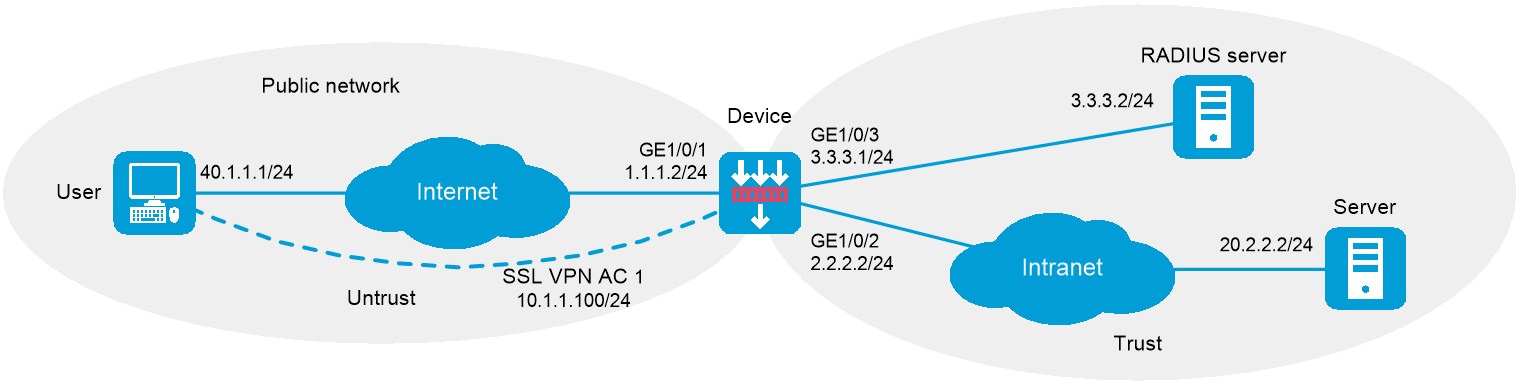
As shown in Figure 1, the device acts as an SSL VPN gateway that connects the public network and private network.
The device uses a CA-signed SSL server certificate. If no SSL server policy is applied to the device, the device uses a self-signed SSL server certificate.
Configure SSL VPN IP access on the device to allow the user to access the internal server in the private network.
Configure the device to perform remote authentication and authorization (through the remote RADIUS server) for the user.
This configuration example was created and verified on E8371 of the F5000-AI160 device.
Before configuring IP access, perform the following tasks:
Make sure the server has a route to 10.1.1.0/24.
Configure the RADIUS server to provide authentication and authorization for the user.
1. Obtain CA certificate file ca.cer and local certificate file server.pfx for the device. (Details not shown.)
2. Assign IP addresses to interfaces:
# Assign an IP address to interface GigabitEthernet 1/0/1.
<Device> system-view
[Device] interface gigabitethernet 1/0/1
[Device-GigabitEthernet1/0/1] ip address 1.1.1.2 255.255.255.0
[Device-GigabitEthernet1/0/1] quit
# Assign IP addresses to other interfaces in the same way. (Details not shown.)
3. Create SSL VPN AC interface AC 1 and configure the IP address as 10.1.1.100/24 for the interface.
[Device] interface sslvpn-ac 1
[Device-SSLVPN-AC1] ip address 10.1.1.100 24
[Device-SSLVPN-AC1] quit
4. Configure settings for routing.
This example configures static routes, and the next hop in the routes is 2.2.2.3 to the server, and 1.1.1.3 to the user.
[Device] ip route-static 20.2.2.2 24 2.2.2.3
[Device] ip route-static 40.1.1.1 24 1.1.1.3
5. Add interfaces to security zones.
[Device] security-zone name untrust
[Device-security-zone-Untrust] import interface gigabitethernet 1/0/1
[Device-security-zone-Untrust] import interface sslvpn-ac 1
[Device-security-zone-Untrust] quit
[Device] security-zone name trust
[Device-security-zone-Trust] import interface gigabitethernet 1/0/2
[Device-security-zone-Trust] import interface gigabitethernet 1/0/3
[Device-security-zone-Trust] quit
6. Configure rules in a security policy to permit the traffic between the Untrust and Local security zones for the user to access the SSL VPN gateway:
# Configure a rule named sslvpnlocalout1 to permit the packets from the device to the user.
[Device] security-policy ip
[Device-security-policy-ip] rule name sslvpnlocalout1
[Device-security-policy-ip-1-sslvpnlocalout1] source-zone local
[Device-security-policy-ip-1-sslvpnlocalout1] destination-zone untrust
[Device-security-policy-ip-1-sslvpnlocalout1] source-ip-host 1.1.1.2
[Device-security-policy-ip-1-sslvpnlocalout1] source-ip-host 10.1.1.100
[Device-security-policy-ip-1-sslvpnlocalout1] destination-ip-host 40.1.1.1
[Device-security-policy-ip-1-sslvpnlocalout1] destination-ip-subnet 10.1.1.0 24
[Device-security-policy-ip-1-sslvpnlocalout1] action pass
[Device-security-policy-ip-1-sslvpnlocalout1] quit
# Configure a rule named sslvpnlocalin1 to permit the packets from the user to the device.
[Device-security-policy-ip] rule name sslvpnlocalin1
[Device-security-policy-ip-2-sslvpnlocalin1] source-zone untrust
[Device-security-policy-ip-2-sslvpnlocalin1] destination-zone local
[Device-security-policy-ip-2-sslvpnlocalin1] source-ip-host 40.1.1.1
[Device-security-policy-ip-2-sslvpnlocalin1] source-ip-subnet 10.1.1.0 24
[Device-security-policy-ip-2-sslvpnlocalin1] destination-ip-host 1.1.1.2
[Device-security-policy-ip-2-sslvpnlocalin1] destination-ip-host 10.1.1.100
[Device-security-policy-ip-2-sslvpnlocalin1] action pass
[Device-security-policy-ip-2-sslvpnlocalin1] quit
# Configure a rule named sslvpnlocalout2 to permit the packets from the device to the server.
[Device-security-policy-ip] rule name sslvpnlocalout2
[Device-security-policy-ip-3-sslvpnlocalout2] source-zone local
[Device-security-policy-ip-3-sslvpnlocalout2] destination-zone trust
[Device-security-policy-ip-3-sslvpnlocalout2] source-ip-host 2.2.2.2
[Device-security-policy-ip-3-sslvpnlocalout2] source-ip-host 3.3.3.1
[Device-security-policy-ip-3-sslvpnlocalout2] destination-ip-host 20.2.2.2
[Device-security-policy-ip-3-sslvpnlocalout2] destination-ip-host 3.3.3.2
[Device-security-policy-ip-3-sslvpnlocalout2] action pass
[Device-security-policy-ip-3-sslvpnlocalout2] quit
# Configure a rule named sslvpnlocalin2 to permit the packets from the server to the device.
[Device-security-policy-ip] rule name sslvpnlocalin2
[Device-security-policy-ip-4-sslvpnlocalin2] source-zone trust
[Device-security-policy-ip-4-sslvpnlocalin2] destination-zone local
[Device-security-policy-ip-4-sslvpnlocalin2] source-ip-host 20.2.2.2
[Device-security-policy-ip-4-sslvpnlocalin2] source-ip-host 3.3.3.2
[Device-security-policy-ip-4-sslvpnlocalin2] destination-ip-host 2.2.2.2
[Device-security-policy-ip-4-sslvpnlocalin2] destination-ip-host 3.3.3.1
[Device-security-policy-ip-4-sslvpnlocalin2] action pass
[Device-security-policy-ip-4-sslvpnlocalin2] quit
# Configure a rule named untrust-trust to allow the user to access the server through the SSL VPN AC interface.
[Device-security-policy-ip] rule name untrust-trust
[Device-security-policy-ip-5-untrust-trust] source-zone untrust
[Device-security-policy-ip-5-untrust-trust] destination-zone trust
[Device-security-policy-ip-5-untrust-trust] source-ip-subnet 10.1.1.0 24
[Device-security-policy-ip-5-untrust-trust] destination-ip-host 20.2.2.2
[Device-security-policy-ip-5-untrust-trust] action pass
[Device-security-policy-ip-5-untrust-trust] quit
# Configure a rule named trust-untrust to permit the packets from the server to the user through the SSL VPN AC interface.
[Device-security-policy-ip] rule name trust-untrust
[Device-security-policy-ip-6-trust-untrust] source-zone trust
[Device-security-policy-ip-6-trust-untrust] destination-zone untrust
[Device-security-policy-ip-6-trust-untrust] source-ip-host 20.2.2.2
[Device-security-policy-ip-6-trust-untrust] destination-ip-subnet 10.1.1.0 24
[Device-security-policy-ip-6-trust-untrust] action pass
[Device-security-policy-ip-6-trust-untrust] quit
[Device-security-policy-ip] quit
7. Configure a PKI domain named sslvpn and certificate-related parameters.
<Device> system-view
[Device] pki domain sslvpn
[Device-pki-domain-sslvpn] public-key rsa general name sslvpn
[Device-pki-domain-sslvpn] undo crl check enable
[Device-pki-domain-sslvpn] quit
[Device] pki import domain sslvpn der ca filename ca.cer
[Device] pki import domain sslvpn p12 local filename server.pfx
8. Create an SSL server policy named ssl and specify PKI domain sslvpn for the policy.
[Device] ssl server-policy ssl
[Device-ssl-server-policy-ssl] pki-domain sslvpn
[Device-ssl-server-policy-ssl] quit
9. Configure the SSL VPN gateway for user access. Configure the IP address for SSL VPN gateway gw as 1.1.1.2 and port number as 2000, and then apply server policy ssl to the gateway.
[Device] sslvpn gateway gw
[Device-sslvpn-gateway-gw] ip address 1.1.1.2 port 2000
[Device-sslvpn-gateway-gw] ssl server-policy ssl
[Device-sslvpn-gateway-gw] service enable
[Device-sslvpn-gateway-gw] quit
10. Create an IP access address pool named ippool and specify the address range as 10.1.1.1 to 10.1.1.10.
[Device] sslvpn ip address-pool ippool 10.1.1.1 10.1.1.10
11. Configure RADIUS settings:
# Create a RADIUS scheme named rscheme. Specify the primary authentication server and primary accounting server as 3.3.3.2. Set the keys for communication with the servers to 123456.
[Device] radius scheme rscheme
[Device-radius-rscheme] primary authentication 3.3.3.2
[Device-radius-rscheme] primary accounting 3.3.3.2
[Device-radius-rscheme] accounting-on enable
[Device-radius-rscheme] key authentication simple 123456
[Device-radius-rscheme] key accounting simple 123456
# Exclude the domain name from the username sent to the RADIUS server.
[Device-radius-rscheme] user-name-format without-domain
[Device-radius-rscheme] quit
12. Create a user group named group1 and authorize the user group to use SSL VPN policy group pgroup.
[Device] user-group group1
[Device-ugroup-group1] authorization-attribute sslvpn-policy-group pgroup
[Device-ugroup-group1] quit
13. Configure ISP domain domain1:
# Create an ISP domain named domain1 and authorize the domain to use user group group1.
[Device] domain domain1
[Device-isp-domain1] authorization-attribute user-group group1
# Configure the ISP domain to use RADIUS scheme rscheme for AAA of users.
[Device-isp-domain1] authentication sslvpn radius-scheme rscheme
[Device-isp-domain1] authorization sslvpn radius-scheme rscheme
[Device-isp-domain1] accounting sslvpn radius-scheme rscheme
[Device-isp-domain1] quit
14. Create an SSL VPN context named ctx, specify gateway gw for the context, and then associate the context with VPN instance VPN1.
[Device] sslvpn context ctx
[Device-sslvpn-context-ctx] gateway gw
[Device-sslvpn-context-ctx] vpn-instance VPN1
[Device-sslvpn-context-ctx] aaa domain domain1
[Device-sslvpn-context-ctx] ip-route-list rtlist
[Device-sslvpn-context-ctx-route-list-rtlist] include 20.2.2.0 255.255.255.0
[Device-sslvpn-context-ctx-route-list-rtlist] quit
[Device-sslvpn-context-ctx] uri-acl uriacl
[Device-sslvpn-context-ctx-uri-acl-uriacl] rule 1 permit uri icmp://20.2.2.0
[Device-sslvpn-context-ctx-uri-acl-uriacl] quit
[Device-sslvpn-context-ctx] ip-tunnel interface sslvpn-ac 1
[Device-sslvpn-context-ctx] ip-tunnel address-pool ippool mask 255.255.255.0
[Device-sslvpn-context-ctx] policy-group pgroup
[Device-sslvpn-context-ctx-policy-group-pgroup] ip-tunnel access-route ip-route-list rtlist
[Device-sslvpn-context-ctx-policy-group-pgroup] filter ip-tunnel uri-acl uriacl
[Device-sslvpn-context-ctx-policy-group-pgroup] quit
[Device-sslvpn-context-ctx] service enable
[Device-sslvpn-context-ctx] quit
# Verify that SSL VPN gateway gw is up on the device.
[Device] display sslvpn gateway
Gateway name: gw
Operation state: Up
IP: 1.1.1.2 Port: 2000
SSL server policy configured: ssl
SSL server policy in use: ssl
Front VPN instance: Not configured
# Verify that SSL VPN context ctx is up on the device.
[Device] display sslvpn context
Context name: ctx
Operation state: Up
AAA domain: domain1
Certificate authentication: Disabled
Password authentication: Enabled
Authentication use: All
SMS auth type: Not configured
Urlmasking: Disabled
Code verification: Disabled
Default policy group: Not configured
Associated SSL VPN gateway: gw
SSL client policy configured: ssl
SSL client policy in use: ssl
Maximum users allowed: 1048575
VPN instance: Not configured
Idle timeout: 30 min
Authentication server-type: aaa
Password changing: Enabled
# On the user PC, launch the IP access client software, and then enter the address 1.1.1.2, port number 2000, username sslvpn, and password 123456 to log in to the SSL VPN gateway. (Details not shown.)
# Display SSL VPN session information on the device.
[Device] display sslvpn session context ctx
SSL VPN context: ctx
Users: 1
Username Connections Idle time Created User IP
sslvpn 6 0/00:02:05 0/00:03:14 40.1.1.1
# On the user PC, display IPv4 routing table to verify that the user has a route to the server.
|
|
NOTE: The address 40.1.1.1/24 is the address of the local NIC, and 10.1.1.1/24 is the address that the SSL VPN gateway allocates to the user. |
>route -4 print
IPv4 Route Table
===========================================================================
Active Routes:
Network Destination Netmask Gateway Interface Metric
10.1.1.0 255.255.255.0 On-link 10.1.1.1 276
10.1.1.1 255.255.255.255 On-link 10.1.1.1 276
10.1.1.255 255.255.255.255 On-link 10.1.1.1 276
20.2.2.0 255.255.255.0 On-link 10.1.1.1 276
20.2.2.255 255.255.255.255 On-link 10.1.1.1 276
40.1.1.0 255.255.255.0 On-link 40.1.1.1 276
40.1.1.1 255.255.255.255 On-link 40.1.1.1 276
40.1.1.255 255.255.255.255 On-link 40.1.1.1 276
===========================================================================
# Verify that the user can ping the server.
C:\>ping 20.2.2.2
Pinging 20.2.2.2 with 32 bytes of data:
Reply from 20.2.2.2: bytes=32 time=197ms TTL=254
Reply from 20.2.2.2: bytes=32 time=1ms TTL=254
Reply from 20.2.2.2: bytes=32 time=1ms TTL=254
Reply from 20.2.2.2: bytes=32 time=186ms TTL=254
Ping statistics for 20.2.2.2:
Packets: Sent = 4, Received = 4, Lost = 0 (0% loss),
Approximate round trip times in milli-seconds:
Minimum = 1ms, Maximum = 197ms, Average = 96ms
#
interface GigabitEthernet1/0/1
ip address 1.1.1.2 255.255.255.0
#
interface GigabitEthernet1/0/2
ip address 2.2.2.2 255.255.255.0
#
interface GigabitEthernet1/0/3
ip address 3.3.3.1 255.255.255.0
#
interface SSLVPN-AC1
ip address 10.1.1.100 255.255.255.0
#
security-zone name Trust
import interface GigabitEthernet1/0/2
import interface GigabitEthernet1/0/3
#
security-zone name Untrust
import interface GigabitEthernet1/0/1
import interface SSLVPN-AC1
#
ip route-static 20.2.2.0 24 2.2.2.3
ip route-static 40.1.1.0 24 1.1.1.3
#
radius scheme rscheme
primary authentication 3.3.3.2
primary accounting 3.3.3.2
accounting-on enable
key authentication simple 123456
key accounting simple 123456
user-name-format without-domain
#
domain domain1
authorization-attribute user-group group1
authentication sslvpn radius-scheme rscheme
authorization sslvpn radius-scheme rscheme
accounting sslvpn radius-scheme rscheme
#
user-group group1
authorization-attribute sslvpn-policy-group pgroup
#
pki domain sslvpn
public-key rsa general name sslvpn
undo crl check enable
#
pki import domain sslvpn der ca filename ca.cer
pki import domain sslvpn p12 local filename server.pfx
#
ssl server-policy ssl
pki-domain sslvpn
#
sslvpn ip address-pool ippool 10.1.1.1 10.1.1.10
#
sslvpn gateway gw
ip address 1.1.1.2 port 2000
ssl server-policy ssl
service enable
#
sslvpn context ctx
vpn-instance VPN1
gateway gw
ip-tunnel interface SSLVPN-AC1
ip-tunnel address-pool ippool mask 255.255.255.0
uri-acl uriacl
rule 1 permit uri icmp://20.2.2.0
ip-route-list rtlist
include 20.2.2.0 255.255.255.0
policy-group pgroup
filter ip-tunnel uri-acl uriacl
ip-tunnel access-route ip-route-list rtlist
aaa domain domain1
service enable
#
security-policy ip
rule 0 name sslvpnlocalout1
action pass
source-zone local
destination-zone untrust
source-ip-host 1.1.1.2
source-ip-host 10.1.1.100
destination-ip-host 40.1.1.1
destination-ip-subnet 10.1.1.0 255.255.255.0
rule 1 name sslvpnlocalin1
action pass
source-zone untrust
destination-zone local
source-ip-host 40.1.1.1
source-ip-subnet 10.1.1.0 255.255.255.0
destination-ip-host 1.1.1.2
destination-ip-host 10.1.1.100
rule 2 name sslvpnlocalout2
action pass
source-zone local
destination-zone trust
source-ip-host 2.2.2.2
source-ip-host 3.3.3.1
destination-ip-host 3.3.3.2
destination-ip-host 20.2.2.2
rule 3 name sslvpnlocalin2
action pass
source-zone trust
destination-zone local
source-ip-host 3.3.3.2
source-ip-host 20.2.2.2
destination-ip-host 2.2.2.2
destination-ip-host 3.3.3.1
rule 4 name untrust-trust
action pass
source-zone untrust
destination-zone trust
source-ip-subnet 10.1.1.0 255.255.255.0
destination-ip-host 20.2.2.2
rule 5 name trust-untrust
action pass
source-zone trust
destination-zone untrust
source-ip-host 20.2.2.2
destination-ip-subnet 10.1.1.0 255.255.255.0