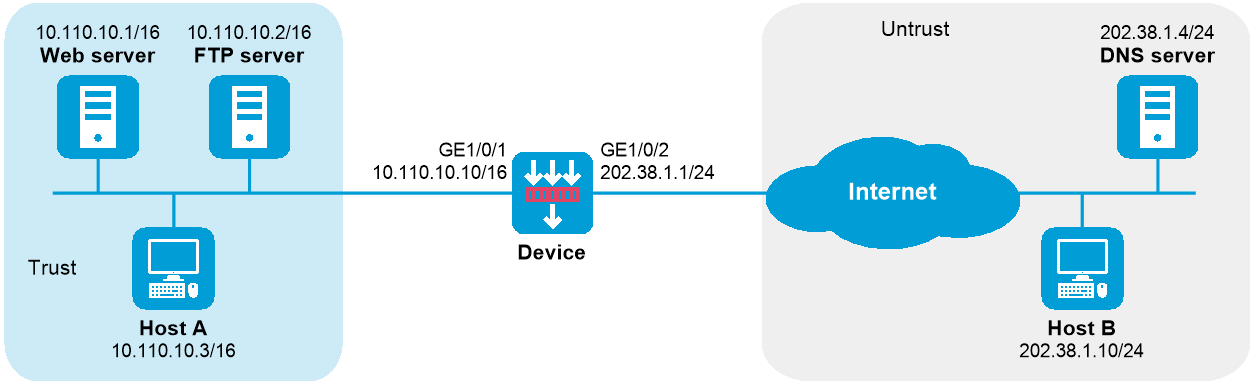
As shown in Figure 1, the internal Web server at 10.110.10.1/16 and FTP server at 10.110.10.2/16 provide services for external user. The company has three public addresses 202.38.1.1 through 202.38.1.3. The DNS server at 202.38.1.4 is on the external network.
Configure NAT so that:
The public IP address 202.38.1.2 is used by external users to access the Web and FTP servers.
External users can use the public address or domain name of internal servers to access them.
Internal users can access the internal servers by using their domain names.
To meet the network requirements, perform the following tasks:
Configure a NAT server mapping by mapping the public IP addresses and port numbers of the internal servers to a public address and port numbers so that external users can access the internal servers.
Configure NAT DNS mapping and NAT ALG so that the public IP address of the internal server in the payload of the DNS response packet can be translated to the private IP address.
This configuration example was created and verified on E8371 of the F5000-AI160 device.
# Assign IP addresses to interfaces and configure routes, security zones, zone pairs, and interzone policies. Make sure the network connections are available. (Details not shown.)
# Enable NAT ALG for DNS.
<Device> system-view
[Device] nat alg dns
# Enter interface view of GigabitEthernet 1/0/2.
[Device] interface gigabitethernet 1/0/2
# Configure a NAT server mapping to allow external hosts to access the internal Web server by using the address 202.38.1.2.
[Device-GigabitEthernet1/0/2] nat server protocol tcp global 202.38.1.2 inside 10.110.10.1 http
# Configure a NAT server mapping to allow external hosts to access the internal FTP server by using the address 202.38.1.2.
[Device-GigabitEthernet1/0/2] nat server protocol tcp global 202.38.1.2 inside 10.110.10.2 ftp
# Enable outbound NAT with Easy IP on GigabitEthernet 1/0/2.
[Device-GigabitEthernet1/0/2] nat outbound
[Device-GigabitEthernet1/0/2] quit
# Configure two NAT DNS entries by mapping the domain name www.server.com of the Web server to 202.38.1.2, and ftp.server.com of the FTP server to 202.38.1.2.
[Device] nat dns-map domain www.server.com protocol tcp ip 202.38.1.2 port http
[Device] nat dns-map domain ftp.server.com protocol tcp ip 202.38.1.2 port ftp
# Verify that both internal and external hosts can access the internal servers by using domain names. (Details not shown.)
# Display all NAT configuration and statistics.
[Device] display nat all
NAT outbound information:
Totally 1 NAT outbound rules.
Interface: GigabitEthernet1/0/2
ACL: ---
Address group ID: ---
Port-preserved: N NO-PAT: N Reversible: N
Config status: Active
NAT internal server information:
Totally 2 internal servers.
Interface: GigabitEthernet1/0/2
Protocol: 6(TCP)
Global IP/port: 202.38.1.2/21
Local IP/port : 10.110.10.2/21
Rule name : ServerRule_2
NAT counting : 0
Config status : Active
Interface: GigabitEthernet1/0/2
Protocol: 6(TCP)
Global IP/port: 202.38.1.2/80
Local IP/port : 10.110.10.1/80
Rule name : ServerRule_1
NAT counting : 0
Config status : Active
NAT DNS mapping information:
Totally 2 NAT DNS mappings.
Domain name: ftp.server.com
Global IP : 202.38.1.2
Global port: 21
Protocol : TCP(6)
Config status: Active
Domain name: www.server.com
Global IP : 202.38.1.2
Global port: 80
Protocol : TCP(6)
Config status: Active
NAT logging:
Log enable : Disabled
Flow-begin : Disabled
Flow-end : Disabled
Flow-active : Disabled
Port-block-assign : Disabled
Port-block-withdraw : Disabled
Alarm : Disabled
NO-PAT IP usage : Disabled
NAT mapping behavior:
Mapping mode : Address and Port-Dependent
ACL : ---
Config status: Active
NAT ALG:
DNS : Enabled
FTP : Enabled
H323 : Disabled
ICMP-ERROR : Enabled
ILS : Disabled
MGCP : Disabled
NBT : Disabled
PPTP : Enabled
RTSP : Enabled
RSH : Disabled
SCCP : Disabled
SCTP : Disabled
SIP : Disabled
SQLNET : Disabled
TFTP : Disabled
XDMCP : Disabled
Static NAT load balancing: Disabled
NAT link-switch recreate-session: Disabled
NAT configuration-for-new-connection: Disabled
# Verify that NAT sessions have been created for external host access to internal Web server.
[Device] display nat session verbose
Slot 1:
Initiator:
Source IP/port: 202.38.1.10/63593
Destination IP/port: 202.38.1.2/80
DS-Lite tunnel peer: -
VPN instance/VLAN ID/Inline ID: -/-/-
Protocol: TCP(6)
Inbound interface: GigabitEthernet1/0/2
Source security zone: Untrust
Responder:
Source IP/port: 10.110.10.1/80
Destination IP/port: 202.38.1.10/63593
DS-Lite tunnel peer: -
VPN instance/VLAN ID/Inline ID: -/-/-
Protocol: TCP(6)
Inbound interface: GigabitEthernet1/0/1
Source security zone: Trust
State: TCP_ESTABLISHED
Application: HTTP
Rule ID: -/-/-
Rule name:
Start time: 2017-05-21 15:09:11 TTL: 11s
Initiator->Responder: 5 packets 1145 bytes
Responder->Initiator: 3 packets 1664 bytes
Total sessions found: 1
#
nat dns-map domain ftp.server.com protocol tcp ip 202.38.1.2 port 21
nat dns-map domain www.server.com protocol tcp ip 202.38.1.2 port 80
#
interface GigabitEthernet1/0/1
ip address 10.110.10.10 255.255.0.0
#
interface GigabitEthernet1/0/2
ip address 202.38.1.1 255.255.255.0
nat outbound
nat server protocol tcp global 202.38.1.2 21 inside 10.110.10.2 21
nat server protocol tcp global 202.38.1.2 80 inside 10.110.10.1 80
#
security-zone name Trust
import interface GigabitEthernet1/0/1
#
security-zone name Untrust
import interface GigabitEthernet1/0/2
#
security-policy ip
rule 0 name trust-untrust
action pass
source-zone trust
destination-zone untrust
rule 1 name untrust-trust
action pass
source-zone untrust
destination-zone trust