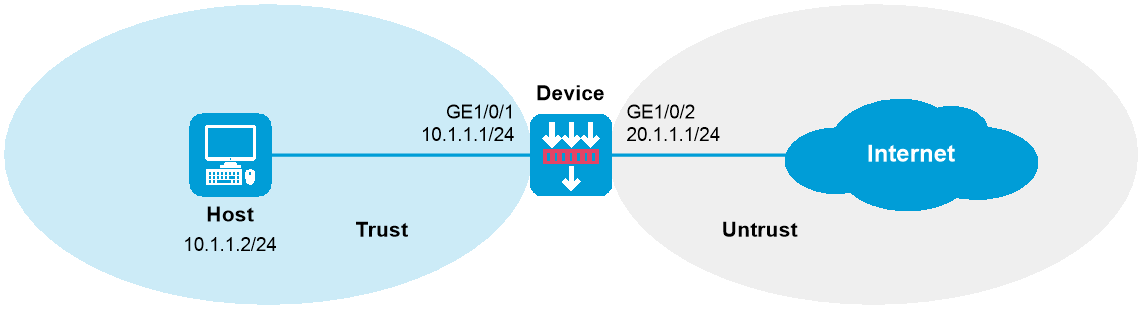
As shown in Figure 1, configure bandwidth management on the device to meet the following requirements:
The maximum bandwidth is limited to 30720 kbps for both upstream and downstream iQiYiPPS application traffic of the host in the intranet.
The guaranteed bandwidth is 30720 kbps for both upstream and downstream FTP traffic of the host .
The bandwidth of the interface to the Internet is limited to 102400 kbps.
This configuration example was created and verified on E8371 of the F5000-AI160 device.
1. Assign IP addresses to interfaces:
# Assign an IP address to interface GigabitEthernet 1/0/1.
<Device> system-view
[Device] interface gigabitethernet 1/0/1
[Device-GigabitEthernet1/0/1] ip address 10.1.1.1 255.255.255.0
[Device-GigabitEthernet1/0/1] quit
# Assign IP addresses to other interfaces in the same way. (Details not shown.)
2. Configure settings for routing.
This example configures static routes, and the next hop in the routes is 20.1.1.2.
[Device] ip route-static 3.1.1.2 24 20.1.1.2
3. Add interfaces to security zones.
[Device] security-zone name trust
[Device-security-zone-Trust] import interface gigabitethernet 1/0/1
[Device-security-zone-Trust] quit
[Device] security-zone name untrust
[Device-security-zone-Untrust] import interface gigabitethernet 1/0/2
[Device-security-zone-Untrust] quit
4. Configure a security policy:
# Configure a rule named trust-untrust to allow the host to access the Internet.
[Device] security-policy ip
[Device-security-policy-ip] rule name trust-untrust
[Device-security-policy-ip-1-trust-untrust] source-zone trust
[Device-security-policy-ip-1-trust-untrust] destination-zone untrust
[Device-security-policy-ip-1-trust-untrust] source-ip-host 10.1.1.2
[Device-security-policy-ip-1-trust-untrust] action pass
[Device-security-policy-ip-1-trust-untrust] quit
[Device-security-policy-ip] quit
5. Configure traffic profiles:
# Create a traffic profile named aiqiyi, and enter traffic profile view.
[Device] traffic-policy
[Device-traffic-policy] profile name aiqiyi
# Set the maximum bandwidth to 30720 kbps for both upstream and downstream traffic.
[Device-traffic-policy-profile-aiqiyi] bandwidth upstream maximum 30720
[Device-traffic-policy-profile-aiqiyi] bandwidth downstream maximum 30720
[Device-traffic-policy-profile-aiqiyi] quit
# Create a traffic profile named profileftp, and enter traffic profile view.
[Device-traffic-policy] profile name profileftp
# Set the guaranteed bandwidth to 30720 kbps for both upstream and downstream traffic.
[Device-traffic-policy-profile-profileftp] bandwidth upstream guaranteed 30720
[Device-traffic-policy-profile-profileftp] bandwidth downstream guaranteed 30720
[Device-traffic-policy-profile-profileftp] quit
[Device-traffic-policy] quit
6. Set the expected bandwidth to 102400 kbps for interface GigabitEthernet 1/0/2.
[Device] interface gigabitethernet 1/0/2
[Device-GigabitEthernet1/0/2] bandwidth 102400
[Device-GigabitEthernet1/0/2] quit
7. Configure traffic rules:
[Device] traffic-policy
# Create a traffic rule named aiqiyi, and enter traffic rule view.
[Device-traffic-policy] rule name aiqiyi
# Configure the predefined application iQiYiPPS as a match criterion.
[Device-traffic-policy-rule-1-aiqiyi] application app iQiYiPPS
# Specify traffic profile aiqiyi for traffic rule aiqiyi.
[Device-traffic-policy-rule-1-aiqiyi] action qos profile aiqiyi
[Device-traffic-policy-rule-1-aiqiyi] quit
# Create a traffic rule named ruleftp, and enter traffic rule view.
[Device-traffic-policy] rule name ruleftp
# Configure the predefined application FTP as a match criterion.
[Device-traffic-policy-rule-2-ruleftp] application app ftp
# Specify traffic profile profileftp for traffic rule ruleftp.
[Device-traffic-policy-rule-2-ruleftp] action qos profile profileftp
[Device-traffic-policy-rule-2-ruleftp] quit
[Device-traffic-policy] quit
# Verify that the iQiYiPPS application traffic rate cannot exceed 30720 kbps and the FTP traffic rate can reach a minimum of 30720 kbps when the total traffic rate on GigabitEthernet 1/0/2 reaches 102400 kbps. (Details not shown.)
#
interface GigabitEthernet1/0/1
ip address 10.1.1.1 255.255.255.0
#
interface GigabitEthernet1/0/2
bandwidth 102400
ip address 20.1.1.1 255.255.255.0
#
security-zone name Trust
import interface GigabitEthernet1/0/1
#
security-zone name Untrust
import interface GigabitEthernet1/0/2
#
ip route-static 3.1.1.0 24 20.1.1.2
#
traffic-policy
rule 1 name aiqiyi
action qos profile aiqiyi
application app iQiYiPPS
rule 2 name ruleftp
action qos profile profileftp
application app ftp
profile name aiqiyi
bandwidth downstream maximum 30720
bandwidth upstream maximum 30720
profile name profileftp
bandwidth downstream guaranteed 30720
bandwidth upstream guaranteed 30720
#
security-policy ip
rule 0 name trust-untrust
action pass
source-zone trust
destination-zone untrust
source-ip-host 10.1.1.2