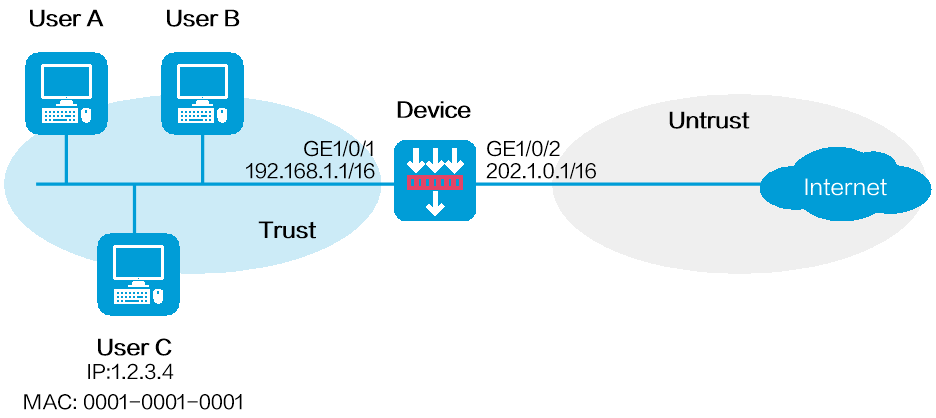
As shown in Figure 1, configure the user blacklist feature on the device to block packets from User C for 50 minutes. The IP address of User C is 1.2.3.4 and the MAC address of User C is 0001-0001-0001.
This configuration example was created and verified on E8371 of the F5000-AI160 device.
Assign IP addresses to interfaces:
Assign an IP address to interface GigabitEthernet 1/0/1.
<Device> system-view
[Device] interface gigabitethernet 1/0/1
[Device-GigabitEthernet1/0/1] ip address 192.168.1.1 255.255.0.0
[Device-GigabitEthernet1/0/1] quit
# Assign IP addresses to other interfaces in the same way. (Details not shown.)
Add interfaces to security zones.
[Device] security-zone name trust
[Device-security-zone-Trust] import interface gigabitethernet 1/0/1
[Device-security-zone-Trust] quit
[Device] security-zone name untrust
[Device-security-zone-Untrust] import interface gigabitethernet 1/0/2
[Device-security-zone-Untrust] quit
Configure a security policy to allow hosts in security zone trust to access the Internet.
[Device] security-policy ip
[Device-security-policy-ip] rule name trust-untrust
[Device-security-policy-ip-1-trust-untrust] source-zone trust
[Device-security-policy-ip-1-trust-untrust] destination-zone untrust
[Device-security-policy-ip-1-trust-untrust] source-ip-subnet 192.168.0.0 16
[Device-security-policy-ip-1-trust-untrust] action pass
[Device-security-policy-ip-1-trust-untrust] quit
[Device-security-policy-ip] quit
Configure the user blacklist:
# Add a network access user named userc.
[Device] local-user userc class network
[Device-luser-network-userc] quit
# Configure a static identity user with the username userc, IP address 1.2.3.4, and MAC address 0001-0001-0001.
[Device] user-identity static-user userc bind ipv4 1.2.3.4 mac 0001-0001-0001
# Add a user blacklist entry for user userc and set the blacklist entry aging time to 50 minutes.
[Device] blacklist user userc timeout 50
# Enable user identification.
[Device] user-identity enable
# Enable the global blacklist feature.
[Device] blacklist global enable
# Verify that the user blacklist entry is successfully added.
[Device] display blacklist user
User name Domain name Type TTL(sec) Dropped
userc Manual 2987 0
# Verify that the device drops packets from User C for 50 minutes and forwards packets from User C after 50 minutes. (Details not shown.)
#
interface GigabitEthernet1/0/1
port link-mode route
ip address 192.168.1.1 255.255.0.0
#
interface GigabitEthernet1/0/2
port link-mode route
ip address 202.1.0.1 255.255.0.0
#
security-zone name Trust
import interface GigabitEthernet1/0/1
#
security-zone name Untrust
import interface GigabitEthernet1/0/2
#
local-user userc class network
authorization-attribute user-role network-operator
#
blacklist global enable
#
user-identity enable
user-identity static-user userc bind ipv4 1.2.3.4 mac 0001-0001-0001
#
security-policy ip
rule 1 name trust-untrust
action pass
source-zone trust
destination-zone untrust
source-ip-subnet 192.168.0.0 255.255.0.0