About cloud disks
What is a cloud disk
Cloud disks provide persistent block storage resources for cloud hosts. You can format cloud disks and configure file systems on them like on physical disks. You can attach and detach cloud disks used as data disks for cloud hosts. When destroying cloud hosts, the system retains the attached cloud disks.
The system relies on OpenStack Cinder to offer the cloud disk service. The system supports full lifecycle management of cloud disks and provides disk backup, disk snapshots, and disk cloning to enhance data reliability and data reuse.
Concepts
Cloud disk backups and snapshots
A cloud disk backup or snapshot is a copy of a cloud disk at a specific point of time. You can use cloud disk backups and snapshots for data restoration. The following table lists the differences between backups and snapshots.
Table-1 Differences between backups and snapshots
|
Item |
Creation and destruction |
Data restoration |
|
Backup |
A cloud disk backup contains complete data of a cloud disk at a specific point of time. The system can destroy a cloud disk that has backups, and the backups cannot be recovered after they are destroyed with the cloud host. |
A backup is used to restore the data on the original cloud disk, or a specific cloud disk to the state it was at the time of backup creation. All changes made after the backup was created are lost. |
|
Snapshot |
A cloud disk snapshot contains complete data of a cloud disk at a specific point of time. The system cannot destroy a cloud disk that has snapshots. |
A snapshot is used to create a new cloud disk to take over services from the original cloud disk. The new cloud disk has the same data as the original cloud disk had when the snapshot was taken. You can also use a snapshot to restore the data on the original cloud disk to the state it was when the snapshot was taken. All changes made after the snapshot was taken are lost. |
Cloud disk cloning
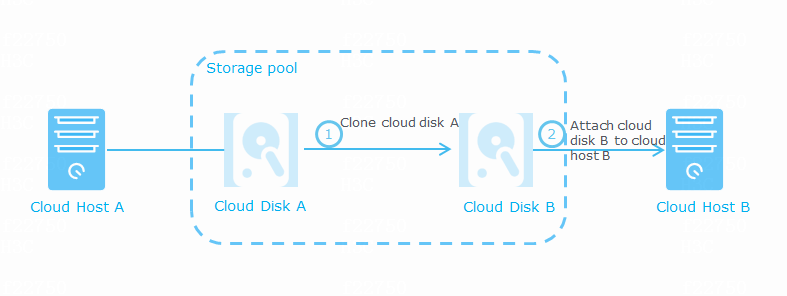
Cloud disk cloning copies all files of a cloud disk to create a new cloud disk. This feature is applicable to a scenario where multiple cloud hosts need to use cloud disks that contain the same data.
Figure-1 Cloud disk cloning mechanisms
Relationship with other services
|
Service |
Relationship |
|
Cloud host |
Cloud hosts use cloud disks as data disks. |
Restrictions and guidelines
The cloud disk feature is supported only by shared file systems. Local file systems do not support this feature.
Not all CAS versions support the disk encryption feature. To use this feature, you can use one of the following CAS versions: E0718, E0718P03, E0730, and E0730P01.
If you remove a disk from CAS or VMware, the state of the disk will not change on the system. In this situation, an error will occur if you make another operation on the removed disk.
Cloud disks in RAW format do not support cloud disk backup.
The following table shows the cloud disk features supported by VMware and H3C CAS.
|
Hypervisor |
Snapshot |
Backup |
Cloning |
|
VMware |
√ |
× |
√ |
|
CAS |
√ |
√ |
√ |