Configure an overall plan
You can use the UIS-Sec basic services after configuring an overall plan and configure quotas in the plan. You can also edit and view the existing overall plan.
Restrictions and guidelines
The Create button is available only when no overall plan exists.
You can edit but cannot delete the overall plan.
When you specify a network segment, the CIDR field is required and the address pool field is optional. If you do not specify an address pool, the system can use all network addresses in the CIDR.
Create an overall plan
Log in to the UIS-Sec portal of UIS Manager Standard Edition.
On the top navigation bar, click O&M.
From the left navigation pane, select Resource Quotas > Overall Plan.
Click Create.
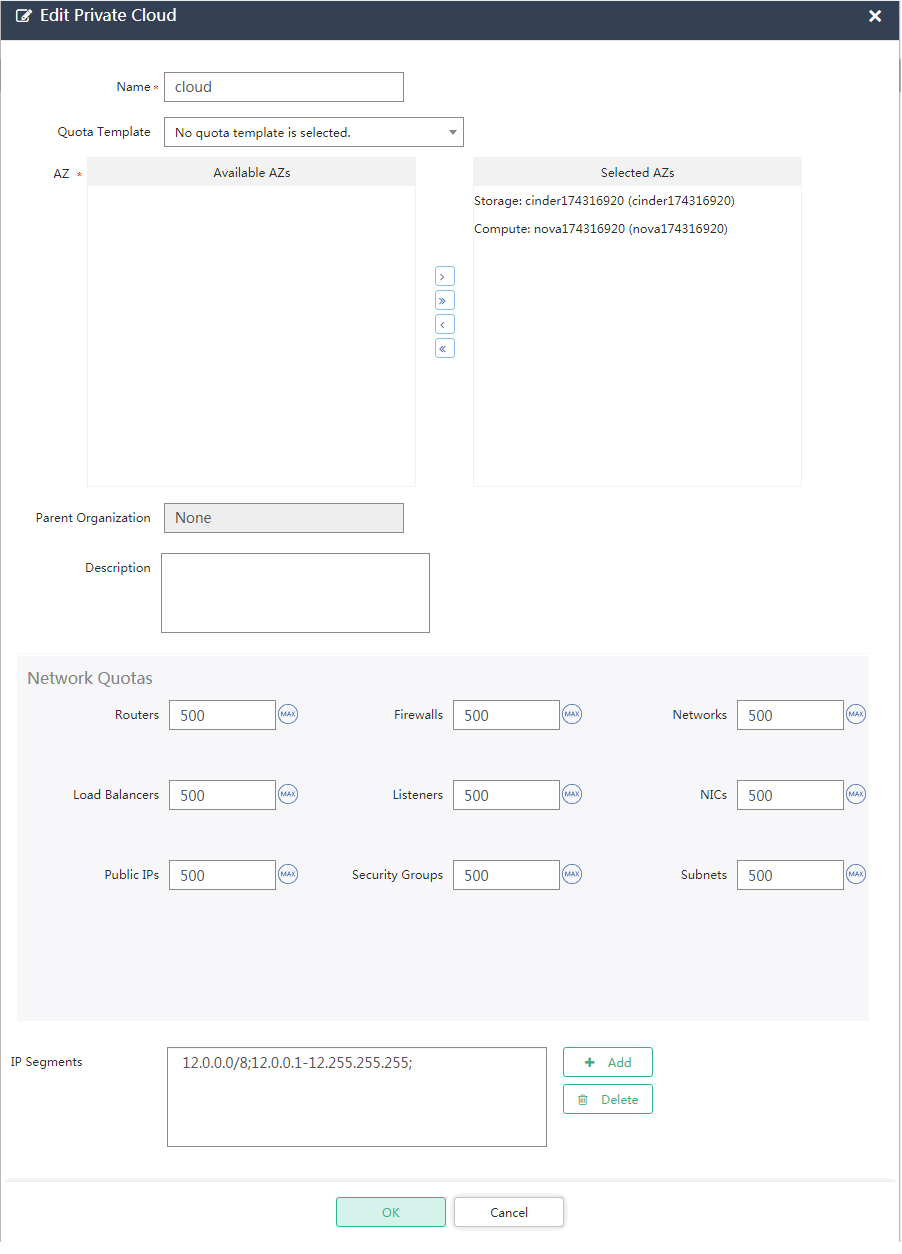
Configure the overall plan parameters as described in "Parameters."
Figure-1 Configuring overall plan parameters
Click Create.
Parameters
AZs: Specify the AZs that provide compute and storage resources.
Quota Template: Select a quota template.
Compute/Storage/Network Quotas: Specify the compute, storage, and network resource quotas. The resource amount requested by users cannot exceed the quota limit.
Network Addresses: Add IP address ranges that can be assigned to organizations.
CIDR: Specify the CIDR.