Configure LB resource collaboration
On the top navigation bar, click Services, and then select DRX > DRX service name from the navigation pane.
Click Load Balancing.
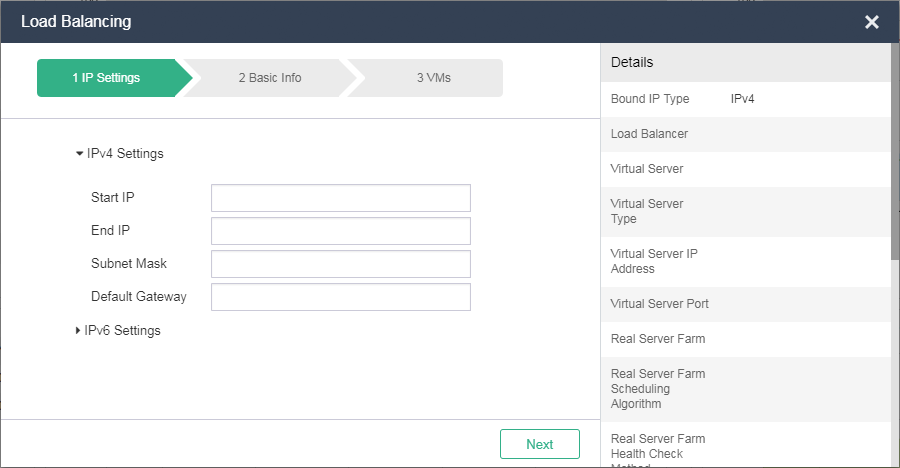
Configure the LB parameters as needed, and then click OK.
|
Parameter |
Description |
|
Start IP |
Enter the start IP address of the VM. |
|
End IP |
Enter the end IP address of the VM. Make sure you have sufficient addresses to assign when you specify a start IP and an end IP. |
|
Load Balancer |
Select a load balancer. A load balancer distributes traffic to real servers. |
|
Virtual Server |
Select a virtual server. A virtual server provides a virtual IP. It receivers user requests, and the load balancer selects a real server to respond to the requests. |
|
Real Server Farm |
Select a real server farm that contains VMs providing services. |
|
VM Port |
Enter a service port. Different service ports provide different services. |
|
Scheduling Algorithm |
Select a scheduling algorithm. A load balancer selects a real server based on the scheduling algorithm. |
|
Health Check Method |
Select a health check method. A load balancer checks the health status of the real servers in the real server farm. It does not distribute user requests to a real server when it detects that the real server is unavailable. After the real server recovers, the load balancer continues to distribute user requests to the real server. This process is transparent to users. |