Configuration procedure
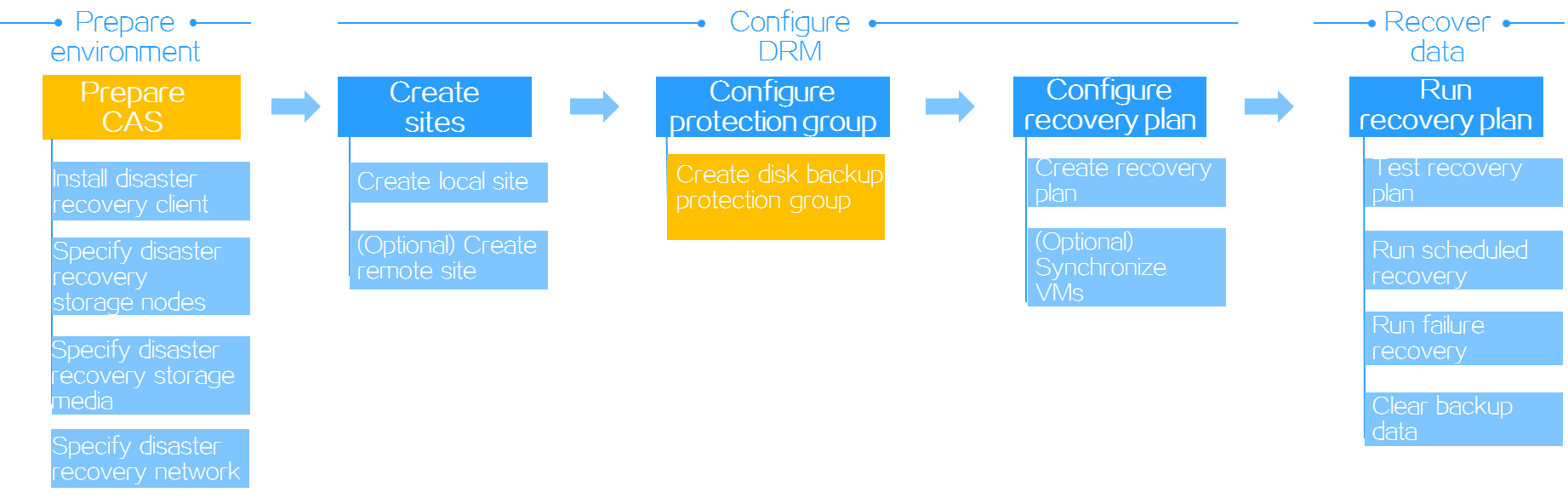
It shows the general configuration procedures for disk backup-based disaster recovery. For more information about the configuration procedures, see "Disaster recovery preparations", "DRM tasks" and "Disaster recovery scenarios"
Figure-1 Configuration procedure for disk backup-based disaster recovery
Disaster recovery preparations
Before you configure disk backup-based disaster recovery, perform the following tasks:
On the protected site, install the disaster recovery client on protected VMs or bare metal servers.
On the recovery site, configure disaster recovery storage nodes, disaster recovery storage media, and disaster recovery network on CAS.
DRM tasks
Configure sites
On either the protected site or recovery site, configure a local site and a remote site on CAS. For disk backup-based disaster recovery on heterogeneous clouds, you can configure only a local site.
Configure a protection group
A disk backup protection group protects a set of VMs or bare metal nodes installed with the disaster recovery client by synchronizing data of the protected objects automatically in real time. A disk backup protection group can operate in one of the following modes depending on the services running on its protected objects:
Common mode—VMs or production nodes operate independently.
Dual-node mode—Two VMs or production nodes must have shared storage to store the data that can be accessed by both of them.
Cluster mode—VMs or production nodes must have shared storage to store the data that can be accessed by all of them.
A disk backup protection group supports the following scenarios:
Homogeneous clouds—CAS CVM systems with the same version run on the protected and recovery sites to protect CVM VMs. In this scenario, you must specify the protected and recovery sites, select VMs installed with the disaster recovery client on the protected site as the protected objects, select a disaster recovery policy, and then configure network mappings between these sites.
Heterogeneous clouds—CAS CVM protects the VMs on a CVM system with a lower version or VMs or bare metal servers on other platforms, and recovers them on a CAS CVM system with a higher version. In this scenario, you use a local site as the recovery site, specify the VMs or bare metal servers installed with the disaster recovery client as the protected objects, select a disaster recovery policy, and then configure production node network resources on the recovery site.
After you create a protection group, CAS automatically synchronizes VM data. In the homogeneous clouds scenario, you also can manually synchronize VM data before failover.
Configure a recovery plan
DRM allows you to customize disaster recovery settings by creating recovery plans on a per-protection group basis. When a recovery plan is executed, DRM automatically restores protected objects on the recovery site.
Disaster recovery scenarios
Recovery plan test
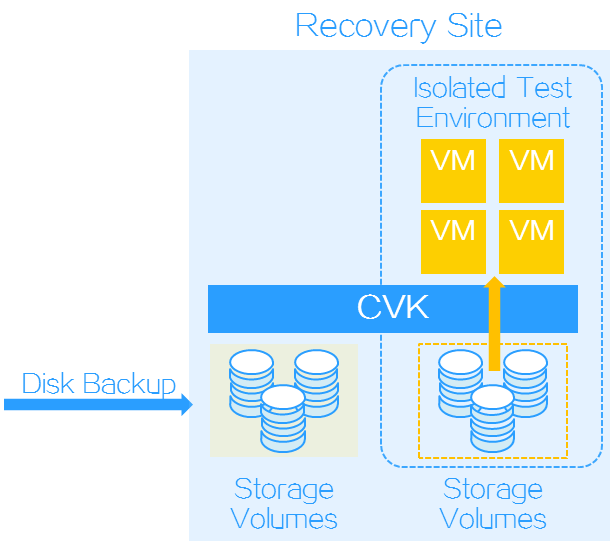
DRM allows you to test whether a recovery plan operates correctly by failing over protected objects based on the recovery plan to an isolated test environment on the recovery site without interrupting services. You must manually finish a recovery plan test to clear the environment and restore the state of the recovery plan to Ready.
In disk backup-based disaster recovery, VMs are attached to the volume snapshots on the recovery site.
Figure-2 Recovery plan test for disk backup-based disaster recovery
Scheduled recovery
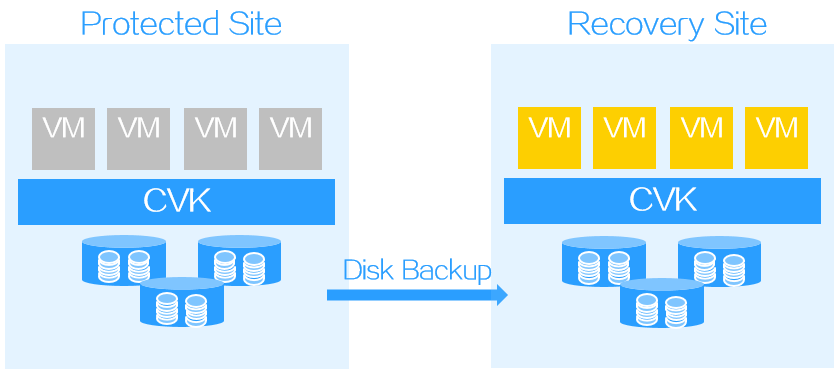
A scheduled recovery resumes protected objects on the recovery site for regular maintenance of the protected site.
In the homogeneous clouds scenario, a scheduled recovery shuts down protected objects and triggers a data replication. DRM resumes VMs on the recovery site only after it finishes copying all protected data to the recovery site.
In a heterogeneous environment, DRM does not shut down protected objects. You must manually shut down them on the protected site.
Figure-3 Scheduled recovery
Failure recovery
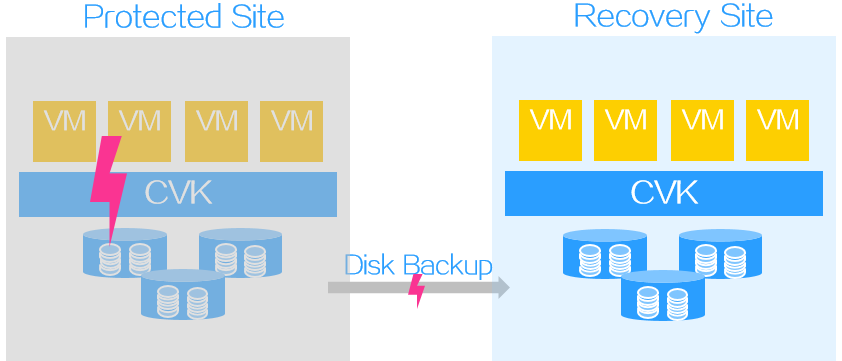
Failure recovery restores protected objects on the recovery site based on a recover plan to reduce the service interruption time when the protected site fails.
For disk backup-based disaster recovery, the RPO is not 0 when failover recovery is executed.
Figure-4 Failure recovery
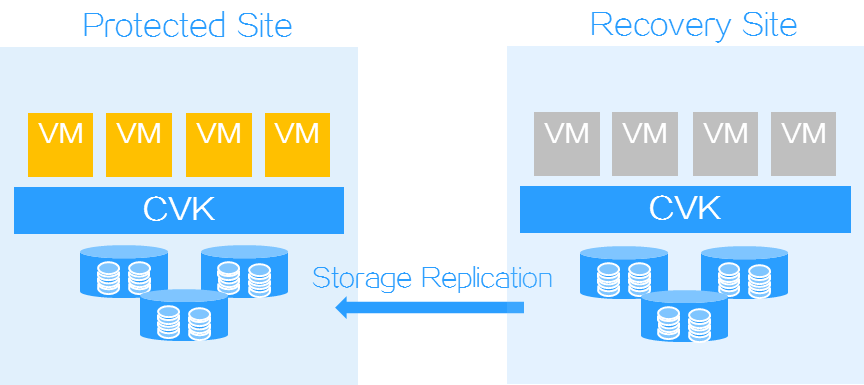
Reverse recovery
Disk replication-based disaster recovery can fall back protected objects with the PE reverse recovery tool from a recovery site to a protected site when the protected site recovers from failure. The PE reverse recovery tool runs on the protected site.
Figure-5 Reverse recovery
Backup data clearing
For disk backup-based disaster recovery, you must clear recovered protected objects and temporary data with the PE reverse recovery tool from the recovery site after services fall back to the protected site. The PE reverse recovery tool runs on the protected site.