本举例是在M9000-AI-E8的R9071版本上进行配置和验证的。
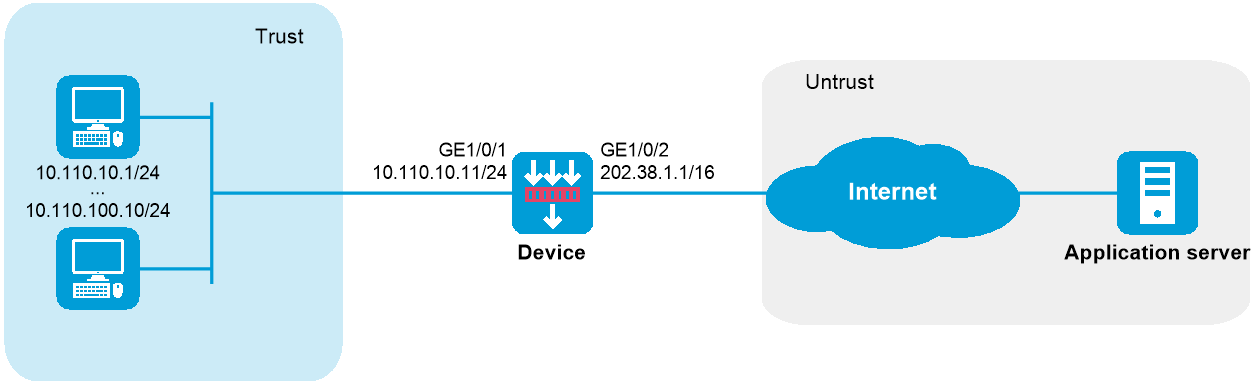
如下图所示,内部网络用户10.110.10.1~10.110.10.10使用外网地址202.38.1.100访问Internet。内网用户地址基于NAT444端口块静态映射方式复用外网地址202.38.1.100,外网地址的端口范围为10001~15000,端口块大小为500。
图-1 NAT444端口块静态映射配置组网图
# 配置接口IP地址、路由、安全域及域间策略保证网络可达,具体配置步骤略。
# 创建NAT端口块组1。
<Device> system-view
[Device] nat port-block-group 1
# 添加私网地址成员10.110.10.1~10.110.10.10。
[Device-port-block-group-1] local-ip-address 10.110.10.1 10.110.10.10
# 添加公网地址成员为202.38.1.100。
[Device-port-block-group-1] global-ip-pool 202.38.1.100 202.38.1.100
# 配置端口块大小为500,公网地址的端口范围为10001~15000。
[Device-port-block-group-1] block-size 500
[Device-port-block-group-1] port-range 10001 15000
[Device-port-block-group-1] quit
# 在接口GigabitEthernet1/0/2上配置NAT444端口块静态映射,引用端口块组1。
[Device] interface gigabitethernet 1/0/2
[Device-GigabitEthernet1/0/2] nat outbound port-block-group 1
[Device-GigabitEthernet1/0/2] quit
# 以上配置完成后,内网主机可以访问外网服务器。通过查看如下显示信息,可以验证以上配置成功。
[Device] display nat all
NAT logging:
Log enable : Disabled
Flow-begin : Disabled
Flow-end : Disabled
Flow-active : Disabled
Port-block-assign : Disabled
Port-block-withdraw : Disabled
Alarm : Disabled
NO-PAT IP usage : Disabled
NAT mapping behavior:
Mapping mode : Address and Port-Dependent
ACL : ---
Config status: Active
NAT ALG:
DNS : Enabled
FTP : Enabled
H323 : Disabled
ICMP-ERROR : Enabled
ILS : Disabled
MGCP : Disabled
NBT : Disabled
PPTP : Enabled
RTSP : Enabled
RSH : Disabled
SCCP : Disabled
SCTP : Disabled
SIP : Disabled
SQLNET : Disabled
TFTP : Disabled
XDMCP : Disabled
NAT port block group information:
Totally 1 NAT port block groups.
Port block group 1:
Port range: 10001-15000
Block size: 500
Local IP address information:
Start address End address VPN instance
10.110.10.1 10.110.10.10 ---
Global IP pool information:
Start address End address
202.38.1.100 202.38.1.100
NAT outbound port block group information:
Totally 1 outbound port block group items.
Interface: GigabitEthernet1/0/2
port-block-group: 1
Config status : Active
Static NAT load balancing: Disabled
NAT link-switch recreate-session: Disabled
NAT configuration-for-new-connection: Disabled
# 通过以下显示命令,可以看到系统生成的静态端口块表项信息。
[Device] display nat port-block static
Slot 1:
Local VPN Local IP Global IP Port block Connections
--- 10.110.10.7 202.38.1.100 13001-13500 1
--- 10.110.10.5 202.38.1.100 12001-12500 1
--- 10.110.10.9 202.38.1.100 14001-14500 1
--- 10.110.10.3 202.38.1.100 11001-11500 1
--- 10.110.10.2 202.38.1.100 10501-11000 1
--- 10.110.10.4 202.38.1.100 11501-12000 1
--- 10.110.10.6 202.38.1.100 12501-13000 1
--- 10.110.10.1 202.38.1.100 10001-10500 1
--- 10.110.10.10 202.38.1.100 14501-15000 1
--- 10.110.10.8 202.38.1.100 13501-14000 1
Total mappings found: 10
#
interface GigabitEthernet1/0/1
ip address 10.110.10.11 255.255.255.0
#
interface GigabitEthernet1/0/2
ip address 202.38.1.1 255.255.0.0
nat outbound port-block-group 1
#
security-zone name Trust
import interface GigabitEthernet1/0/1
#
security-zone name Untrust
import interface GigabitEthernet1/0/2
#
nat port-block-group 1
local-ip-address 10.110.10.1 10.110.10.10
global-ip-pool 202.38.1.100 202.38.1.100
block-size 500
port-range 10001 15000
#
security-policy ip
rule 0 name trust-untrust
action pass
source-zone trust
destination-zone untrust
rule 1 name untrust-trust
action pass
source-zone untrust
destination-zone trust