本举例是在M9000-AI-E8的R9071版本上进行配置和验证的。
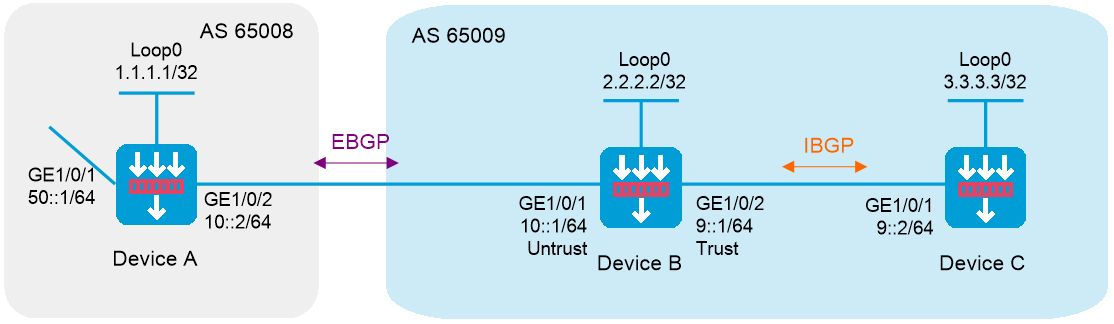
如下图所示,所有设备均运行IPv6 BGP协议。Device A位于AS 65008;Device B和Device C位于AS 65009。要求Device A和Device B之间建立EBGP连接,Device B和Device C之间建立IBGP连接,使得Device C能够访问Device A直连的50::/64网段。
图-1 IPv6 BGP基本配置组网图
配置各接口的IPv6地址及Loopback接口的IPv4地址(略)
根据组网图中规划的信息,将Device B各接口加入对应的安全域。
<DeviceB> system-view
[DeviceB] security-zone name untrust
[DeviceB-security-zone-Untrust] import interface gigabitethernet 1/0/1
[DeviceB-security-zone-Untrust] quit
[DeviceB] security-zone name trust
[DeviceB-security-zone-Trust] import interfacegigabitethernet 1/0/2
[DeviceB-security-zone-Trust] quit
配置安全策略
配置安全策略放行Untrust与Local安全域之间的流量,用于Device A与Device B之间建立EBGP会话。
# 配置名称为ebgplocalin的安全策略规则,使Device B可以接收来自Device A的BGP协议报文。
[DeviceB] security-policy ipv6
[DeviceB-security-policy-ipv6] rule name ebgplocalin
[DeviceB-security-policy-ipv6-0-ebgplocalin] source-zone untrust
[DeviceB-security-policy-ipv6-0-ebgplocalin] destination-zone local
[DeviceB-security-policy-ipv6-0-ebgplocalin] service bgp
[DeviceB-security-policy-ipv6-0-ebgplocalin] action pass
[DeviceB-security-policy-ipv6-0-ebgplocalin] quit
# 配置名称为ebgplocalout的安全策略规则,使Device B可以向Device A发送BGP协议报文。
[DeviceB-security-policy-ipv6] rule name ebgplocalout
[DeviceB-security-policy-ipv6-1-ebgplocalout] source-zone local
[DeviceB-security-policy-ipv6-1-ebgplocalout] destination-zone untrust
[DeviceB-security-policy-ipv6-1-ebgplocalout] service bgp
[DeviceB-security-policy-ipv6-1-ebgplocalout] action pass
[DeviceB-security-policy-ipv6-1-ebgplocalout] quit
配置安全策略放行Local与Trust安全域之间的流量,用于Device B与Device C之间建立IBGP会话。
# 配置名称为bgplocalout的安全策略规则,使Device B可以向Device C发送BGP协议报文。
[DeviceB-security-policy-ipv6] rule name bgplocalout
[DeviceB-security-policy-ipv6-2-bgplocalout] source-zone local
[DeviceB-security-policy-ipv6-2-bgplocalout] destination-zone trust
[DeviceB-security-policy-ipv6-2-bgplocalout] service bgp
[DeviceB-security-policy-ipv6-2-bgplocalout] action pass
[DeviceB-security-policy-ipv6-2-bgplocalout] quit
配置安全策略放行Trust与Untrust安全域之间的流量,使得Device C可以访问Device A的直连网段8.1.1.0/24。
# 配置名称为trust-untrust的安全策略规则,使Trust安全域和Untrust安全域之间的流量可以互通。
[DeviceB-security-policy-ipv6] rule name trust-untrust
[DeviceB-security-policy-ipv6-3-trust-untrust] source-zone trust
[DeviceB-security-policy-ipv6-3-trust-untrust] destination-zone untrust
[DeviceB-security-policy-ipv6-3-trust-untrust] source-ip-subnet 9:: 64
[DeviceB-security-policy-ipv6-3-trust-untrust] destination-ip-subnet 50:: 64
[DeviceB-security-policy-ipv6-3-trust-untrust] action pass
[DeviceB-security-policy-ipv6-3-trust-untrust] quit
[DeviceB-security-policy-ipv6] quit
配置IBGP连接
# 配置Device B。
[DeviceB] bgp 65009
[DeviceB-bgp-default] router-id 2.2.2.2
[DeviceB-bgp-default] peer 9::2 as-number 65009
[DeviceB-bgp-default] address-family ipv6
[DeviceB-bgp-default-ipv6] peer 9::2 enable
[DeviceB-bgp-default-ipv6] quit
# 配置Device C。
<DeviceC> system-view
[DeviceC] bgp 65009
[DeviceC-bgp-default] router-id 3.3.3.3
[DeviceC-bgp-default] peer 9::1 as-number 65009
[DeviceC-bgp-default] address-family ipv6
[DeviceC-bgp-default-ipv6] peer 9::1 enable
配置EBGP连接
# 配置Device A。
<DeviceA> system-view
[DeviceA] bgp 65008
[DeviceA-bgp-default] router-id 1.1.1.1
[DeviceA-bgp-default] peer 10::1 as-number 65009
[DeviceA-bgp-default] address-family ipv6
[DeviceA-bgp-default-ipv6] peer 10::1 enable
# 配置Device B。
[DeviceB-bgp-default] peer 10::2 as-number 65008
[DeviceB-bgp-default] address-family ipv6
[DeviceB-bgp-default-ipv6] peer 10::2 enable
配置通过IPv6 BGP发布的网段路由
# 配置Device A。
[DeviceA-bgp-default-ipv6] network 10:: 64
[DeviceA-bgp-default-ipv6] network 50:: 64
[DeviceA-bgp-default-ipv6] quit
[DeviceA-bgp-default] quit
# 配置Device B。
[DeviceB-bgp-default-ipv6] network 10:: 64
[DeviceB-bgp-default-ipv6] network 9:: 64
[DeviceB-bgp-default-ipv6] quit
[DeviceB-bgp-default] quit
# 配置Device C。
[DeviceC-bgp-default-ipv6] network 9:: 64
[DeviceC-bgp-default-ipv6] quit
[DeviceC-bgp-default] quit
# 在Device B上查看IPv6 BGP对等体的信息。可以看出,Device A和Device B之间建立了EBGP连接,Device B和Device C之间建立了IBGP连接。
[DeviceB] display bgp peer ipv6
BGP local router ID: 2.2.2.2
Local AS number: 65009
Total number of peers: 2 Peers in established state: 2
* - Dynamically created peer
Peer AS MsgRcvd MsgSent OutQ PrefRcv Up/Down State
9::2 65009 41 43 0 1 00:29:00 Established
10::2 65008 38 38 0 2 00:27:20 Established
# 在Device A上查看IPv6 BGP路由表信息。可以看出,Device A学习到了AS 65009内的路由信息。
[DeviceA] display bgp routing-table ipv6
Total number of routes: 4
BGP local router ID is 1.1.1.1
Status codes: * - valid, > - best, d - dampened, h - history,
s - suppressed, S - stale, i - internal, e - external
Origin: i - IGP, e - EGP, ? - incomplete
* >e Network : 9:: PrefixLen : 64
NextHop : 10::1 LocPrf :
PrefVal : 0 OutLabel : NULL
MED : 0
Path/Ogn: 65009i
* > Network : 10:: PrefixLen : 64
NextHop : :: LocPrf :
PrefVal : 32768 OutLabel : NULL
MED : 0
Path/Ogn: i
* e Network : 10:: PrefixLen : 64
NextHop : 10::1 LocPrf :
PrefVal : 0 OutLabel : NULL
MED : 0
Path/Ogn: 65009i
* > Network : 50:: PrefixLen : 64
NextHop : :: LocPrf :
PrefVal : 32768 OutLabel : NULL
MED : 0
Path/Ogn: i
# 在Device C上查看IPv6 BGP路由表信息。可以看出,Device C学习到了到达50::/64网段的路由。
[DeviceC] display bgp routing-table ipv6
Total number of routes: 4
BGP local router ID is 3.3.3.3
Status codes: * - valid, > - best, d - dampened, h - history,
s - suppressed, S - stale, i - internal, e - external
Origin: i - IGP, e - EGP, ? - incomplete
* > Network : 9:: PrefixLen : 64
NextHop : :: LocPrf :
PrefVal : 32768 OutLabel : NULL
MED : 0
Path/Ogn: i
* i Network : 9:: PrefixLen : 64
NextHop : 9::1 LocPrf : 100
PrefVal : 0 OutLabel : NULL
MED : 0
Path/Ogn: i
* >i Network : 10:: PrefixLen : 64
NextHop : 9::1 LocPrf : 100
PrefVal : 0 OutLabel : NULL
MED : 0
Path/Ogn: i
* >i Network : 50:: PrefixLen : 64
NextHop : 10::2 LocPrf : 100
PrefVal : 0 OutLabel : NULL
MED : 0
Path/Ogn: 65008i
# 使用Ping进行验证,Device C能够访问Device A直连的50::/64网段。
[DeviceC]ping ipv6 50::1
Ping6(56 data bytes) 9::2 --> 50::1, press CTRL+C to break
56 bytes from 50::1, icmp_seq=0 hlim=63 time=1.000 ms
56 bytes from 50::1, icmp_seq=1 hlim=63 time=1.000 ms
56 bytes from 50::1, icmp_seq=2 hlim=63 time=2.000 ms
56 bytes from 50::1, icmp_seq=3 hlim=63 time=1.000 ms
56 bytes from 50::1, icmp_seq=4 hlim=63 time=1.000 ms
--- Ping6 statistics for 50::1 ---
5 packet(s) transmitted, 5 packet(s) received, 0.0% packet loss
round-trip min/avg/max/std-dev = 1.000/1.200/2.000/0.400 ms
#
interface LoopBack0
ip address 1.1.1.1 255.255.255.255
#
interface GigabitEthernet1/0/1
port link-mode route
ipv6 address 50::1/64
#
interface GigabitEthernet1/0/2
port link-mode route
ipv6 address 10::2/64
#
bgp 65008
router-id 1.1.1.1
peer 10::1 as-number 65009
#
address-family ipv6 unicast
network 10:: 64
network 50:: 64
peer 10::1 enable
#
#
interface LoopBack0
ip address 2.2.2.2 255.255.255.255
#
interface GigabitEthernet1/0/1
port link-mode route
ipv6 address 10::1/64
#
interface GigabitEthernet1/0/2
port link-mode route
ipv6 address 9::1/64
#
security-zone name Trust
import interface GigabitEthernet1/0/2
#
security-zone name Untrust
import interface GigabitEthernet1/0/1
#
bgp 65009
router-id 2.2.2.2
peer 9::2 as-number 65009
peer 10::2 as-number 65008
#
address-family ipv6 unicast
network 9:: 64
network 10:: 64
peer 9::2 enable
peer 10::2 enable
#
security-policy ipv6
rule 0 name ebgplocalin
action pass
source-zone untrust
destination-zone local
service bgp
rule 1 name ebgplocalout
action pass
source-zone local
destination-zone untrust
service bgp
rule 2 name bgplocalout
action pass
source-zone local
destination-zone trust
service bgp
rule 3 name trust-untrust
action pass
source-zone trust
destination-zone untrust
source-ip-subnet 9::/64
destination-ip-subnet 50::/64
#
#
interface LoopBack0
ip address 3.3.3.3 255.255.255.255
#
interface GigabitEthernet1/0/1
port link-mode route
ipv6 address 9::2/64
#
bgp 65009
router-id 3.3.3.3
peer 9::1 as-number 65009
#
address-family ipv6 unicast
network 9:: 64
peer 9::1 enable