Add a VOI course
The system supports adding a VOI course by creating or importing the VOI course. You can use the system image ISO file to create a VOI course, or import an existing VOI course image file to create the course.
Create a VOI course
From the navigation pane, select Images > Course Images.
Click Create.
Select a VOI course type, complete other basic course settings, and then click Save & Proceed.
Click Next to enter the software installation procedure, and start building a VOI course.
The system does not support software installation for VOI courses through software upload.
|
|
During the software installation process, you can click Finish
at any time to quit software installation. To continue building the course,
click the |


Import a VOI course
Perform this task to import a VOI course image to Space Console. The imported VOI course image can be used directly but cannot be further developed.
From the navigation pane, select Images > Course Images.
Click Import, select the VOI course type, upload the VOI course image, and configure relevant settings.
Click Finish.
The imported course is displayed in the course list.
Parameters
Creating a VOI course
Course Type: Select VOI. Endpoints of a specific type can access only the course of that type.
Course Name: Specify the name of the course.
Host: Specify the host of the VM where the course will be built.
Path: Specify the storage path for the course image file. To create a storage path, navigate to the Data Center > Teaching Storage > Teaching Image Storage Settings page.
User Access: Specify the users that can access the course. Teachers can use the course to start classes. Students can use only the course in self-study scenarios.
All—The course is open to all users.
None—The course is not open to any users.
Selected—The course is only open to selected users. Login to the teacher client or student client is required before the class is started. To select users, click Edit.
Classroom Access: Specify the classrooms to which the course is available.
All—The course is available to all classrooms.
Selected—The course is available only to selected classrooms. To select classrooms, click Edit.
Configure: Select the VOI endpoint model compatible with the course.
Dedicated: Applies to the scenario where the endpoints are the same model or are official endpoints. You can select the system default VOI endpoint model or a user-defined VOI endpoint model in flavor settings. The selected model in flavor settings must be consistent with the user endpoint model. For example, if the user endpoint model is C206V, you must select the model C206V in flavor settings.
General: Applies to the scenario where the endpoints are different models or are unofficial endpoints. You need to set the CPU, memory, and system disk sizes according to the general endpoint hardware configuration. If the configured CPU and memory sizes are larger than the general endpoint hardware configuration, the desktop uses the CPU and memory sizes in the hardware configuration. If the configured CPU and memory sizes are smaller than the general endpoint hardware configuration, the desktop uses the configured CPU and memory sizes. Make sure the configured system disk size is not larger than the system disk size of the general endpoint.
To modify the flavor settings, following this guideline: The total disk size = operating system size (approximately 4 GB) + data disk size + image VHD file size + system disk size + remaining space. The system disk size and data disk size are configurable. The remaining space is flexible for use. When the VOI endpoint is running the client operating system, the endpoint loads the image VHD file to the system disk. In this case, the system disk size = client image VHD file size + remaining system disk size. The following figure shows the disk usage for the C206V endpoint. The default data disk size, system disk size, and image VHD file size for the endpoint are 2 GB, 120 GB, and 15 GB, respectively.
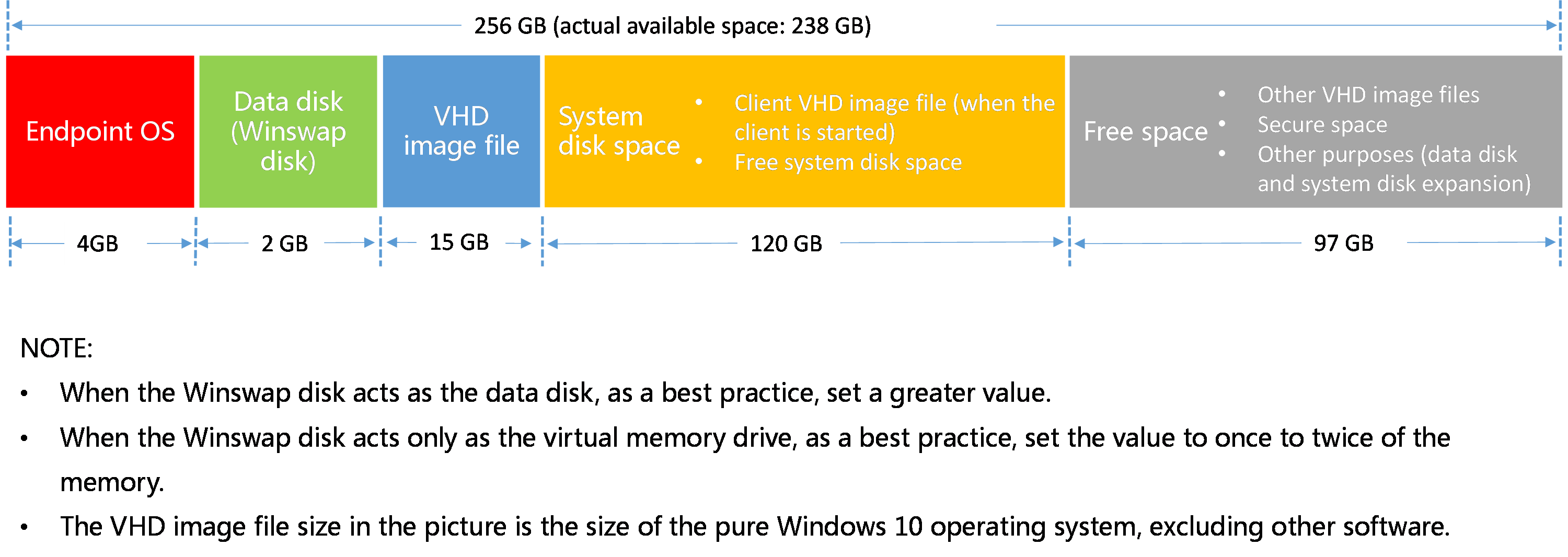
Follow these steps to calculate and plan the system and data disk sizes for VOI flavor settings:
Follow the guidelines in the figure to set the data disk size based on the application scenario of the Winswap data disk.
Estimate the image VHD file size, that is, the pure operating system size and the size of the software application to install.
In education scenario, for image switchover purpose, you need to plan the sizes for other image VHD files and reserve the sizes in the remaining space.
After completing the previous plans, calculate the system disk size.
Endpoint Groups: Select endpoint groups the VOI endpoints in which will use the created course as the default course.
Default Course: The first VOI course created for a specific VOI endpoint type is specified as the default course. When you create a course of this VOI endpoint type again, you can specify the course as the default course. The created course will replaced the previous default course. The system will issue the default course image by VOI endpoint type after the VOI endpoint is registered and added to the VOI endpoint group matching the Learningspace client.
Network: Select the vSwitch for the course image VM network.
System Image: Specify the ISO image of the operating system used by the course VM.
Course Logo: Specify a logo for the course.
Username Prefix: Specify the username prefix for VMs created during classes of the exam course. By default, username prefix is Administrator.
Digits in Username Suffix: Set the number of digits in the username suffix. For example, if you set this parameter to 2, usernames are suffixed with 01, 02, 03, and so on. By default, no suffix is added to usernames.
Login Password Customization: Set the password used for SSO on VMs.
Reset Computer Name: Turn on this option to change the computer names of the teaching desktops to the endpoint names, for example, Stu-1.
Importing a VOI course
Select Image Pool: Select the storage location for the imported course image. To create a storage path, navigate to the Data Center > Teaching Storage > Teaching Image Storage Settings page.
Parent Image: Parent image of the desktop image. When the image is used to build another image, the image becomes a parent image. When you upload a child image, you must select its parent image.
Operating System: Specify the operating system for the imported course image.
User Access: Specify the users that can access the course. Teachers can use the course to start classes. Students can use only the course in self-study scenarios.
All—The course is open to all users.
None—The course is not open to any users.
Selected—The course is only open to selected users. Login to the teacher client or student client is required before the class is started. To select users, click Edit.
Classroom Access: Specify the classrooms to which the course is available.
All—The course is available to all classrooms.
Selected—The course is available only to selected classrooms. To select classrooms, click Edit.
Upload Files: Select the VOI course image files to upload.
Course Logo: Specify a logo for the course.
Username Prefix: Specify the username prefix for VMs created during classes of the exam course. By default, username prefix is Administrator.
Digits in Username Suffix: Set the number of digits in the username suffix. For example, if you set this parameter to 2, usernames are suffixed with 01, 02, 03, and so on. By default, no suffix is added to usernames.