Configure heterogeneous migration
Heterogeneous migration allows migration of disk data on physical x86 servers, VMs managed by UIS Manager, and VMs managed by another platform to destination VMs on the UIS Manager platform. It requires client installation on the source device.
Restrictions and guidelines
The capacity of the volume or disk is equivalent to or smaller than 128 TB. As a best practice to obtain the best online migration performance, keep the capacity of the volume or disk within 32 TB.
Data incremented in an incremental interval is equivalent to or smaller than one TB.
To perform differential migration or backup on an EXT2/EXT3/EXT4 file system, make sure the file system capacity is smaller than 64 TB.
For more restrictions and guidelines, see the usage guidelines of the corresponding release or contact the technical support.
Configuration workflow
Figure-1 Heterogeneous migration configuration workflow
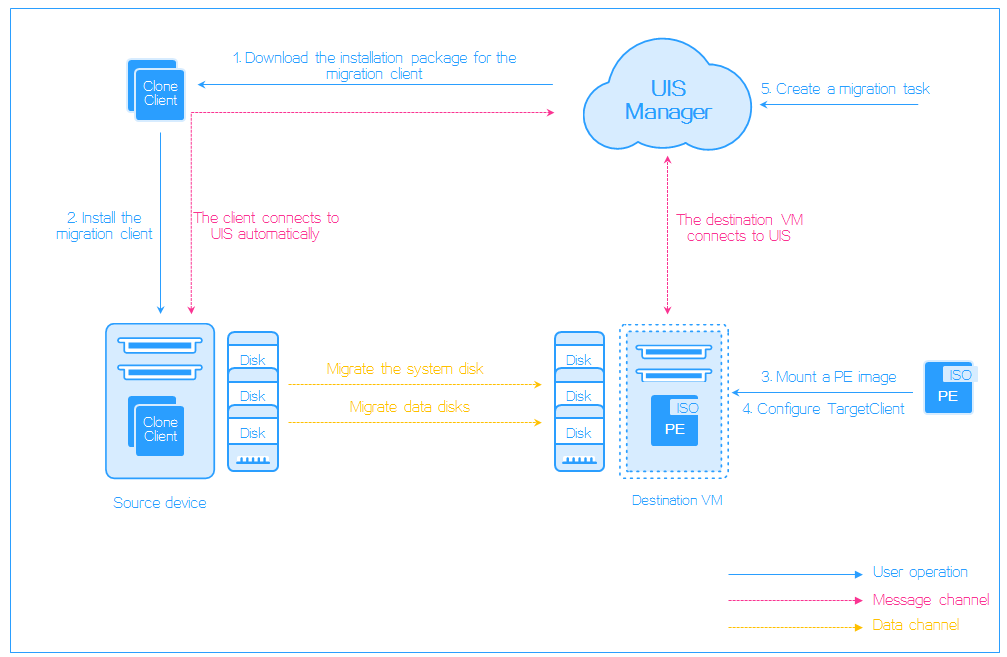
To perform a heterogeneous migration, you must perform the following tasks:
Download a migration client from UIS Manager to a source device (physical server or VM).
Install the migration client and connect the source device to UIS Manager. Then, the migration client reports the status of the source device to UIS Manager.
Mount the PE image to the destination VM, configure the TargetClient, and connect TargetClient to the UIS Manager. Then, the TargetClient reports the status of the destination VM to UIS Manager.